
How to Use Data Classification to Audit specific Data Access in Microsoft SQL Server
In this article I want to share a targeted approach to audit access to specific objects within a database in Microsoft SQL Server.
- In my last article, Evading Data Access Auditing in Microsoft SQL Server – and how to close the gaps, I showed multiple approaches to gain access to a chunk of sensitive data using the statistics object in SQL Server. The hardest one to capture is access to data that is exposed via the dynamic management function (DMF) dm_db_stats_histogram. This requires an additional Audit Specification in the master database for this system object. In the end we required 3 different Audit Action Groups to cover all the methods used to read data from our example table.
In the former article I did also mention SQL Data Discovery and Classification, in the context of discovering sensitive data.
Microsoft SQL Server’s Data Classification doesn’t enforce access control on its own, so one can argue it isn’t a classic security control. However, starting with SQL Server 2022, it gains a powerful new capability: auditing access to sensitive data.
It introduces the new Action group, SENSITIVE_BATCH_COMPLETED_GROUP which gets triggered any time a query in SQL Server touches data that has been classified.
Background
The classification metadata is part of the Tabular Data Stream (TDS) protocol, and therefore this information can be used not just in the underlying table data, but also in the query execution phase and even in the client when receiving the result-set.
And as it turns out, this matches our scenario perfectly.
What we need to do is of course first classify the columns that we want to monitor access to. So, let’s do that with our CreditCard table columns:
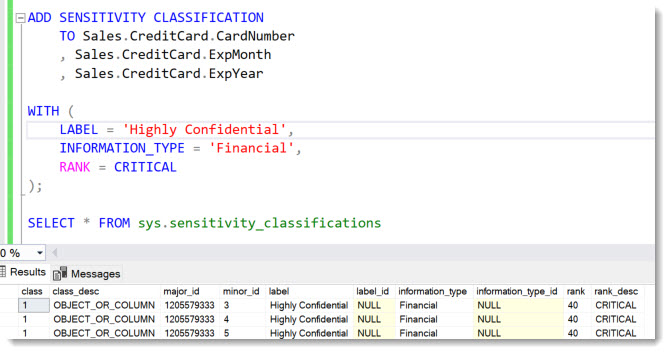
Then we include the new action group in the Audit Specification:
ALTER DATABASE AUDIT SPECIFICATION [AuditSpec_Select]
ADD (SENSITIVE_BATCH_COMPLETED_GROUP)
Now User Sneaky will again access the CreditCard numbers via the statistics using the Dynamic Management Function (DMF), which proved the hardest one to capture:
SELECT range_high_key, equal_rows, distinct_range_rows
FROM sys.dm_db_stats_histogram(OBJECT_ID(‘Sales.CreditCard’), 5);
Checking the Audit log:

Gottcha!
So instead of requiring a second Audit in master-database to capture access via system objects, the SENSITIVE_BATCH_COMPLETED_GROUP gets triggered no matter where the call came from. Simply because it touches classified data and this metadata is inherited by the statistics object!
In Fact, the SENSITIVE_BATCH_COMPLETED_GROUP-Audit Action group captures all the 3 described methods to access the data: SELECT from table, DBCC SHOWSTATISTICS, SELECT from Dynamic Management Function, as we can see here:

Neat, isn’t it?
As we can see, if we have scenarios where we just need to audit very specific data access, Data Classification is of immense help.
Of course, you need to make sure that nobody drops or in general manipulates the Data Classification itself. To audit ADD / DROP SENSITIVITY CLASSIFICATION you need add the SENSITIVITY_CLASSIFICATION_CHANGE_GROUP.
Happy Auditing
Andreas
Thank you for reviewing: Sravani Saluru, Senior Product Manager at Microsoft Azure Data and responsible for Auditing in Azure SQL, Fabric SQL and SQL Server.


Leave a Reply
Want to join the discussion?Feel free to contribute!