
Posts
To rename or not, that is the question – how to protect SQL Server’s built-in sysadmin account sa
Updated: May 2026
This article has been updated to reflect the SQL Server 2025 behavior change around disabled login failures.
This is another one of those subjects that keep circulating: should you rename your sa account? Plenty of “security check” scripts swear you should. Meanwhile, when you talk to actual humans in the real world, you’ll notice that almost nobody does it. (Funny how that works.) So what does Sarpedon Quality Lab® recommend – and why? Our answer (read to the end) may surprise you.Some background first
This discussion goes back to the 2000’s, when SQL Server installations around the globe were breached simply by connecting to port 1433 using the username “sa”, the default sysadmin account – often with no password (which was the default for many installations back then). Fast forward to 2022, with ransomware on the rise: the “BlueSky” ransomware specifically brute-forced the sa account of its victims and “FreeWorld” did the same in 2023. The list goes on. Since Microsoft SQL Server’s default sysadmin account is “sa”, it’s always the first target. Today, everyone knows you need a strong password, but what else can be done to prevent falling victim to brute-force attacks? Let’s get the most obvious solutions out of the way:- Don’t expose your database server to the internet. This is the most obvious and effective measure against external attacks.
- Disable SQL Authentication. Using Windows AD accounts with Kerberos authentication is a better choice. Kerberos not only handles secure authentication but also validates the server’s identity to the client – provided it’s configured correctly.
Options to protect the sa-acount in SQL Server
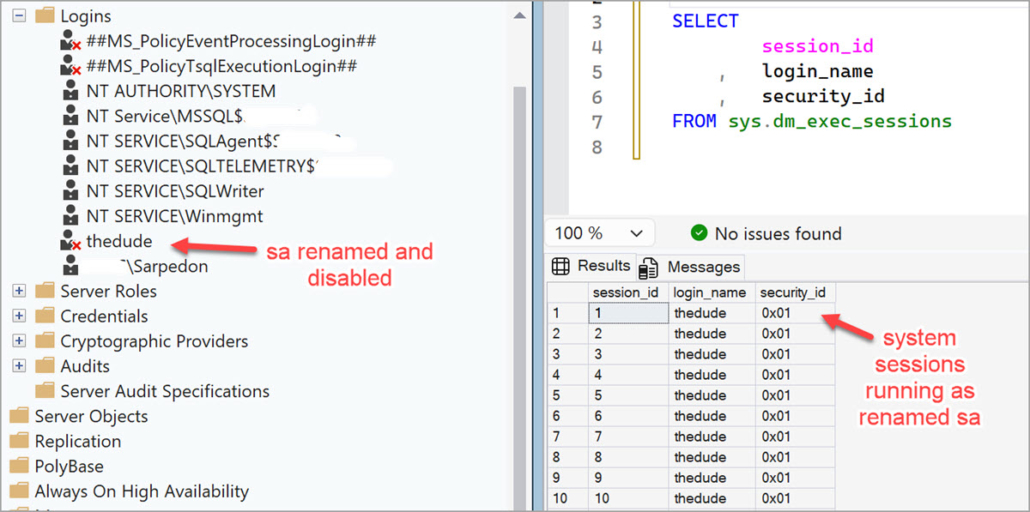
Assuming we must keep mixed Mode Authentication enabled, we can do 3 things with the sa-account:- Rename sa
- Disable sa – note that this does not prevent impersonation from within the SQL engine (DISABLE and DENY LOGIN, DENY USER & Effect on Impersonation and Permissions)
- Set a super strong password – up to 128 characters are supported
Renaming sa Pros and Cons
While renaming the sa account is technically simple, the reality is a bit more nuanced.Pros:
- Brute‑force attacks are extremely common, and letting an attacker waste time hammering a non‑existent sa account can buy you valuable time for detection and containment.
- Note: Note: The client always receives the same generic error message – “Login failed for user”, error 18456 – whether the password is wrong or the login doesn’t exist. Only the error state (visible in the SQL Server Error Log) reveals the real cause.
- Figuring out the new name of sa requires access to SQL Server in the first place.
- The SID of the original sa account is fixed at 0x01 and cannot be changed, but an attacker would still need to already have SQL Server access to query system views and discover the renamed account. At that point, you’re dealing with a completely different attack vector.
- The alternative – capturing TDS packets on the network and waiting for a real sa session – is theoretically possible, but it’s hardly the first thing an attacker would invest resources in.
- You are a federal agency like the U.S. Department of Defense (DoD) or work for one of the agencies: The STIG (Security Technical Implementation Guide) for SQL Server, published by the Defense Information Systems Agency (DISA) requires it.
Cons:
- Many real‑world applications still require sa for parts of their workflow – sometimes only during setup, sometimes during ongoing operations. Yes, vendors should fix this and never require sa, but as long as this remains common practice, renaming sa cannot be recommended universally for every customer.
- Scripts and processes often rely on standard ownership by sa, such as database owner, Always On Availability Group owner, or other server level objects.
- This requires strict process control during deployments to ensure the alternative name is always used consistently.
- Even Microsoft components occasionally expect sa by name. Replication, certain patches, or other subsystems have been known to fail when sa has been renamed. You cannot blindly assume everything will continue working.
- The new name may already be known. If an attacker has compromised a less critical SQL Server in the same environment, and the renamed sa account is standardized across servers, the benefit evaporates.
- It can cause confusion. Renamed accounts can complicate troubleshooting – e.g., working with Agent job owners, auditing login sessions, and generally supporting the SQL Server.
Storytime
While I worked on the Microsoft SQL Server security team, we started a project to explore ways to eliminate the attack vector that sa represents. As with so many things, however, the project was eventually abandoned – not due to lack of desire, but because of resource constraints and the complexity of changing an account that’s widely used, not only internally but also by various satellite services of SQL Server. So, dear reader… consider yourself warned 😉.Disabling sa
If sa is disabled, it cannot be used to log in.
But there was an important issue before SQL Server 2025:
SQL Server returned a distinct error message when a login existed but was disabled:

(Error 18470)
That made it visible to an attacker that sa existed but was unavailable. In practical terms, brute-force tooling could stop wasting time on sa and move on to other targets much sooner.
To be fair, this depends on the sophistication of the attack code. But the signal was there.
Update from May 2026:
With SQL Server 2025, Microsoft addressed this behavior. A disabled login now returns the generic login failure message instead:
Login failed for user ‘sa’. (Error 18458)
That is good for defenders. Failed sa login attempts can still be monitored and treated as an attack signal, without revealing to the attacker whether the login is disabled.
Conclusion
Of course there is no one answer that will be best for everyone. But here are our guidelines:Renaming sa
In a perfectly controlled and managed system, renaming sa would be useful to avoid this obvious target, especially since until SQL Server 2022, disabling it immediately signals to an attacker to look elsewhere. However, in the real world, it is difficult – sometimes impossible – to ensure that no dependencies on the name sa exist in applications, code, jobs, or other database objects. Renaming can therefore introduce risks. If you are supporting a federal agency, for example, you may need to implement workarounds, such as temporarily renaming it back to sa for certain operations.Disabling sa
Disabling sa is technically a useful option, effectively rendering all attacks on the account futile. However, since before SQL Server 2025, the resulting error message explicitly discloses that the account is disabled, I hesitate to recommend it universally. In many cases it just won’t matter: because in environments that security is taken seriously, there will be monitoring in place, so any brute-force attack will be noticed quickly. And in combination with a loooong complex password, it does not make any difference if it is disabled or just unbreachable. With the change in SQL Server 2025, the error message does not disclose anything any more, so if you just feel better by disabling it, go ahead.What Sarpedon Quality Lab recommends – it may surprise you
1) Set a very long passwordUse at least 40 characters, up to SQL Server’s maximum of 128 characters. Include numbers and both uppercase and lowercase letters.
Use special characters sparingly. While SQL Server is fine they can create avoidable edge cases with tooling, automation, copy/paste, password vaults, or connection strings.
Length is what matters most here.
2) Closely monitor sa login activityMonitor failed login attempts against sa.
And also monitor successful sa logins.
Ideally, there should be none during normal operations. If sa succeeds interactively, that should stand out. – Using sa for daily work is strongly recommended against.
3) Do not rename sa as a general recommendationGiven the large and highly heterogeneous customer base we work with, we do not recommend renaming sa as a default practice.
It may look attractive from an obscurity perspective, but it introduces too much operational risk: scripts, vendor tooling, monitoring, documentation, support procedures, and emergency access assumptions may all break or become harder to reason about.
And let’s just say Microsoft is not exactly arguing with us on this one. 😉
4) Enable or disable sa: make it a control decision, not a ritualBefore deciding whether to disable sa, verify that points 1 and 2 are covered:
-
- sa has a very long, non-shared, vaulted password.
- sa login activity is monitored.
- Successful sa logins are the exception and investigated.
If you cannot verify those conditions, disable sa.
If those conditions are covered, disabling sa will not materially change the risk profile.
Before SQL Server 2022: Keeping sa enabled with a strong password and close monitoring can have one practical advantage: failed brute-force attempts continue to generate useful signals. Disabling it may simply tell an attacker that brute-forcing sa is futile.
SQL Server 2025 and later: If the password and monitoring controls are in place, the enable/disable decision matters much less. At that point, it is mostly an operational policy choice rather than a major security differentiator.
Ending thoughts and wishes to the SQL Server team
Hopefully, this guidance helps those who need to make that decision to justify it. Requests to Microsoft:- Surface “Login disabled” simply an error state A failed login should not reveal why it failed, so attackers gain no insight during brute-force attempts. This seems like low-hanging fruit and could even be delivered in a CU. Thank you to Microsoft for listening and addressing this.
- Limit or block the use of SA As I have written before (My 7 wishes for access control in SQL Server and Azure SQL security), SQL Authentication won’t go away for at least another decade or two. Customers need better guardrails to avoid using sa at all. Additionally, the database engine remains vulnerable as long as internal processes run unchecked under sysadmin, as highlighted by recent CVEs—for example: https://support.microsoft.com/en-us/topic/kb5063756-description-of-the-security-update-for-sql-server-2022-gdr-august-12-2025-f56e3677-84b7-4ba3-ab13-b33fcfabb212
Happy securing
AndreasThanks to my colleagues for reviewing and keeping me honest:
Thomas Grohser, SQL Server Infrastructure Architect and recognized expert in SQL Server security Ralf Dietrich, Database security and forensics expertLinks for further reading:
- DISABLE and DENY LOGIN, DENY USER & Effect on Impersonation and Permissions https://andreas-wolter.com/en/disable-and-deny-login-deny-user-effect-on-impersonation-and-permissions/
- SQL Server Error 18456 https://learn.microsoft.com/en-us/sql/relational-databases/errors-events/mssqlserver-18456-database-engine-error?view=sql-server-ver17
- Are Your Passwords in the Green? https://www.hivesystems.com/blog/are-your-passwords-in-the-green
- BlueSky ransomware https://thedfirreport.com/2023/12/04/sql-brute-force-leads-to-bluesky-ransomware/
- FreeWorld ransomware https://www.helpnetsecurity.com/2023/09/06/ms-sql-cyberattack/ ).
Separation of Duties (SoD) and role-based security conception in SQL Server
Introduction With the upcoming implementation of the European General Data Protection Regulation (GDPR) in May 2018, having a security concept in place is essentially required by law. Microsoft SQL Server, just like other database systems, carries the main asset to protect: the data itself. Therefore, it is time for an article from a more strategic […]
CONTROL SERVER vs. sysadmin/sa: permissions, system procedures, DBCC, automatic schema creation and privilege escalation caveats
Since SQL Server 2005, the server wide permission CONTROL SERVER has been existing. In principle being an alternative to sysadmin-membership, it did not turn out to be much more than a shelf warmer. – Little known and even less used. One of the main reasons for this was the absence of an option to grant […]
