
Evading Data Access Auditing in Microsoft SQL Server – special commands – and how to close the gaps
In this article, I detail complex evasion techniques that security teams and auditors should be aware of when monitoring data access.
- Recently, I already published some indirect ways how malicious users can evade security Auditing in Microsoft SQL Server (and Azure SQL) databases, and how to ensure those methods are detected:
- Evading Data Access Auditing in Microsoft SQL Server – and how to close the gaps
- How to Use Data Classification to Audit specific Data Access in Microsoft SQL Server
- 2b) make sure to also consider this still unfixed security bug: Bug in Auditing allows for undetected Data Exfiltration by low privileged user
The methods that I will share here allow an attacker to either conceal his identity or even evade auditing completely.
Most of these commands require sysadmin privileges. However, if your goal is to audit every access to sensitive data, this typically means “all users” – not with an exception for administrators. Because of this, it’s important to understand these methods so you can make an informed decision about whether to include them in your auditing scope.
Here is what you need to watch out for:

DBCC PAGE
Using the undocumented but well-known command DBCC PAGE, a DBA can read raw table or index data as it is stored in the 8-KB data pages inside the data file.
Mitigation: Monitor any DBCC command usage, and specifically this one, as it should hardly ever be used for good reasons.
Using a Linked Server query
This is a real tricky one:
Many SQL Server systems have Linked Servers set up. And some of them are set up with a common security principal that will log on to the linked server. Like here:
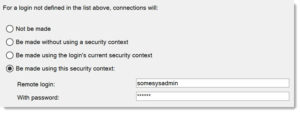
That means that if someone wants to simply hide their identity, they can use a linked server query, like the following:
SELECT * FROM [LinkedServerName].AdventureWorks2022.Sales.CreditCard
If we are auditing the Sales.CreditCard table, all we will see in the Audit log is the principal “somesysadmin”.

SQL Auditing currently has no way of telling which user initiated the SELECT on the table, since the Linked Server query is essentially a new Logon. It is not an impersonation like with EXECUTE AS, where SQL Server has the “original Login” information.
Mitigation: To cover this, you need a combination of Extended Events in addition to the Audit functionality.
Change Data Capture
If Change Data Capture has been set up on a table, all changes are kept in a special capture table. This table is not audited by default. Querying the capture table discloses the data just as the original table:
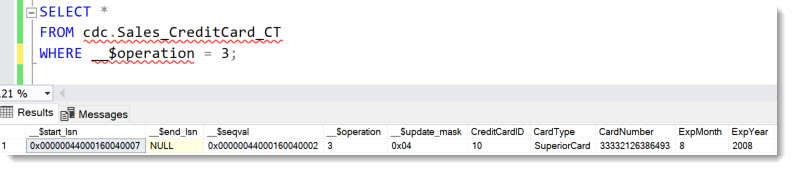
This method works only for data that has changed and normally does not allow reading the whole table content at once.
Mitigation: Ensure all Capture tables access is audited if they can contain sensitive data.
DML Triggers
DML Triggers can easily be abused for copying data that is changed into a separate table that is not being audited.
Mitigation: Audit DML Trigger creation and do a code-analysis.
Complex or inefficient methods
fn_dblog and fn_dump_dblog
These commands read data from the transaction log. fn_dblog reads the current, active transaction log, whereas fn_dump_dblog can read a Transaction Log backup.
That limits the usefulness of these commands since the transaction log only contains data that has been changed – much like using Change Data Capture. If the sensitive data in question has not been changed for a long time, it may not be in reach through these commands at all.
But since every data change must go through the transaction log, an update such as this statement:
UPDATE Sales.CreditCard
SET CardNumber = 33332126386433
WHERE CardNumber = 33332126386493
can be found using fn_dblog. It requires some conversion and knowledge of the underlying table schema, but it’s doable:

Mitigation: Monitor special system function usage. In the article Evading Data Access Auditing in Microsoft SQL Server – and how to close the gaps, I share an example.
Query Plans
In theory, it is possible to extract sensitive values from query plans. This can be done using the DMV sys.dm_exec_query_plan or the Query Store procedure sys.query_store_plan.
However, this technique is very limited since mostly such values are only stored once per query plan and typically just one value per parameter, like in the following example:
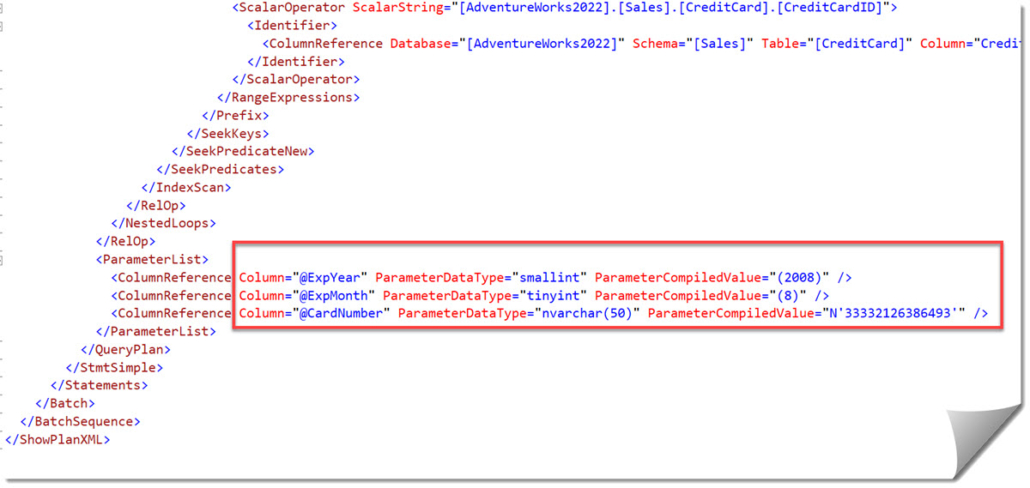
Mitigation: If this is of concern, you need to (A) limit who can read query plans and (B) audit the specific system procedures. Also, don’t forget to cover the Query Store objects if it is enabled.
Stack dump using XEvents
Technically, anyone who has the power to create XEvents sessions and add Events, can also add Actions. And the Action “create_dump_single_thread” can create a minidump for just an individual thread. With some filtering, one could create a minidump every time a user somehow touches the table CreditCard, like this snippet shows:
ADD EVENT sqlserver.sql_batch_completed(SET collect_batch_text=(1)
ACTION(sqlserver.create_dump_single_thread,sqlserver.tsql_stack)
WHERE ([sqlserver].[equal_i_sql_unicode_string]([sqlserver].[database_name],N’AdventureWorks2022′) AND [sqlserver].[like_i_sql_unicode_string]([sqlserver].[sql_text],N’%CreditCard%’)))
Note:
Do not test this on your system! This method puts a huge performance penalty on these queries.
The Minidump file contains the data in clear text:
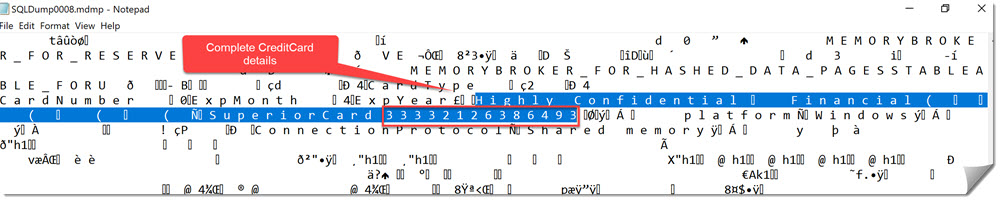
Mitigation: Because of the huge performance impact on the queries that will trigger the minidump, this method will surely draw immediate attention. Besides that, it is of course not very efficient. But if you must make sure, you should grant permissions for Extended Events to only those who need it and limit the permissions further. For some examples, see here: Using Extended Events for Tracing SQL Server and Azure SQL DB in compliance with Principle of Least Privilege – Example role separation
DBCC OUTPUTBUFFER and INPUTBUFFER statements
In theory, it is possible to capture statements that expose the sensitive values a part of the statement using DBCC INPUTBUFFER, when the value in question is the input for a WHERE-clause for example.
The other way around, capturing the OUTPUTBUFFER of queries that return sensitive data is even more difficult, as that data is in hexadecimal and ASCII, so you would at least have to have a very precise pattern to search for.
None of these are efficient methods, since the person using them would have to wait for other users to read the data that he is interested in. And that will realistically be only be a very tiny percentage of the overall sessions running on a system.
So, take it more as a remote possibility than an actual realistic attack vector.
Mitigation: Always monitor any use of DBCC commands for suspicious patterns as you should do anyway.
Replication in SQL Server
If you need to audit data access, you cannot forget about all the kinds of copies that may exist of that data. Always On Availability group read-only replicas should have the same Audit setting just like everything else should be aligned across the involved nodes.
On the other hand, Replication in SQ Server based on reading the data from the table rather than the log-stream, and then distributing that data on a record-level to other databases, which can reside locally or remote. And that other database structure is completely independent from the source. That means Auditing needs to be set up separately as well.
Mitigation: Set up Auditing on all SQL Server databases that contain copies of your data.
Mirroring in Fabric
Similar to SQL Server Replication, Mirroring in Fabric creates copies of the data, not the whole database, and does not copy auditing configuration.
But on top of that, the copy is not another SQL Server database, but a Parquet-file in OneLake, which is a whole different technology.
Mitigation: At the time of this writing (Oct 2025), there is no auditing for read-access available for OneLake data. Hence, you need to decide:
(A) ensure that no sensitive tables can be mirrored to Fabric
(B) Consider all mirrored databases as exposed to anyone who has access to the Fabric workspace that can host mirrored data.
Windows level
For completeness, of course, it is also possible to read data from the Data files or Transaction Log files – when the SQL Server process does not have them locked, Backup files, bcp-files for Replication data, or with a bit more work from memory. So of course, data security does not stop at the SQL Server process.
Mitigation: You should audit file-level access to database-files and backup files at least – wherever they may reside (also to help detect ransomware attacks early on). Auditing access to memory is a bit more complex and goes beyond what this post can cover. Also, if someone has gained the necessary privileges to do that, reading data from memory is probably not worth the effort since there are more effective attacks possible at this moment 😉
Summary
While many of the methods shown are cumbersome and impractical for large-scale data exfiltration without detection, whether they pose a real concern depends on what you’re storing, what needs to be protected, and your specific threat model.
And some of them are easy enough to allow Admins to go undetected if you are not auditing DBCC commands, for example.
And for those who cannot accept exceptions:
If comprehensive auditing of sysadmin-level access to sensitive data is required, consider enforcing privileged access through hardened, dedicated jump hosts. These systems should be instrumented with OS-level auditing capabilities such as screen recording, input logging (e.g., keystrokes), and session capture. Access to these workstations—and the associated privileged accounts—should be provisioned just-in-time (JIT) and removed immediately after use, ideally integrated with a Privileged Access Management (PAM) solution.
Hopefully, you find these insights useful.
If you’re unsure whether your auditing practices are sufficient or find it challenging to analyze the data you collect, we can help. My team specializes in helping organizations with strict security requirements secure their databases and effectively audit for suspicious activity.
Let’s connect.
Happy Auditing
Andreas
Kindly reviewed by:
Thomas Grohser, SQL Server Infrastructure Architect
Sravani Saluru, Senior Product Manager at Microsoft Azure Data and responsible for Auditing in Azure SQL, Fabric SQL and SQL Server
Links to the other articles in this series on database security auditing, with examples for Microsoft SQL Server:


Leave a Reply
Want to join the discussion?Feel free to contribute!