
Protecting database data at rest: Transparent Data Encryption, Backup Encryption or Always Encrypted
Recently I wrote about protecting data in transit by using TLS for encryption (Use TLS 1.2 and trusted certificates to encrypt data in transit for all SQL Servers, including development environments )
This article is about how to protect data at rest.
First: Where does data reside when talking about SQL Server?
Before deciding on a technology, one should understand where the data resides which we want to protect.
When it comes to data in Microsoft SQL Server, not everything is as obvious as it seems from afar. While it may be clear that table data is stored within the data file, there are numerous other places where data can be exposed in clear text. And we do not want to overlook any of these spots.
Therefore, let’s have a look at all the places where the SQL Engin itself may expose data:
(Note: I am not including the applications here. Those need to be considered on a case-by-case basis. But I am giving some pointers to what else to consider.)
- Inside the data files (mdf, ndf) (no surprise here)
- In addition to the data files, data is also visible through the transaction log (.ldf) of the respective database.
- Also, the shared TempDB system database can contain user data.
- Databases may contain files: Either they use the Filestream functionality of SQL Server (recommended), or they may use just text links inside a data table and store the files in a custom location on disk.
This can be anywhere and is completely out of the hands of SQL Server: It can be on the SQL Server but also on a file server, or even on the client itself (permanently or temporary).
- In-Memory OLTP data which is stored in the MEMORY_OPTIMIZED_DATA filegroup
- If you are using replication, you need to consider not only the subscribers but also the snapshot data stored in files on disk.
- Finally: Backups. Backups are (hopefully) stored on a different storage system than the active database system, usually at some centralized backup storage solution.
- Make sure to account for native SQL backups, as well as for backups that may be created by a storage virtualization layer, or third-party backup software, by taking snapshots of the whole volumes or individual files.
As we can see, depending on the application and the SQL Server architecture, some data is exposed outside of the regular database files. Let’s keep that in mind for the next step.
What to protect against
Now you probably would like to say: encrypt everything. But let’s spend a few thoughts on the attack vector that we want to prevent – in the context of the mentioned targets above:
If you look through the list above, it is mainly about 2 targets that exist in every system:
- the local storage of the machine with the database engine running (in this context I would consider the volumes provided by a SAN “local” as well)
- the backup storage
If an attacker gains access to the local storage of SQL Server, there are two sub-scenarios that are likely:
- SQL Server is compromised and with that: all data that SQL Server has access to
- The whole system (the Windows server as such) is compromised: any file can be accessed and stolen. – This is the most common case.
Note
What is not a plausible scenario is that the attacker can only access specific database files (data files for a specific database but no other database files). I am mentioning this apparently irrelevant difference because we need to consider it when we choose the proper technology.
I am also excluding the “attacker walks out of the data center with the whole server under the arm” here. Statistically, this is very unlikely (mostly in these cases it’s then even about the hardware rather than the data on the servers). But for data centers containing highly valuable assets, BitLocker or similar is a must to protect against this possibility.
Goal
We must ensure that we can encrypt data at rest in a manner that prevents attackers from accessing the data – even if the SQL Server files or the entire machine are compromised. (and this last bit is important as we shall see)
When it comes to encryption, two factors mainly determine its strength: the obvious one is the encryption algorithm. (AES, RSA, etc.) But there is a second factor to keep in mind: the security of the encryption key. Without that key, the data is useless to anyone. Therefore, this key must be stored in a secure location but easily accessible enough to allow required operations on the encrypted data.
The choice: TDE, Backup encryption or Always Encrypted.
SQL Server offers several technologies for encrypting data at rest:
- Transparent data encryption (TDE) – encrypts the database files on disk but decrypts the data on the fly when read by the SQL Server engine, thus being completely “transparent” to queries.
- Backup encryption – encrypts the backup files as part of the BACKUP DATABASE command
- Always Encrypted – encrypts data in columns, initiated through the client application’s driver. SQL Server never sees the unencrypted data.
- Always Encrypted with secure enclaves – same as (3) but by using a secure enclave in the server’s memory supports many more operations on the encrypted data than the initial version without secure enclaves.
- Cryptographic functions (ENCRYPTBYKEY, ENCRYPTBYPASSPHRASE, ENCRYPTBYASYMKEY, ENCRYPTBYCERT) – a programmatic way, using T-SQL and certificates or keys which are stored in SQL Server, or passwords, to encrypt values in table cells. All of these options have their drawbacks, and I would recommend using Always Encrypted over these functions.
If you are not familiar with these technologies, please follow the links provided to learn more about their functionality since I will not go into all aspects in this article.
For the sake of this article, the difference between (3) Always Encrypted and (4) Always Encrypted with secure enclaves is irrelevant: both encrypt the data stored in tables. There are differences in supported operations, and you should opt for Always Encrypted with secure enclaves if your application and SQL Server versions support it.
Cryptographic functions (5) are a programmatic way, using T-SQL and certificates or keys which are stored in SQL Server, or passwords, to encrypt values in table cells. All of these options have their drawbacks, and I would recommend using Always Encrypted over these functions.
This article will center on TDE, backup encryption, and Always Encrypted for protecting data at rest.
Let’s start with TDE:
TDE
When encryption for SQL Server is discussed, the immediate suggestion is often to “use TDE (Transparent Data Encryption).” And in some environments which require double encryption to be used, the recommendation might be: “use TDE on top of Bitlocker”.
Since TDE is comparatively easy to turn on (turned off not so much), there is rarely any push-back.
However, there are 2 downsides to TDE which I want to point out here:
- Once TDE is turned on for one database, the shared system database TempDB will automatically be encrypted by SQL Server as well. This is of course necessary for security, but it needs to be considered from a performance perspective in addition to the encryption of the user database. (TDE incurs a CPU performance overhead of about 2% to 4%.) Although the impact is minor, it is non-negligible, particularly since it affects all databases, regardless of TDE usage. And CPU is the ultimate and non-adjustable resource.
On top of that, this operation is irreversible: while you can turn off encryption of every user database, for TempDB there is no way to turn TDE off ever again. So, if you play with TDE for the first time make sure to not use your production system, as even if you remove TDE from your database, TempDB will remain encrypted forever. - Security: contrary to common belief, TDE does NOT protect when the Windows server that hosts SQL Server has been compromised: if the attacker gains access to the system database master in addition to the user database, he will be able to decrypt the database. The reason lies within the design of TDE: the encryption key is stored within master and an attacker with admin privileges on the server can use that to decrypt the database.
– an attacker who gains access with lower privileges would not be able to access SQL Server database files anyway and hence TDE does not offer further protection. - Backups are automatically encrypted if the database is encrypted. But now comes the bitter reality: do you keep backups of system databases separate from user database backups? In other words, can someone with access to user database backups also read the system database master’s backup? – In my 25 years of experience I can only remember 2 clients who went this extra mile. If you’re like most, and you don’t, keep in mind point (2): since the master database contains the master key, an attacker could decrypt user databases as well. Consequently, the encryption may only delay exposure for a few hours or days, depending on the attacker’s skills and the size of the data involved.
Ok, so if TDE does not protect data at rest when the system is compromised in a way that allows the attacker access to the master database, what does?
The correct answer is: Always Encrypted.
Always Encrypted
Always Encrypted does protect against attacks on data at rest even when the whole server has been compromised. However, it also has many limitations in terms of data types and supported operations and even requires changes in the application. Therefore, one cannot just “turn it on” like TDE. Always Encrypted is a great encryption technology and excels thanks to storing the encryption keys out of reach for SQL Server (if implemented correctly). However, it is not a technology that a DBA alone can decide to use or not.
So yes, please explore this technology further together with your developers. (Link to Tutorial: Getting started using Always Encrypted with secure enclaves in SQL Server )
But it is not a simple let alone complete fix for protecting data at rest either.
What about Backup Encryption?
Backup Encryption
As the name says, Backup Encryption is only designed to encrypt the backup files that SQL Server creates. So technically, it protects less than TDE.
However, if you recall the weakness of TDE when a system is compromised (remember that with the key in the system database master every user database can be decrypted), this difference is irrelevant anyway.
Therefore, if we focus on protecting the backup files that are out of control of the SQL Server system, Backup Encryption is doing what you need. Nothing more, nothing less. It protects the database backup files the same way that TDE would do. But without the performance overhead on the live database, let alone TempDB.
Summary and recommendations
Let me try to squeeze what we have learned into a comparison matrix:
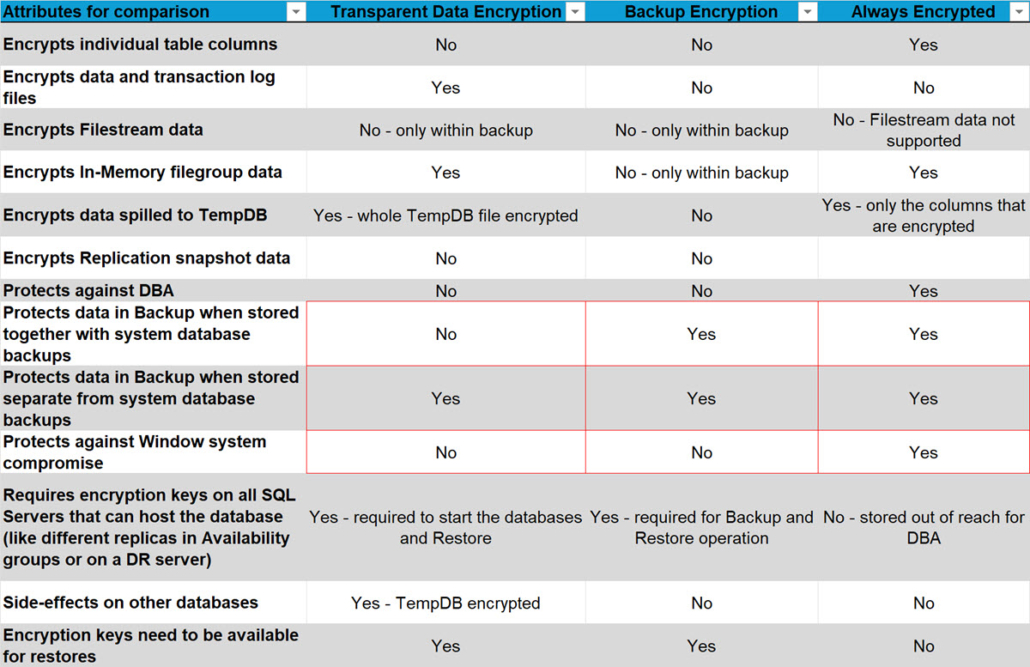
* In security, we can’t simply assume the best-case scenario. Plus, experience shows that the typical practice is to store all database backups—both system and user—together in a single central location accessible by SQL Server, and then move them all to another location as a group
It may come as a surprise to some but given that TDE does not make a real difference when it comes to protecting the data stored in SQL Server, I am not promoting TDE to be used as a silver bullet. Yes, on paper, it does encrypt the database. That is a fact. And because of that it may still suffice to get through certain audits. But if your focus is to safeguard your data rather than just getting a checkbox to pass and audit, then you should focus on where it makes a difference.
Here is what I recommend:
- Encrypt your Backups using native Backup Encryption with SQL Server
- I am not recommending any specific third-party tool as they introduce another dependency which when the time comes, can be problematic. But this is a decision solely up to you. You can use a third-party app. Just make sure to understand the encryption hierarchy and how the keys are protected.
- Make sure to keep the decryption key safely stored in a different location than the backup files
- Use Always Encrypted (with secure enclaves) to protect your most sensitive data (PII etc.)
- If you cannot use that, look at the T-SQL functions or use application-side encryption methods.
- Use TDE if the Auditor demands it.
- And store system database backups separately if you want to rely on the encryption
- Make sure to monitor activity on your server and keep the ACLs for the data and transaction log files tight (which they are by default). Other than administrators no one should be able to (A) stop SQL Server and (B) read the data file directories.
- Here are some links on this subject: Configure Windows service accounts and permissions, Configure file system permissions for Database Engine access
Happy securing
Andreas
Thank you to my Sarpedon Quality Lab Germany team members: Torsten Strauss for the idea for this article and Ralf Dietrich and Lars Lawrenz for brainstorming.


Why should replication subscribers and snapshot data be considered in data security?
That’s a great question because it’s easy to miss this potential data-leak:
When using SQL Server Replication, Snapshots are used for the initial synchronization and of course for Snapshot Replication constantly.
It used plain-text files that contain the data as it is stored in the table. And that means in the case of TDE, the data is unencrypted in these files.
And unfortunately, Always Encrypted does not support replication in SQL Server.
Good Article and detailed information, thanks.
One matter about encryption in SQL Server that not referenced/ highlighted that much is encryption traffics between end points in AlwaysOn Availability Group setup…which is important for data protection.
Thanks
Emad Al-Mousa
Thank you.
True, there isn’t much talk about Availability Group communication encryption specifically.
It “should” be covered by the same encryption that is used by the SQL Server engine for communication on the standard T-SQL Endpoint.
And in my recent article I talked about this and also about the limitations of SQL Server 2022 support for TDS 1.3. Always On Availability Group connectivity for example does not support it (https://learn.microsoft.com/en-us/sql/relational-databases/security/networking/tds-8?view=sql-server-ver16 )
So in the end it’s not that simple unfortunately.
Andreas