
Evading Data Access Auditing in Microsoft SQL Server – and how to close the gaps
In this article I want to point out some important evasion-methods for anyone concerned about Auditing data access.
In former articles I have already written about the importance of Auditing (Security concept: Audit Trail) and what constitutes a minimal Audit every database system should have in place (Recommendation for Security Auditing for databases – with example for Microsoft SQL Server).
But if you are storing sensitive data as in finance and healthcare (not an exclusive list!), you know that you can’t stop at the basics. You need to specifically protect against Data Exfiltration attacks. And that is where Data Access Auditing comes in: logging and monitoring access to sensitive data. That can be to detect internal actors as well as external threat actors: An internal actor who is attempting to read data that he has no business reason to read, or an external actor who is preparing or conducting a large data exfiltration attack.
How do I know if we have sensitive data, and where it is stored?
Data discovery is really a subject on its own, and goes beyond what I can cover in this article.
If you do not know if or where you have stored sensitive data, I urge you to consider investing in a solution that helps you identify such data in your database-environment.
Even a low-cost solution can make a big difference vs no discovery-attempt at all. Not every environment needs a full-fledged Data Governance solution, but at a certain size there is really no way around it if you want to safeguard your data with confidence.
In the SQL Server world, we have:
-
- built-in SQL Data Discovery and Classification which looks for table and column names in databases
- Microsoft Purview (which I had the honor to help integrate into the SQL Engine in my role at Microsoft), which uses a combination of metadata scanning, data classification, and pattern-based content analysis: Learn about Microsoft Purview Unified Catalog
Once you know what data to specifically monitor for access, in Microsoft SQL Server you create a so-called Audit and then an Audit Specification.
- There are tons of How-To’s you can find on the internet that cover the basic approach. I.e. Create a server audit and database audit specification Here I will focus on the shortcomings.
The basic security Audit Specification for read access to data
For this article I will use the database AdventureWorks2022 samples database which contains tables with sensitive data such as CreditCard details.
Important note on CreditCard numbers in Plaintext
In fact, CreditCard information is so sensitive that it should never ever be stored in plain text. I apologize for using this bad example and hope someone at Microsoft feels responsible and empowered by leadership to fix this, so it stops being a pattern.)
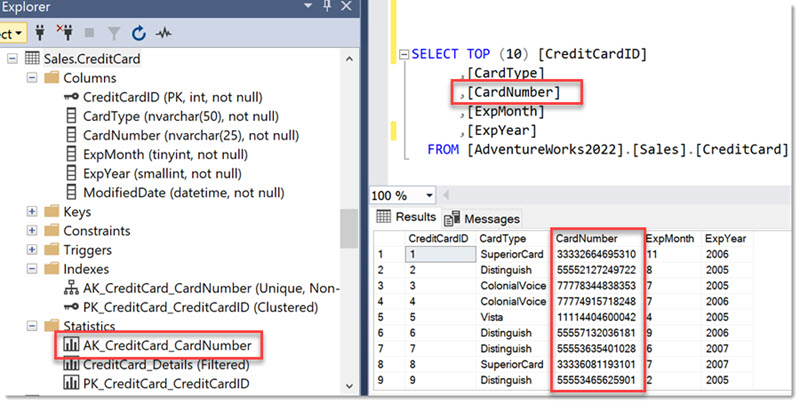
I repeat: Do not store CreditCard numbers (the PAN) in plaintext, ever! This is a violation of the PCI-DSS compliance standard which is applicable to all organizations that store cardholder data.
For this article, we will define the following rule for Auditing:
Example requirement: Audit (Log and review) every read-access to tables in the Sales schema.
We keep it that simple.
Based on that we can create an Audit at the server level:
CREATE SERVER AUDIT [Audit_SensitiveObjects]
TO FILE
( FILEPATH = N’D:\SQLData\Audits\’
)
GO
Nothing special about this Audit definition. The focus is on the Specification here.
Then we create the Audit Specification which logs to the Audit above:
CREATE DATABASE AUDIT SPECIFICATION [AuditSpec_Select]
FOR SERVER AUDIT [Audit_SensitiveObjects]
ADD (SELECT ON SCHEMA::[Sales] BY [public])
In a nutshell: we create an Audit Specification that captures every SELECT-command that touches any object within the schema Sales. Also no tricks here, just as documented (Database-level audit actions) .
- As you can see, we are auditing every user, no exception. (In SQL Server every database user is member of the database role public and cannot be removed. Comparable to the Everyone-Group in Windows.)
Testing the basic Audit-setup
Let’s test if the Audit works as expected. We will utilize a User named “Sneaky” for the tests in this article and run a query that selects from our CreditCard table:
SELECT TOP (10) *
FROM [Sales].CreditCard
And we see the following in the Audit:

(ignore the first row which just states that the Audit had been started)
All there as expected.
First attempt to evade auditing via secondary object
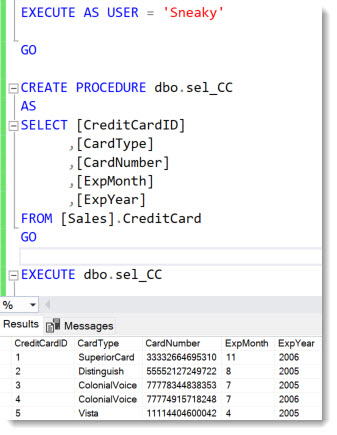
Now User Sneaky has the idea that instead of selecting from the table directly, he could try utilizing a stored procedure that resides in a different schema, and call that instead running the SELECT directly, hoping to evade the Auditing.
After creating the stored procedure, the User Sneaky can execute it and the rows from the table are returned as shown below:
Did SQL Auditing catch this?
Yes, it did. And not only that, but it also tells us that the access happened through nested calls (A procedure running the select)

As I have shown in my session “Securing SQL Server from Inside-Attacks” at PASS Summit 2009, when Auditing was freshly released with SQL Server 2008, one of the main advantages of Auditing over the formerly available SQL Trace method is, that it captures based on the accessed objects, no matter where the statement comes from.
In the log you can see that the Audit was triggered by the sql statement that selected from the CreditCard table, but to help us understand the access-path, we can see the name of the stored procedure that was executed in the column additional_info.
Takeaway:
No matter behind how many nesting levels of views or procedures a user tries to hide the access to the audited table, auditing will capture the access-attempt.
– Including the tsql stack of objects that lead to it.
That is awesome and an important requirement for a security control: to be enforced at every access point.
Note on Permissions
If you know me, you know I take the topic of permissions very seriously. However, this article isn’t about permissions per se. The principles I’m discussing here apply to any user, regardless of their permission level. Even a sysadmin should be subject to auditing. In this specific example, the user might be a developer or support engineer with DDL permissions in addition to SELECT. But ultimately, it doesn’t matter – if the rule is “we shall audit,” then we shall audit. 😉
Alright, so we got the basics covered.
Let’s look at some other ways to get to the data.
Evading auditing using DBCC SHOWSTATISTICS to read data from the Statistics objects
If you look back at the table definition above, you will notice several statistics objects. Statistics contain samples of the actual data of an index or column.
The Sales.CreditCard-table in the AdventureWorks database has a predefined statistics object named AK_CreditCard_CardNumber. Any user who has SELECT access to the table can also read statistics (which is kind of important for the Query Analyzer to choose a good query plan)
Since our User Sneaky has the SELECT-permission on the table but wants to avoid being audited, he could try reading the data that’s available in the statistics. Like so:
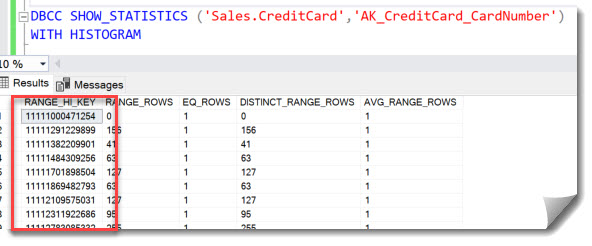
Marked in red are the CreditCard numbers, which are in the first column of the statistics object.
Does the SELECT-Action in SQL Auditing capture the access to the CreditCard numbers via the statistics histogram using DBCC_SHOWSTATISTICS?:
No!
The Audit log contains no new entry.
This histogram contains only 153 rows, but still, these are legitimate CreditCard numbers.
Since User Sneaky is just that: sneaky, and is a power-user with DDL-permissions, he can now carefully craft further statistics to get more than 153 CreditCard numbers. He could create multiple filtered statistics for example, like so, essentially dividing them up into buckets of 100:

And so on.
None of that is Audited under the SELECT-event, even though it clearly exposes data!
Background to understand Auditing in Microsoft SQL Server
Historically SQL Server Auditing was designed to Audit based on permission-checks. This is why instead of an Audit Group “Read data” or something like that, it is “SELECT”. Because there is a permission SELECT that one can have on a table and the audit will trigger when it is checked. Of course, several adjustments had to be made to make Audit also log access by sysadmins which do not trigger permission checks. But this legacy is probably the reason why there are some non-intuitive Audit groups that are very “activity-based” rather than “result-based”. (“SELECT from objects” vs “Read data”).
Solution: How to Audit DBCC-access to Statistics objects
Now in this case, User Sneaky used a DBCC-command, and if you are somewhat familiar with the Audit Groups of SQL Server, you may have seen that there is a separate Audit Action Group for just that: DBCC_GROUP. Let’s add that to the Audit Specification:
ALTER DATABASE AUDIT SPECIFICATION [AuditSpec_Select]
ADD (DBCC_GROUP)
And after running the DBCC_SHOWSTATISTICS again, we see the following in the Audit log:

Alright, this works as expected.
Important note on DBCCs:
It is not by chance that the DBCC_GROUP Audit Action group is one of the essential action groups which I recommend every system to monitor (see Recommendation for Security Auditing for databases – with example for Microsoft SQL Server ). Besides DBCC_SHOWSTATS there are other DBCC commands which sysadmins could use for malicious purposes, among them DBCC PAGE, which allows reading the raw 8-KB pages which SQL Server uses to store data. So, make sure to monitor those commands specifically.
Alright, so we can capture all access variations?! Well, not so fast.
Evading auditing using Statistics objects and system function
User Sneaky knows SQL Server in and out. He also knows that since SQL Server version 2016 there is a Dynamic Management Function (DMF) which can be used instead of the DBCC command: sys.dm_db_stats_histogram.
So, what happens if he uses this query instead?:
SELECT range_high_key, equal_rows, distinct_range_rows
FROM sys.dm_db_stats_histogram(OBJECT_ID(‘Sales.CreditCard’), 5);
Note the 5 is the statistics object Id, which can be obtained by querying sys.stats. The results are essentially the same as for the DBCC command.
Does the SELECT-Action in SQL Auditing capture the access to the CreditCard numbers via the statistics histogram using the DMF sys.dm_db_stats_histogram?:
No!
The Audit log contains no new entry.
Solution: How to Audit access to Statistics objects via DMF
As you may realize, I won’t just publish security bugs without showing a possible solution. So, what can we do here?
1st attempt:
Searching the Audit Action Groups brings up SCHEMA_OBJECT_ACCESS_GROUP. From the name and description this one might capture that – and more. Let’s try:
ALTER DATABASE AUDIT SPECIFICATION [AuditSpec_Select]
ADD (SCHEMA_OBJECT_ACCESS_GROUP)
Reading the histogram via the DMF again and checking the Audit log still yields no results. It captures a lot of other stuff that I have no interest in though, so I let’s drop that Action Group again.
ALTER DATABASE AUDIT SPECIFICATION [AuditSpec_Select]
DROP (SCHEMA_OBJECT_ACCESS_GROUP)
2nd attempt:
There is no distinct Audit Group for system views. But we can define Audits on individual objects, if we know their names. Almost the same way as I am auditing the whole schema sales, I can monitor the schema sys, or even the individual DMVs and DMFs within the sys-schema.
There’s one peculiarity, though: those objects don’t actually reside in the user database, but in a hidden system database called mssqlsystemresource, which isn’t directly accessible. When you try to Audit dynamic system objects from within a user database you get this error:
Error 33099: You cannot add server-scoped catalog views, system stored procedures, or extended stored procedures to a database audit specification in a user database. Instead add them to a database audit specification in the master database.
We need to create the following database audit specification in the master database:
CREATE DATABASE AUDIT SPECIFICATION [AuditSpec_Select_dm_db_stats_histogram]
FOR SERVER AUDIT [Audit_SensitiveObjects]
ADD (SELECT ON OBJECT::[sys].[dm_db_stats_histogram] BY [public])
Once this is in place, access to the DMF sys.dm_db_stats_histogram is logged:

- Notice the database user being guest, since we do not have an explicit user in master. But when Auditing SQL Server, you should always look at the column session_server_principal_name
3rd attempt, alternative:
The alternative would be to use the BATCH_COMPLETED_GROUP, which captures every individual statement that is run against the database. Like so:
ALTER DATABASE AUDIT SPECIFICATION [AuditSpec_Select]
ADD (BATCH_COMPLETED_GROUP)
Which logs all the mentioned read attempt methods shown and more:

However, due to the large volume of data generated by BATCH_COMPLETED – I’ve seen it reach up to a terabyte per day on a busy system – it’s usually considered a last resort. Additionally, the 3,000-character limit on filters is quickly exhausted once you realize how much filtering is actually needed.
In my next article, I’ll present a more elegant and efficient solution that can be used in SQL Server 2022. > How to Use Data Classification to Audit specific Data Access in SQL Server
Summary
In sum: Auditing access to data isn’t quite as trivial as the Audit Groups may make us believe:
The SELECT-Action captures specifically only Select-commands run against a given object (can be the whole database, schema or individual objects such as tables or views.
However, depending on the environment, one needs to consider potential indirect attacks or even side-channels. Most database systems use different object types to help optimize workloads that may contain actual data. Such as Indexes, Statistics and Query Plans with parameter values or other system functions that may return data from a running session.
Therefore, it may be required to capture additional Events, such as in this case DBCC-commands. And if nothing else helps, collecting every single statement may be required as last resort. In such a case it is critical to consider the overhead on the system as well as consider ow to handle the large amount of log-data.
In a system with 10 queries per minutes this may be easy, but when you have thousands of statements per minute the performance-impact will start to be felt. And the Audit logs will quickly take up many gigabytes if not terabytes.
If you have such a critical system to Audit, don’t shy away from seeking help from professionals. At Sarpedon Quality Lab we know SQL Server in and out and have experience with collecting and parsing Audit information.
Resources on Auditing for Microsoft SQL
Lastly, here are some resources on data access Auditing support in Microsoft SQL offerings:
- SQL Server and Managed Instance: SQL Server Audit
- Azure SQL: Auditing for Azure SQL Database and Azure Synapse Analytics
- SQL database in Fabric: at the time of this article is still in Preview and does not support Auditing: Features comparison: Azure SQL Database and SQL database in Microsoft Fabric (preview)
- Fabric Warehouse: Auditing is in Preview: SQL audit logs in Fabric Data Warehouse (Preview) and just received a refreshed granular GUI: Experience the New Visual SQL Audit Logs Configuration in Fabric Warehouse
- Article by Emad Al-Mousa describing accessing data via statistics to circumvent auditing: bypassing Data Classification and Auditing feature in SQL Server 2019
Happy Auditing
Andreas
Thank you for reviewing: Sravani Saluru, Senior Product Manager at Microsoft Azure Data and responsible for Auditing in Azure SQL, Fabric SQL and SQL Server.


Leave a Reply
Want to join the discussion?Feel free to contribute!