
SQL Server 2025 CU1 Improvement Allow Creating of Databases within a Contained Availability Group – current limitations
First of all: It’s always encouraging to see the Product team act on user feedback. SQL Server 2025 CU1 introduces an improvement that allows the creation and restoration of databases within contained availability groups (CAG). This is a step in the right direction, but as you’ll see, there are still some bumps to smooth out. Keep the feedback coming (here: Allow creation and restore of databases in contained availability group) — progress is happening, but we’re not quite there yet.
Background
The overarching goal is to make Contained Availability Groups (CAGs) fully transparent to applications, particularly in setup routines.
I’ve previously written about the advantages and limitations of using SQL Server Contained Availability Groups here: Why you should use SQL Server contained availability groups to save time – and why consultants may not tell you about them
What’s new in SQL Server 2025 CU1
The recently published first Cumulative Update (CU1) for SQL Server 2025, includes a Fix called: Enables creating or restoring the database by using a listener for Container Availability Group Connection. This feature lets Contained AG users create and restore the database without a connection to the SQL instance.
The documentation now contains an entry Enable database creation or restoration in contained availability group sessions. It states: “This enhancement streamlines workflows for users assigned the appropriate roles, allowing seamless operations within contained AG environments.”
However, I’d advise a little caution with the word “seamless.” In this article I will take a deeper look at how this works — and where it still needs some polish.
Creating a database from a connection to a contained Availability Group – How does it actually work?
The documentation is not very elaborate about this, so allow me to go over the process of creating or restoring a database from a connection to a contained Availability Group:
Requirement: a Login with at l.east CREATE ANY DATBASE permission inside the Contained AG’s context
- Run EXECUTE sp_set_session_context @key = N’allow_cag_create_db’, @value = 1;
- Run a CREATE DATABASE statement – or, alternatively, run a RESTORE DATABASE-statement.
- Then run BACKUP DATABASE to establish the Log Chain base (same as you do when putting a database into any Availability Group).
- Then add the database to the Availability Group.
So, contrary to what some might expect, you can’t simply create a database within the context of the AG and expect it to be part of the AG immediately. It must be manually added to the availability group afterward. Until that step is done, the database will only be visible on the host machine.(!) – like the screenshot below shows:
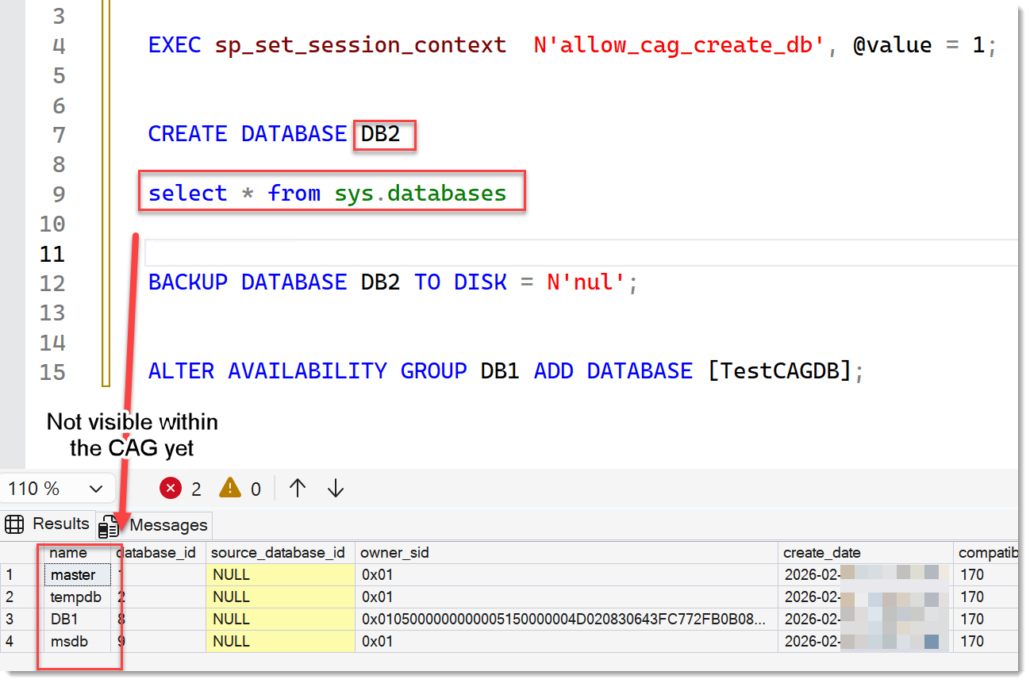
Now that we understand the process, let’s investigate the steps closely and how they affect usability:
Gotcha #1: special command required
Before a user can create or restore a database within a contained AG connection, they need to run a special command:
EXECUTE sp_set_session_context @key = N’allow_cag_create_db’, @value = 1;
While this looks easy, it is a blocker to any install-routine to just roll out databases as usual. I cannot imagine application vendors willing to adjust their setup routines to:
A) check if the connection is against a Contained AG
B) if so, run that command before starting the main deployment
c) Don’t forget to then also add the database to the CAG
In my opinion, at this stage, this functionality will be useful mainly for DBAs who are accustomed to running ad-hoc scripts, but it doesn’t help with streamlining deployment for applications or vendors.
I wonder why this session context is required at all and not the default. That might be just because of the rush the team was under.
My recommendation to the Microsoft product team:
To make this work seamless for setup routines, there can’t be any special commands required. I know, there is much more to it, and we will get to it further down.
Gotcha #2: special proc sp_sysutility_cag_create_db lacks basic checks
To simplify the 4-step process from above), Microsoft has provided a stored procedure: dbo.sp_sysutility_cag_create_db, found in msdb.
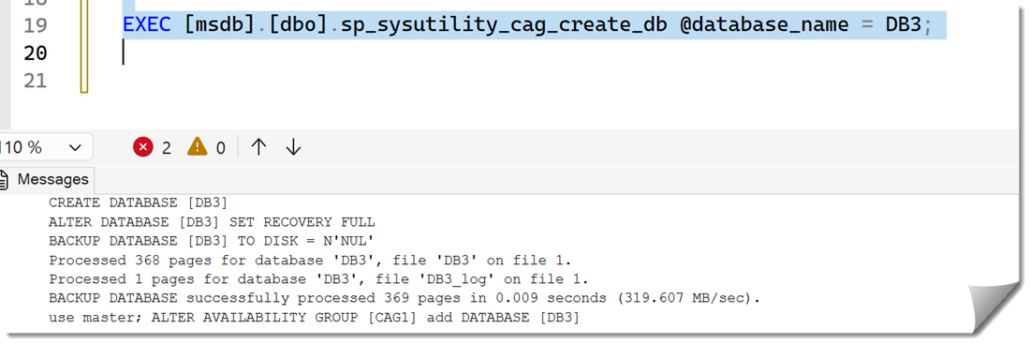
However, this stored procedure is not documented (only mention in this technet blog: Creating a Contained Availability Group and Enabling Database Creation via CAG Listener). Also, it simply automates the steps I outlined above without any error handling or checks. It’s risky to use without caution.
This is what it does when you try to add a database which already exists:
CREATE DATABASE [DBAlreadyInCAG]
Msg 1801, Level 16, State 3, Line 29
Database ‘DBAlreadyInCAG’ already exists. Choose a different database name.
ALTER DATABASE [DBAlreadyInCAG] SET RECOVERY FULL
BACKUP DATABASE [DBAlreadyInCAG] TO DISK = N’NUL’
Processed 424 pages for database ‘DBAlreadyInCAG’, file ‘DB11’ on file 1.
Processed 1 pages for database ‘DBAlreadyInCAG’, file ‘DB11_log’ on file 1.
BACKUP DATABASE successfully processed 425 pages in 0.016 seconds (207.122 MB/sec).
use master; ALTER AVAILABILITY GROUP [CAG1] add DATABASE [DBAlreadyInCAG]
Msg 35280, Level 16, State 2, Line 29
Database ‘DBAlreadyInCAG’ cannot be added to availability group ‘CAG1’. The database is already joined to the specified availability group. Verify that the database name is correct and that the database is not joined to an availability group, then retry the operation.
- Well, it tried 🙂 – It could have checked if the DB is already inside the CAG instead though. Now it broke the Backup chain by creating another Backup that the DBA won’t know about and not storing it anywhere. Worst case this can lead to data loss(!).
Gotcha #3: dbo.sp_sysutility_cag_create_db prone to command injection and lacks errorhandling
Maybe the procedure was no meant to be released yet. I am not sure.
But have a look at the code:
CREATE PROCEDURE dbo.sp_sysutility_cag_create_db
@database_name sysname,
@createdb_sql NVARCHAR(MAX) = NULL
AS
BEGIN
SET NOCOUNT ON
DECLARE @fIsContainedAGSession int
EXECUTE @fIsContainedAGSession = sys.sp_MSIsContainedAGSession
if (@fIsContainedAGSession = 1)
BEGIN
DECLARE @SQL NVARCHAR(MAX);
EXEC sp_set_session_context @key = N’allow_cag_create_db’, @value = 1;
IF @createdb_sql IS NULL
SET @SQL = ‘CREATE DATABASE ‘ + QUOTENAME(@database_name);
ELSE
SET @SQL = @createdb_sql;
PRINT @SQL
EXEC sp_executesql @SQL;
SET @SQL = ‘ALTER DATABASE ‘ + QUOTENAME(@database_name) + ‘ SET RECOVERY FULL’;
PRINT @SQL
EXEC sp_executesql @SQL;
SET @SQL = ‘BACKUP DATABASE ‘ + QUOTENAME(@database_name) + ‘ TO DISK = N”NUL”’;
PRINT @SQL
EXEC sp_executesql @SQL;
DECLARE @AG_Name sysname;
set @AG_Name = (SELECT name FROM sys.availability_groups ags
INNER JOIN sys.dm_exec_sessions des ON ags.group_id = des.contained_availability_group_id
WHERE @@SPID = des.session_id);
SET @SQL = ‘use master; ALTER AVAILABILITY GROUP ‘ + QUOTENAME(@AG_Name) + ‘ add DATABASE ‘ + QUOTENAME (@database_name)
PRINT @SQL
EXEC sp_executesql @SQL;
EXEC sp_set_session_context @key = N’allow_cag_create_db’, @value = 0;
END
ELSE
BEGIN
RAISERROR(‘This can only be used with a contained availability group connection.’, 16, 1);
END
END
The @createdb_sql variable, which for some reason is exposed as an input-parameter, can be exploited to execute arbitrary SQL code if injected through a vulnerable interface. While it doesn’t directly elevate privileges thanks to the fact that sp_executesql breaks ownership-chaining and proper use of QUOTENAME(), it does present a risk if used within workflows that pull values from a table or other sources.
My recommendation to the Microsoft product team:
Personally, I would vouch to get rid of this proc altogether. The benefit is too small. Any DBA can create this proc with proper custom error handling. If anything, it should be a proper system stored procedure, not requiring access to msdb and only allow execution to Logins with CREATE ANY DATABASE-permission.
Gotcha #4 and 5: One can add ANY database to ANY Availability Group
This is easily a double issue:
Once your session has the session context allow_cag_create_db enabled, there is nothing to stop you from adding any database to your Contained Availability Group. – As long as the database is prepared with a full Backup – which all production databases should be.
In fact, you could even add it to any other availability group (no matter, if contained or not!), if you knew its name.
This can be considered a security issue since this could allow a vendor to gain access to a database that does not belong to him. (CAG’s do not pose a security boundary per se, but they can easily be perceived as such and do help a lot. Therefore, I will not go into details how the boundary can be crossed here.)
All it takes is running ALTER AVAILABILITY GROUP [CAGOther] add DATABASE [RandomDatabaseNameThatExists] with any know database name. The statement does not check permissions.
- You will then not see the database if it is in a different CAG now, but hey, you confuse the hell out of your DBA 🙂
My recommendation to the Microsoft product team:
SQL Server should have an owner for Availability Groups so you can limit who can do what with which AG. This is not a new request. But with contained AGs this becomes much more important.
Gotcha #6: Databases are created on the host but not visible in sys.databases
I can’t blame the product team for this, as this is a touch nut to crack, but it should be understood: a user who is connected to a contained AG Listener, can only see databases that are part of this CAG. But when the user creates a new database, it will only show up on the host – until it gets added to the CAG.
This can easily be confusing since you can’t easily check if your database already exists and so on.
My recommendation to the Microsoft product team:
One solution might be that the person which has the CREATE ANY DATABASE permission should be able to see any database it created, even the ones that are not inside the CAG yet. Of course, with a special remark like “unjoined”. But again, this is not an easy challenge.
I would rather go for a truly transparent, “seamless’, to resuse the words from BOL 😉 database-creation, which wraps all these 3 steps (Create DB, Backup DB, Add DB to CAG) under the CREATE DATABASE command – WHEN it’s run under the context of the CAG. In one Transaction. Either it all works or nothing.
Conclusion
Don’t get me wrong: I am super happy that the product team has been able to make a move in the right direction in this specific challenge. I just want to make sure that the challenges for application vendors are clear and that this will continue to see improvements.
I have reached out to the team about these issues and shortcomings, and they are looking into it. That’s all I can say for now.
If you think you want to have someone get your High Availability setup right, feel free to reach out. I work with former engineers and product managers from the Microsoft Product team, and we are happy to help.
Andreas


Leave a Reply
Want to join the discussion?Feel free to contribute!