
##MS_DatabaseManager## Privilege Escalation (Part 2): The Ownership-Based Security Model
In my previous post (SQL Server Privilege Escalation via DatabaseManager-role: Newly discovered Attack Paths Explained), I showed how a privilege escalation can be achieved by modifying a stored procedure in msdb, based on research shared by Emad Al-Mousa.
When I looked into this more closely, it became clear pretty quickly:
It is not just about a few specific procedures.
Documented behavior
According to the documentation, ##MS_DatabaseManager## is supposed to behave like the old dbcreator server-role:
- You can create databases
- You become the owner
- You can fully control databases you create
- You have no permission on other databases
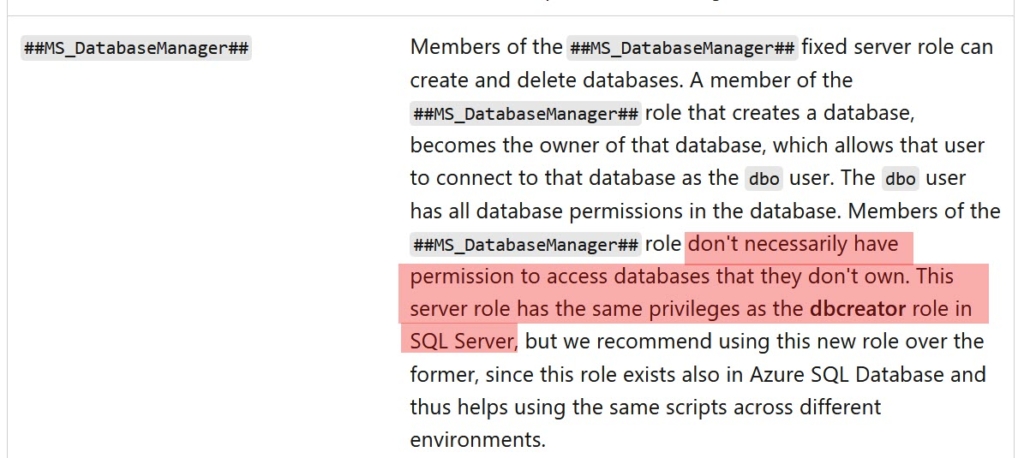
That’s a simple and predictable ownership-based model.
Reality check
After understanding Emad’s elevation paths, I took a step back to take a look at the complete picture.
Looking at the actual server-level permissions of the role:
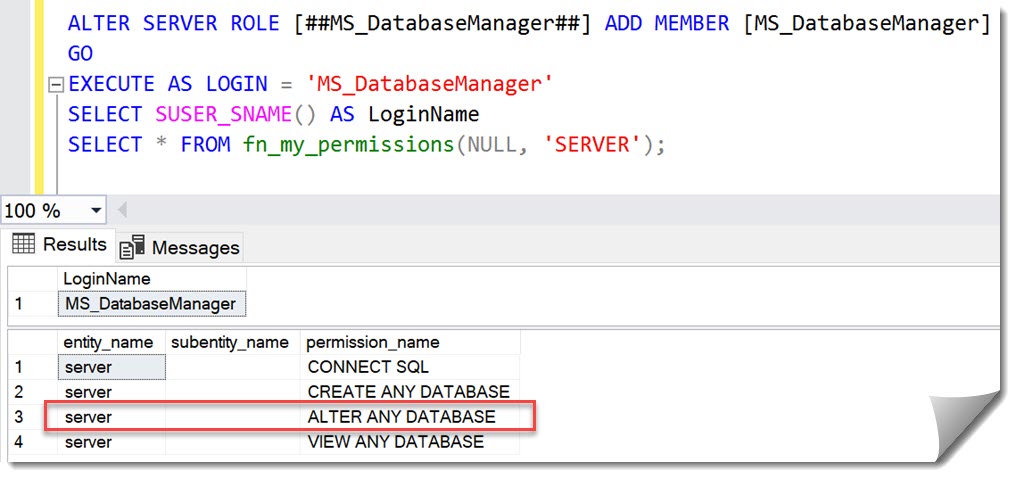
I realized, it includes the ALTER ANY DATABASE-permission!
With that permission, databases can be modified even without ownership.
The only requirement is that the principal can access the database.
The built-in escalation path
And that’s where the problem starts:
System databases like master, msdb and tempdb are accessible for everyone by default. No user mapping required – access is granted via guest and should not be blocked.
Here is a screenshot of the resulting permissions of a member of the ##MS_DatabaseManager##-role in msdb:
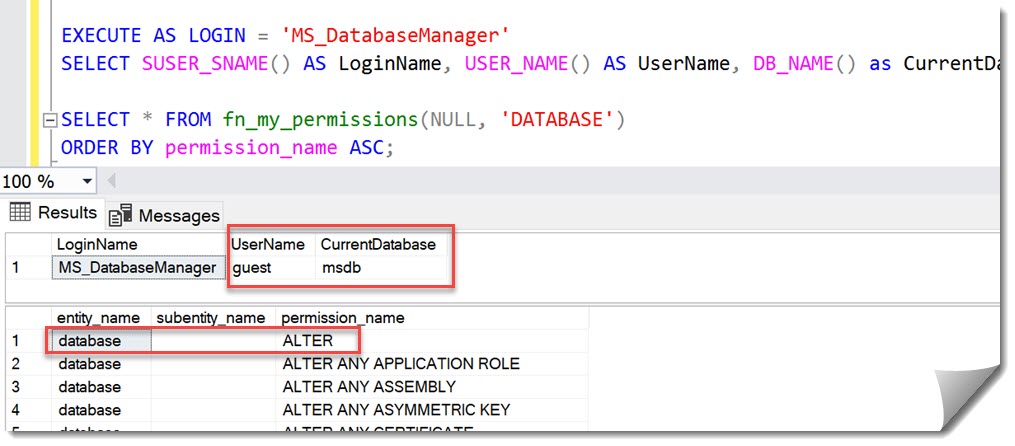
- Access via guest
- Effective permission: ALTER on the database
Which means:
This is not about a few specific procedures – every executable object in msdb and master becomes part of the attack surface.
Practical attack surface
Once you look beyond the original exploit, multiple paths become obvious.
In msdb, for example:
- SQL Agent jobs
- Alerts and schedules
- Backup and maintenance procedures
- Database Mail
Many of those eventually run under elevated privileges.
Emad’s research showed how this can be chained into a working escalation path.
Intended model vs. what actual behavior
Looking back at the original announcement of this role (New server roles for Azure SQL Database and SQL Server 2022 in Public Preview), the intent was clear:
- Control what you create
- Maintain strict ownership boundary
Instead, what we have in practice is:
A role that can modify code in any accessible database — including system databases.
Background
I was the Program Manager at Microsoft, responsible for introducing this role.
The goal was to:
- replace the special dbmanager database role in Azure SQL Database
- Introduce a proper server-level equivalent
- Preserve the ownership-based model
Note
At the time, server roles were not available in Azure SQL Database due to architectural constraints (separation of logical and physical servers). Once those limitations were addressed, new server roles became possible.
The intent was not to introduce broad cross-database modification capabilities.
However, with ALTER ANY DATABASE included, the effective behavior differs significantly from that intent – something I did not catch at the time.
Impact on Auditing
This also explains why database-level auditing alone is not sufficient.
With ALTER ANY DATABASE, it is possible to:
- Disable or modify database-level audits
Recommendations:
- Audit to files that cannot be altered by a sysadmin
- Monitor audit start/stop events
- Always include server-level auditing
The “limited permissions in system databases” myth
During assessments I frequently find that application-vendors have access to master and/or msdb so they can place objects there.
And often this includes stored procedures.
These elevation-examples demonstrate how quickly this opens an elevation-path.
If someone can modify executable objects in system databases, there is a clear path to Privilege Escalation.
Recommendation:
- Use a dedicated utility (code-only) database
- Do not grant permissions on system databases to non-DBA’s
What about Azure SQL database?
Azure SQL Database has a different architecture when it comes to the system databases:
- guest is disabled in master
- msdb is not exposed
As a result, these escalation paths are not available in Azure SQL Database.
My Recommendation
From a security perspective, this looks like a design issue rather than a documentation gap.
A straightforward improvement would be:
- Remove ALTER ANY DATABASE from the role
- Preserve the ownership-based model as originally intended
Yes, this could be called a “breaking change”.
However, in practice, I have not seen scenarios where this broader behavior is intentionally relied upon. What it does affect is the ability to safely adopt the role.
At the moment, the documentation highlights “possible elevation under certain conditions”. In real-world environments, this is not an edge case – it is a direct and inherent possibility given default configurations.
Addressing individual execution paths is not a sustainable solution.
As long as the underlying permissions remain unchanged, new paths will continue to exist.
From a security perspective, this puts the role much closer to CONTROL SERVER than its documented scope would suggest, as it provides a direct path to privilege escalation.
Until this is addressed, I cannot recommend using this role in security-sensitive environments.
Andreas


Leave a Reply
Want to join the discussion?Feel free to contribute!