
When SIEM Enrichment Becomes False Attribution
This week, early morning, a customer alerted me that my account was possibly involved in an incident.
The alert came from Rapid7 InsightIDR:
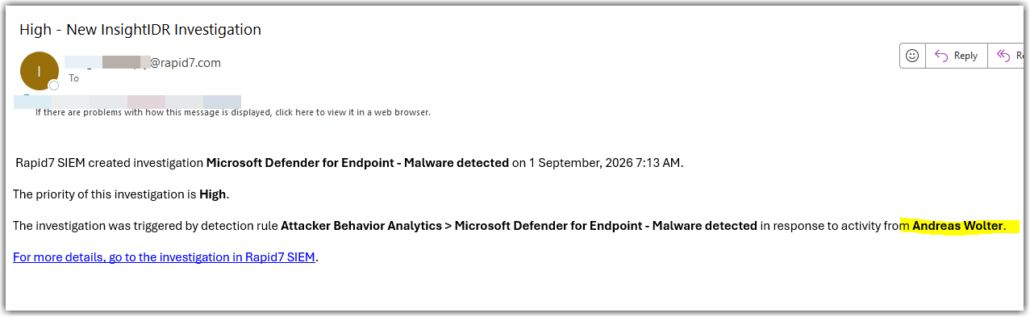
And looking at the alert, yes, there is my name.
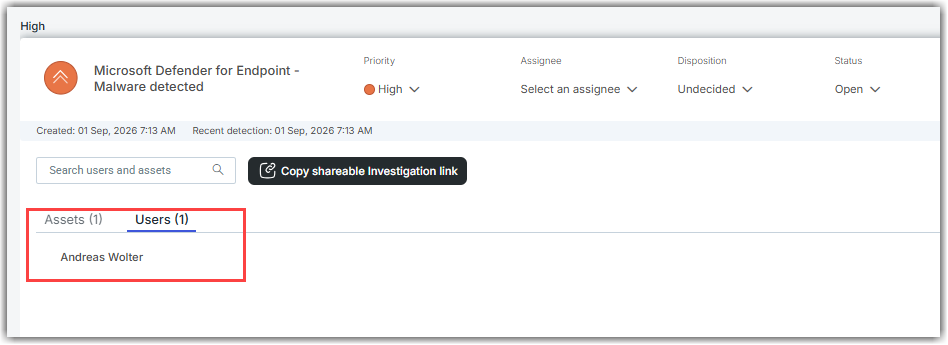
Way to start the day.
However, I know for sure I do not work before getting up, and immediately was suspicious.
So I got hold of the details of the alert. Here are the relevant snippets:
{
“timestamp”: “2026-09-XXXXXXXX”,
“product”: “Microsoft Defender For Endpoint”,
“type”: “Malware”,
“severity”: “High”,
“title”: “‘Splinter’ high-severity malware was prevented”,
“description”: “High-severity malware refers tools used by advanced Threat Activity Groups to target victims. …long text.. \n- _Weaponized_ tools that enable acts of deliberate sabotage or destruction or denial of service.”,
“alert_id”: “XXXXXXXXX-49db-8fc8-39d852d9f596_1”,
“user”: “Andreas Wolter”,
“asset”: “ServerName”,
“source_json”: {
This source_json-boundary turned out to be the most important part of the alert.
“actorDisplayName”: null,
“additionalData”: {
},
“alertPolicyId”: null,
“alertWebUrl”: “https://security.microsoft.com/alerts/xxxxxxxxxxxxxxx?tid=a97c78aa-xxxxxxxxxxx”,
“assignedTo”: null,
“categories”: [
“Malware”
],
…
“detectionSource”: “antivirus”,
“detectorId”: “xxxxxxxxxxxxxxxxx”,
“determination”: null,
“evidence”: [
{
“@odata.type”: “#microsoft.graph.security.deviceEvidence”,
“azureAdDeviceId”: null,
“createdDateTime”: “2026-09-xxxxxxxxxxxxx”,
“defenderAvStatus”: “unknown”,
…
“deviceDnsName”: “ServerName”,
“dnsDomain”: “Domain”,
“firstSeenDateTime”: “2025-xxxxxxxxxxxxx”,
“healthStatus”: “active”,
“hostName”: “Servername”,
“ipInterfaces”: [
],
“lastExternalIpAddress”: “x.x.x.x”,
“lastIpAddress”: ” x.x.x.x “,
“loggedOnUsers”: [ ],
“ntDomain”: null,
…
“remediationStatus”: “active”,
…
],
“verdict”: “suspicious”,
…
{
“@odata.type”: “#microsoft.graph.security.fileEvidence”,
“createdDateTime”: “2026-09-xxxxxxxxxx”,
“detailedRoles”: [
],
“detectionStatus”: “prevented”,
“fileDetails”: {
“fileName”: “printsvc_vbh.dll”,
“filePath”: “C:\Windows\system32\spool\drivers\x64\3”,
“filePublisher”: null,
…
},
“mdeDeviceId”: “xxxxxxxxxxxxxxxxxxxx”,
“remediationStatus”: “prevented”,
“remediationStatusDetails”: “Entity was pre-remediated by Windows Defender”,
…
],
“firstActivityDateTime”: “2026-09-xxxxxxxxxxxxx”,
…
“productName”: “Microsoft Defender for Endpoint”,
“providerAlertId”: “xxxxxxxxxxxxxxxxxxx_1”,
“recommendedActions”: “A. long text ….”,
“serviceSource”: “microsoftDefenderForEndpoint”,
“severity”: “high”,
“status”: “new”,
“systemTags”: [
],
“threatDisplayName”: “Trojan:Win64/Splinter.MS!dha”,
“threatFamilyName”: “Splinter”,
“title”: “‘Splinter’ high-severity malware was prevented”
…
}
The important distinction is between who was logged on, what process caused the file to be examined, and the “user” field added to the alert.
What the alert actually says
The original, raw data from Microsoft Defender For Endpoint contains:
“deviceDnsName”: “Servername”,
“loggedOnUsers”: []
Microsoft defines loggedOnUsers as the users logged onto the machine at the time of the alert. Here it is empty.
The “user”: “My Name” – field is outside source_json.
There is no user evidence associating my account with the detection in the original MDE data. The user field exists only in the outer Rapid7 record.
And this is the key point: the presence of a name in the SIEM alert is not evidence that that account created, loaded, or executed the DLL.
The user field was added by Rapid7 InsightIDR during normalization/enrichment; it is not present in the original Microsoft Defender alert data.
The outer JSON is Rapid7’s normalized third_party_alert format. Rapid7 documents these fields: https://docs.rapid7.com/insightidr/keys-to-use-in-your-queries/
The actual Microsoft alert is what sits inside the “source_json”: { … }
This is the actual detection
Trojan:Win64/Splinter.MS!dha
C:\Windows\system32\spool\drivers\x64\3\printsvc_vbh.dll
And Defender says:
detectionStatus: prevented
remediationStatus: prevented
“Entity was pre-remediated by Windows Defender”
verdict: malicious
That’s good: Defender says it prevented/remediated the file.
What do we take away from this?
Always distinguish between source evidence and SIEM enrichment.
In this case, the alert presented my account as being involved in the activity. But the underlying Microsoft Defender evidence contained no logged-on user, and the user field was not part of the original Defender data.
Enrichment can be useful, but it should not be mistaken for forensic evidence. Before attributing an incident to a user, check where that attribution actually came from.
I would be interested to hear from Rapid7 how this user attribution is derived and whether the UI could make the distinction between source evidence and enriched attribution more explicit.
Happy monitoring
/Andreas


Leave a Reply
Want to join the discussion?Feel free to contribute!