
Get-SqlSafe Community Edition: A Practical First Look at SQL Server Security
A free, transparent baseline assessment for high-level SQL Server security posture
In my experience with SQL Server security assessments, many environments show typical patterns: excessive permissions, weak or missing auditing, legacy authentication exposure, risky configuration choices, and ownership or access-control drift accumulated over years.
Get-SqlSafe Community Edition was released to give teams and also consultants a practical first look at those high-level indicators. It is a free PowerShell-based assessment tool for Microsoft SQL Server, supporting all versions from SQL Server 2016-2025 that helps surface baseline issues before they turn into deeper security problems.
Get-SqlSafe Community Edition is available on GitHub:
https://github.com/Sarpedon-Quality-Lab/sql-security-community-scripts
The tool uses a simple visual connection dialog for connecting to the target SQL Server instance and starting the assessment. The goal is to make the first run straightforward while still producing a transparent local HTML report.
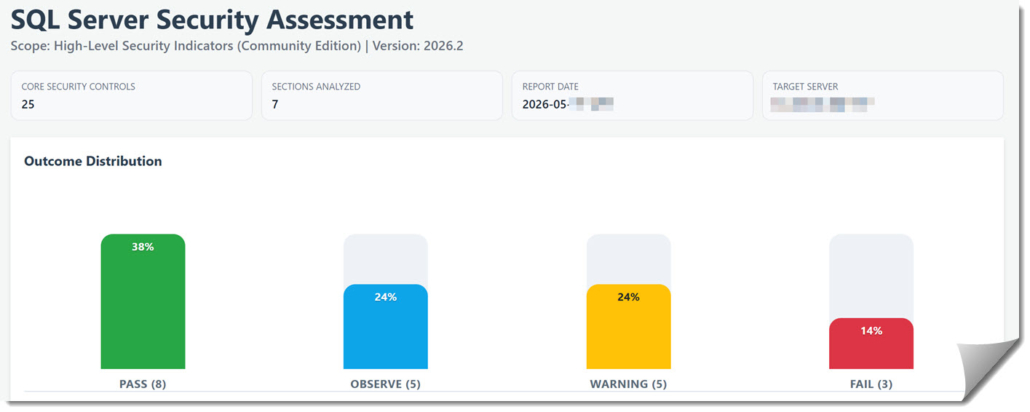
Get-SqlSafe Community Edition generates a local visual HTML report for high-level SQL Server security indicators.
What Get-SqlSafe Community Edition is
Get-SqlSafe Community Edition checks for 25 core SQL Server security indicators and generates a local HTML report. It is designed to be transparent, reviewable, and practical for DBAs, security teams, and consultants who want a first look at SQL Server security hygiene without treating a script as a full audit.
To keep adoption friction low, the tool can be launched through a simple visual connection dialog and produces a local HTML report designed for review and remediation discussions.
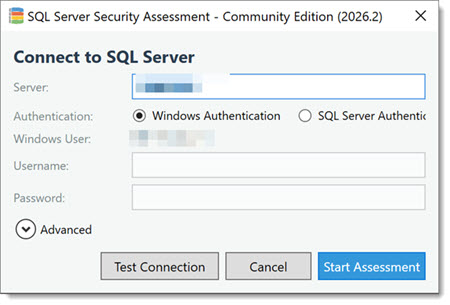
I also plan to make non-interactive execution optional in a future release, while keeping the visual connection experience available.
What the Community Edition is not
A baseline is not a full security assessment
The Community Edition is intentionally limited. It is not a penetration test, not a compliance assessment, and not a full SQL Server security review.
A clean result should not be interpreted as “the server is secure.”
It means the covered baseline indicators look good.
SQL Server’s real attack surface is broader and depends on combinations of permissions, ownership, impersonation, SQL Agent, linked servers, database configuration, service accounts, backups, and operating-system security posture.
Treat the result as a starting point for a deeper review, especially when multiple baseline indicators appear together.
Consultants can also use the report as a visual starting point for customer remediation discussions.
How this fits with other community tools
There are already useful free SQL Server security scripts in the community. Get-SqlSafe Community Edition is not trying to replace them.
Its purpose is more specific: a low-friction, least-privilege, non-invasive first-look assessment that produces a visual report and helps start the remediation conversation.
The focus is on selected high-level indicators that often point to broader security hygiene issues: auditing gaps, NTLM usage, excessive privileges, risky role memberships, orphaned users, invalid ownership mappings, and configuration choices that deserve review.
It is designed to run without sysadmin on supported modern SQL Server versions, avoid changes to SQL Server configuration or data, and produce a local HTML report that technical teams and consultants can also show to leadership.
Note on older version support
I have also used it successfully against SQL Server 2012 and 2014, but unfortunately on those releases, sysadmin is required to run.
If the scan reports findings
Treat findings as indicators, not isolated checkbox failures.
The findings can show up with the following results:
- Info
- Pass
- Observe
- Warning
- Fail
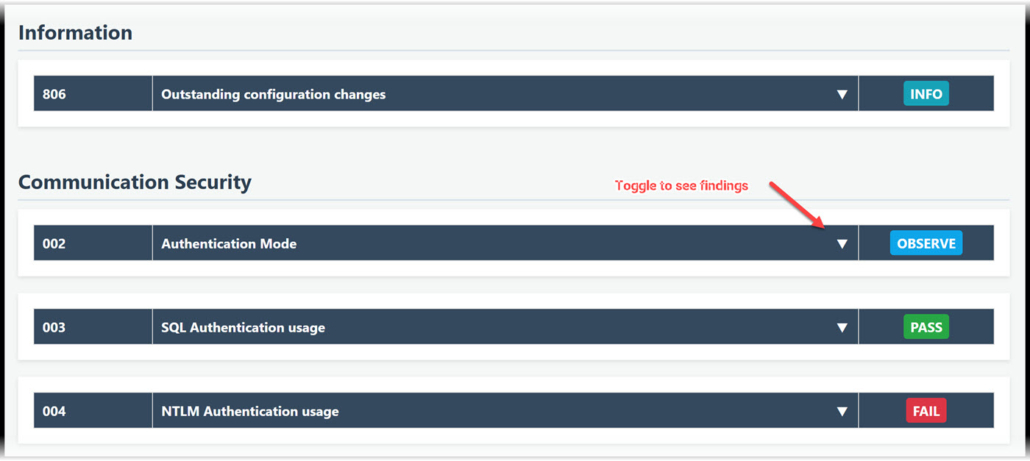
What do the results mean?
- INFO provides useful context. It does not necessarily indicate risk.
- PASS means the assessed condition passed the rule.
- OBSERVE marks conditions that may not be critical in a snapshot, but should be monitored over time.
- WARNING indicates a security-relevant finding that should be reviewed and remediated.
- FAIL indicates a clear security risk that requires prompt attention.
For all findings there will be a recommendation text, often with links to further readings.
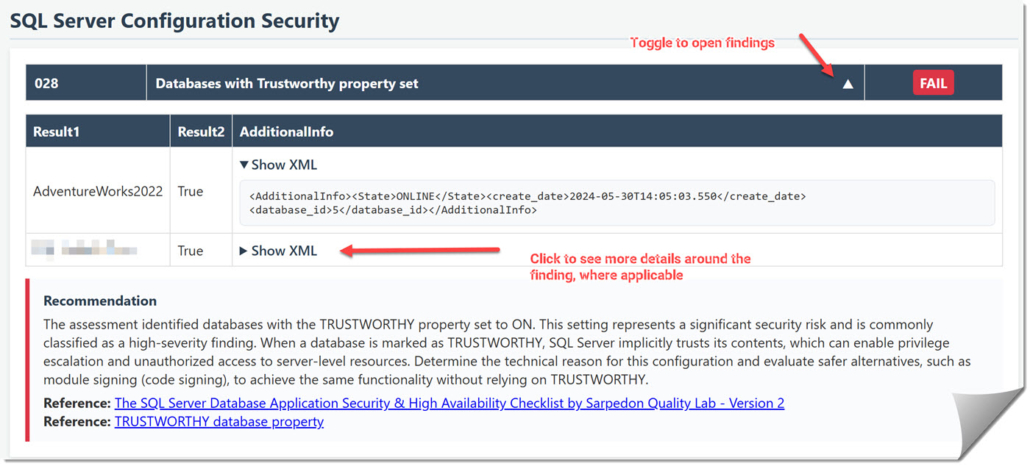
Some findings are straightforward to fix, such as orphaned accounts or obvious configuration drift. Others require more planning, such as NTLM usage, authentication design, or privilege redesign. In my experience, when these high-level indicators appear, the rest of the environment often deserves a deeper review as well.
If the scan is clean
If Get-SqlSafe Community Edition does not report findings, that is an excellent result. It means foundational security hygiene is in good shape for the areas covered, and the most obvious baseline risks are off the table.
But a clean baseline scan is not the end of the security conversation. SQL Server’s attack surface is large, and important escalation paths often hide beyond standard settings or appear only when multiple conditions are reviewed together.
Examples of what the baseline checks look for
The Community Edition covers 25 baseline checks, and I will write separately about selected checks over time.
For this launch post, the important point is not the full list of checks. The important point is how these checks are meant to be interpreted: as practical indicators of high-level SQL Server security posture.
Auditing baseline. One check does not only verify that SQL Server Auditing exists somewhere. It evaluates whether a minimum set of security-relevant audit actions is actively enabled. The baseline used is this published Auditing recommendation: Recommendation for Security Auditing for databases – with example for Microsoft SQL Server
That is different from data access auditing, which depends heavily on workload, data sensitivity, regulatory requirements, and operational constraints and thus cannot be put into a generic recommendation that works for everyone.
NTLM usage. Another check looks at the percentage of currently connected user sessions using NTLM, excluding internal SQL Server sessions. This is not a complete authentication architecture review, but it is a useful indicator.
If a meaningful share of active connections still depends on NTLM – currently evaluated at 10% or more – the environment deserves a closer look at Kerberos readiness, SPN configuration, and legacy application and dependency risk.
This matters because NTLM has well-known security weaknesses and Microsoft is actively moving Windows toward disabling NTLM by default. Microsoft’s Windows IT Pro Blog on disabling NTLM by default
Excessive privileges and ownership drift. Other checks look at excessive privileges, risky role memberships, direct server-level grants, orphaned users, and invalid ownership mappings. These findings are not always isolated emergencies, but they often show where access control has become harder to reason about over time.
Forensic readiness. Some checks are not about blocking an attack directly. They are about forensic readiness: whether the environment captures enough security-relevant activity to support investigation, troubleshooting, and response. This includes areas such as SQL Server Auditing, login-failure logging, and error log retention.
Transparent by design
Security tools should be inspectable, especially when they run in production or customer environments. Get-SqlSafe Community Edition is designed so teams can review the assessment logic, understand what is executed, and run it through their own internal security and change-control process.
Where a full assessment goes deeper
The Community Edition covers 25 essential baseline checks. My full professional SQL Server Security Assessments go significantly deeper, with up to 140+ advanced checks and additional scope around database-level configuration, operating-system and backup security, account attribution, lateral movement paths, and environment-specific attack-path analysis.
The Community Edition is meant to make the first conversation easier.
The full assessment is where the environment-specific risk analysis starts.
Get-SqlSafe Community Edition is available on GitHub:
https://github.com/Sarpedon-Quality-Lab/sql-security-community-scripts
I invite you to review it, test it in a non-production environment, run it against systems where you have approval, and use the result as a starting point for remediation.
Closing
My hope is that Get-SqlSafe Community Edition helps more teams and SQL Server consultants treat SQL Server security as an operational discipline, not just a checklist. If it helps identify and remediate the first obvious risks, it has already served a useful purpose. Once those basics are under control, the logical next step is to look deeper.
If it helps start a useful SQL Server security conversation in your organization or with a client, I would be interested to hear about it.
Stay secure
Andreas


Leave a Reply
Want to join the discussion?Feel free to contribute!