
Running Get-SqlSafe at Scale Across a SQL Server Estate
Get-SqlSafe is a free SQL Server security assessment that checks for common configuration, access-control, authentication, auditing and generates a detailed HTML report.
It has been publicly available for a couple of months and has already received several valuable additions based on user feedback, including console-only mode, Amazon RDS for SQL Server support, and per-database reports.
It has been encouraging to see Get-SqlSafe being used in real environments, including some very large ones.
In this post, I will show how to run the assessment against dozens or even hundreds of SQL Server instances using only a small additional PowerShell wrapper.
What Get-SqlSafe provides
Get-SqlSafe Community Edition is available from Sarpedon Quality Lab.
By default, the script opens a graphical logon prompt, which is convenient when assessing a single server. After the assessment finishes, it automatically opens the generated report in your browser. For automation, it also supports a console-only mode, making it suitable for running against a list of SQL Server instances.
.\Get-SqlSafe.ps1 `
-ConsoleOnly `
-SqlInstance ‘MYSERVER01’ `
-Auth Windows `
-NoAutoOpenReport
Be sure to include -NoAutoOpenReport; otherwise, every completed assessment will open another browser window.
Before you run it at scale
Start with two or three known instances before expanding to a larger list. Confirm that authentication, permissions, connectivity, output naming, and report generation behave as expected in your environment.
- Run the assessment only against systems you are authorized to access.
- Do not embed credentials in the server list or sample wrapper.
- Treat generated reports as sensitive information because they can contain server names, database names, account names, and details about potential security weaknesses.
- Expect unavailable servers, authentication failures, and connection timeouts in any sufficiently large estate.
About the code excerpts: The snippets in this article illustrate individual stages of the approach. They are intentionally not presented as standalone, copy-and-run scripts. The accompanying sample script provides the surrounding variables and additional handling.
Start with a simple server list
For a small number of SQL Server instances, the simplest approach is to run the script sequentially over a text file containing one server or instance name per line. Blank lines and lines beginning with # can be ignored, which makes it easy to annotate the list.
Excerpt: read and normalize the server list
$servers = Get-Content -LiteralPath $serverListPath |
ForEach-Object { $_.Trim() } |
Where-Object { $_ -ne ” -and -not $_.StartsWith(‘#’) } |
Select-Object -Unique
Trimming the entries and removing duplicates prevents simple formatting problems in the input file from turning into unnecessary assessment attempts.
Run Get-SqlSafe for each instance
Once the server list is available as a PowerShell array, each entry can be passed to Get-SqlSafe. The following excerpt shows the basic sequence.
Excerpt: invoke Get-SqlSafe and record basic status
foreach ($server in $servers) {
try {
& $getSqlSafePath `
-ConsoleOnly `
-SqlInstance $server `
-Auth Windows `
-NoAutoOpenReport
$completed++
Write-Host “Completed: $server” -ForegroundColor Green
}
catch {
$failed++
Write-Host “Failed: $server” -ForegroundColor Red
Write-Host $_.Exception.Message -ForegroundColor Red
}
}
This is deliberately basic failure handling. In a production wrapper, you may also want to capture timestamps, exit status, output paths, timeouts, and enough information to retry individual instances.
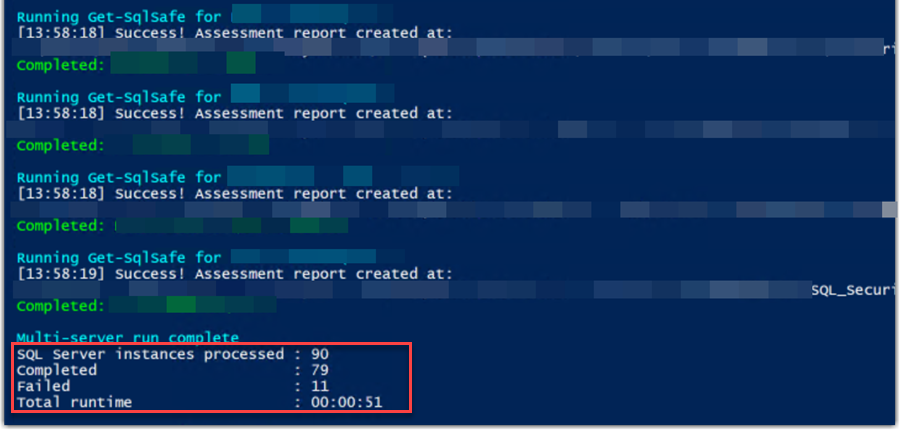
Example screenshot of running Get-SqlSafe against 90 SQL Servers, including 11 not reachable in under a minute.
If you need to step up: parallel execution
Sequential execution is easy to understand and troubleshoot, and probably sufficient for many environments. For a larger estate, however, one slow or unreachable instance can delay everything that follows it.
If sequential execution is too slow, you can start separate PowerShell processes in parallel by using Start-Process. This prevents one slow connection from blocking the entire list, but it also makes accurate completion tracking and failure handling more important.
Avoid starting one process for every server at once. A small concurrency limit is usually sufficient. In one environment, I processed more than 100 SQL Server instances in under 2 minutes with no more than five assessments running in parallel. Your results will depend on network latency, authentication, server responsiveness, and the system running the wrapper.
Note
Reliable parallel orchestration requires more than starting processes.
This requires concurrency limits, timeout handling, result tracking, retry handling, and an unambiguous association between each instance and its output.
Results
After the run, you will have a single “Results”-folder containing one HTML report for every successfully assessed instance.
Now you have a repeatable snapshot of the instances you supplied, collected in a consistent format and produced without deploying an agent or database component.
You should also retain the list of unsuccessful attempts. A missing report can indicate an obsolete server entry, a connectivity problem, or insufficient permissions.
Next: summarize the estate
Opening dozens or hundreds of reports individually is not an efficient way to answer estate-level questions. In my next article, I will show how to extract selected values from the generated reports and turn them into a consolidated SQL Server estate summary.
Summary
Running Get-SqlSafe across an estate does not require a complex platform. Start with console mode, a clean server list, sequential execution, and careful failure tracking. Add controlled parallelism only after the basic workflow is reliable.
The accompanying sample is a blueprint rather than production orchestration. Add the safeguards appropriate for your environment and test it on a few instances before scaling out.
If you have not downloaded Get-SqlSafe yet, you can find it on the Get-SqlSafe resources page.
A working sample of the multi-server runner can be downloaded here: Get-SqlSafe-ServerList-Runner-1.zip
Andreas


Leave a Reply
Want to join the discussion?Feel free to contribute!