
How SQL Server Checks Permissions: Internals of the SQL Server 2022 Permission System
Originally published on Microsoft Tech Community on 27 September 2022, written while I was Senior Program Manager for SQL Server and Azure SQL security at Microsoft. Republished here with minor edits. Read the original.
Status 2026: Microsoft has since retired Purview access policies for SQL (see SQL Server 2025 and the End of Purview Access Policies). The SQL permission internals described here still apply; the parts about external policies are history.
If you have not read about it before, we recently made some deep changes within the permissions of SQL Server. The two most relevant announcements are here:
New granular permissions for SQL Server 2022 and Azure SQL to improve adherence with PoLP
In this article I want to share some more details on why and how we changed the access check code. The answers are less straight-forward than one may think, and some of you may find it interesting.
minor update, Oct 17/2022
In the original article I listed the following Action being part of the Azure Purview for the built-in action-group “SQL Performance Monitor”:
/SqlServers/SystemViewsAndFunctions/ServerSecurityState/Rows/Select
this is incorrect. That Action is part of the “SQL Security Auditor”-role. The correct Action for the “SQL Performance Monitor” is
/Sqlservers/Databases/SystemViewsAndFunctions/DatabasePerformanceState/Rows/
The Why
1)
The first part of the answer to the question “Why?” is quite straightforward: we want to make it easier for customers to adhere to the Principle of Least Privilege (explained here: Security: The Principle of Least Privilege / POLP). And for that we need to create permissions that are more specific, in other words, cover more granular operations than before.
In the announcement-article (New granular permissions for SQL Server 2022 and Azure SQL to improve adherence with PoLP) I also explain a bit how I approached this when we worked on the permissions that cover viewing system metadata:
By keeping a balance between increased security and increase of complexity. The main take-away is, that rather than coming up with a new permission for every individual object, which surely would have driven everyone crazy, we decided to group all these system objects into 2 groups: those which expose information about the security-state of the system – and all the rest. This “all the rest” is covered under the new permission-name PERFORMANCE STATE respectively PERFORMANCE DEFINITION. That way it is possible to keep personae that work on troubleshooting performance and related issues away from gaining insights into the security state of the system.
2)
But there is a second reason that plays a vital role in this undertaking, which has additional implications as you will see:
At the same time as I was responsible for the SQL Server permission system in general, I was also working on a second project: Integrate external policies from Azure Purview to use for access control into SQL Server.
(This new feature was announced here: controlling access to Azure SQL at scale with policies in Purview)
To achieve that, the SQL Server engine permission evaluation algorithm had to be extended to allow permission-checks based on external policies. Policies which are received from Azure Purview contain so-called “Actions,” which can be either allowed or denied.
As you read above, to change the old SQL permissions to the new more granular permissions on system objects, we had to go through each and every permission check already.
Realizing this potential to “Kill two birds with one stone” (no actual birds were harmed in the process, I swear), I convinced the team that doing both changes at the same time would in the long-term safe us a lot of time. Plus, the chances that someone else would want to touch the same code later again would be much lower. While of course doing both at once still added some overhead comparing this to changing the very same code paths later would have been much more extra work.
Therefore, I am glad that the team followed through on that, despite this being unexciting, repetitive work on these 800+ objects.
The undertaking
The main work went into the splitting of permissions for viewing system metadata, which is exposed via (A) Dynamic Management View (DMVs (Dynamic Management Views)) and Dynamic Management Functions (DMFs) for information that is often generated at runtime and (B) Catalog Views for static information.
By splitting, I am referring to the fact that was once covered by (the minimum) permission VIEW DATABASE STATE is now either covered by VIEW DATABASE PERFORMANCE STATE or VIEW DATABASE SECURITY STATE and other 3 splits that we did in this area. The new permissions (see New granular permissions for SQL Server 2022 and Azure SQL to improve adherence with PoLP for details) are lower permissions than the former minimum permissions and at the same time they are still covered by the respective former permissions which are now parent permissions.
These changes of permission requirements naturally required a huge effort by the engineering team that entailed adding new Permission checks for currently about 800 System Objects (DMVs, Catalog Views and DMFs) (!) based on my specification.
- Here it helped that until not long ago I have worked extensively in the space of SQL Server system analysis for about 18 years and working with these objects was my daily bread & butter :).
Big Kudos to all the involved engineers, for fighting through it to the end and not giving up at the sight of this enormous task!
How VIEW SERVER STATE was split up and onboarded to external policies control
Let’s look at a specific example, which can serve as a blueprint for all the changes that we did: Splitting up the SQL permission VIEW SERVER STATE and onboarding it to allow external policy-based checks.
When VIEW SERVER STATE is granted to a Login, this Login (aka the grantee) can read data from Dynamic Management Views (and -Functions) on the server – hundreds of them.
To do that the user will run a command like SELECT * FROM sys.dm_exec_requests.
But there is more: this permission also grants access to some System Stored Procedures such as sys.sp_readerrorlog. For that, the command EXECUTE sys.sp_readerrorlog is used.
And then there are DBCC Commands such as DBCC SQLPERF(NETSTATS) which again have a different syntax.
Explainer: Permissions vs Actions
Before we get into the next part of the work, I need to make sure everyone understands the difference between SQL permissions and so-called actions.
In policy-based access control systems (such as ABAC (attribute-based access control), Attribute-based access control and Azure IAM (Identity & Access Management) RBAC (role-based access control)), usually the term “action” is used instead of permission (also see: Attribute-based access control – Wikipedia). Inside the policy definition, an action is just another attribute, next to subjects (Users) or Object attributes
The difference between action and permission is that actions refer to a specific “operation” like i.e., “read” or “add” or “create.”
On the other hand, a permission is really just an arbitrary name that implies one or more operations to be permitted.
Example
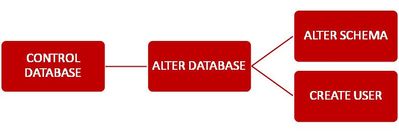
In SQL Server there is a permission called “CONTROL” which can be granted on a database.
But there is no operation in T-SQL (Transact-SQL) that is called “Control” (this is the “arbitrary”-part). Instead, this permission allows the granted user (aka grantee) to run a multitude of commands (“one or more”). In fact, in this specific case almost any command that is available inside a database. It could be anything from a SELECT FROM TableX to ALTER DATABASE.
This hierarchy of SQL permissions is depicted below:
The fact that a permission can allow “one or more” different operations is the most important differentiator between actions and permissions – the latter of which the SQL Server engine used exclusively up until now.
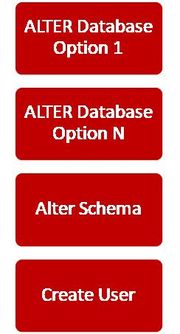
A policy-based permission system that uses actions usually has a separate action for each different operation and those are independent from each other. So-called “covering” permissions, as many traditional database-systems use create challenges for PoLP-compliance and are not commonly used in more modern policy-based access control systems.
This could lead to the following flat list of permissible actions:
Note
While actions themselves are not hierarchical, the objects that they are applied to can and should very well be hierarchically organized. The ability to assign a policy at higher levels of resource-hierarchies, such as subscription or a resource group in Azure, allows for efficient access control without micro-managing individual objects. The same is true within SQL Server Databases where a SELECT-permission granted on a whole database would allow selecting all tables in all schemas.
With this background, it is not hard to guess, that a rich RDBMS such as SQL Server which serves as a platform for many internal and external services and functionalities is hard to bring in line with a concept of atomic actions. I.e. if every single DMV (dynamic management views), system stored procedure or DBCC Command would lead to an individual action, we may have done it according to the books, but the result would be a nightmarish pile of individual actions that would lead to extremely large and unreadable policies.
The solution was to decide on a middle ground that does not compromise on security but keep the ability to express policies manageable.
And this is how it turned out:
SQL Permission changes
The VIEW SERVER STATE permission was split into 2 new permissions:
VIEW SERVER PERFORMANCE STATE and VIEW SERVER SECURITY STATE.
Here the new and old permissions both on Server and on Database level are visualized:
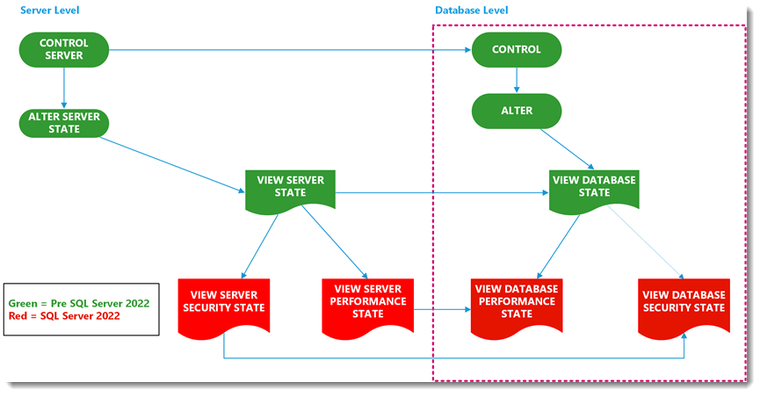
In addition to that, we introduce a new permission: VIEW ANY ERROR LOG.
It covers the following system stored procedures:
sys.xp_enumerrorlogs
sys.sp_readerrorlog
sys.xp_readerrorlog
For the DBCC Commands in the SQL world we keep them under the same VIEW SERVER PERFORMANCE STATE -permission as used for accessing DMVs. This is a small concession to simplicity since it is unlikely that users who are tasked with performance analysis and hence get access to DMVs etc. would not be allowed running these read-only DBCC-commands. This way we save 1 permission in SQL for the price of a small misalignment with the policy-based action as you will see below.
Result: 3 new permissions
New actions for policy-based access control
To express the same as the SQL permissions above permit, we created the following actions to be used by Azure Purview for the built-in action-group “SQL Performance Monitor”:
/SqlServers/SystemViewsAndFunctions/ServerPerformanceState/Rows/Select
/Sqlservers/Databases/SystemViewsAndFunctions/DatabasePerformanceState/Rows/Select
/SqlServers/ErrorLogs/Select
/Sqlservers/DBCCs/ViewServerPerformanceState/Execute
/Sqlservers/Databases/DBCCs/ViewDatabasePerformanceState/Execute
Result: 5 new actions
As you can see here, the use action-names partially align to the SQL permission names that closely match their behavior. In the case of the DBCC commands, we have introduced 2 additional actions as a concession to the action-based model and language.
More Details
Now that we understand the background and the overall idea of working with permissions and actions in parallel, let us see how these checks are implemented inside the SQL engine.
If a given SQL Server is governed by Azure Purview, the server is regularly connecting to the external Microsoft Azure Purview Service and downloads all the relevant policies to a local cache. These policies contain all the required information to match an AAD (Azure Active Directory) Account with the allowed or denied actions.
If the user is running a query that contains objects that are onboarded for external governance, the permission-check will include both the SQL permissions and the external policy-based actions.
Below is a picture of the high-level architecture of this workflow:
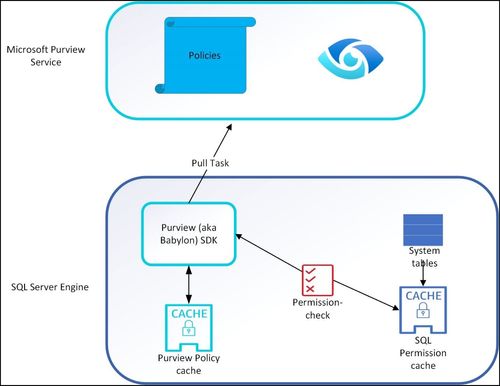
On a high-level, extending existing permission checks to check for new SQL-permissions and at the same time check for new external permissions, the respective locations in code only had to be touched once for both at the same time.
The new permission checks algorithms are based on OR-logic. For example, a user executing the query
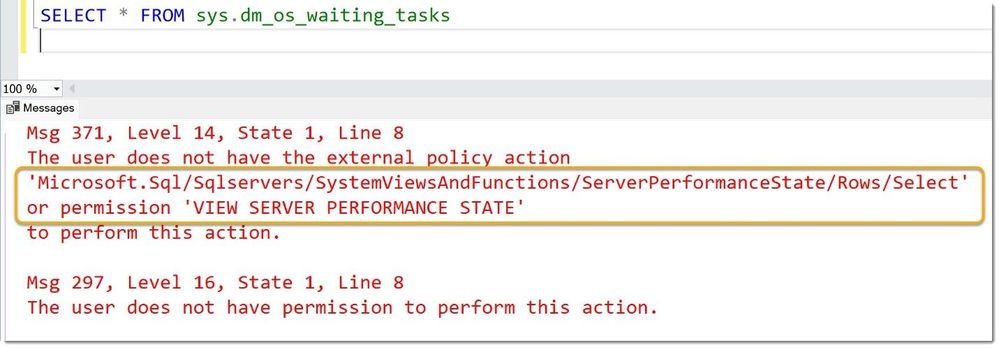
SELECT * FROM sys.dm_os_waiting_tasks
traditionally would undergo a permission check with the following logic:
Is there no DENY for:
(SQL permission) VIEW SERVER PERFORMANCE STATE
AND
is there a GRANT for:
SQL permission VIEW SERVER PERFORMANCE STATE
- There is a check for a DENY on the respective permission, and if that is not the case, the principal still requires an explicit GRANT
Now, in SQL Server 2022 and Azure SQL Database, all the commands that we onboarded to allow externally based permissions/actions, will undergo a permission-check with the following new extended logic:
is there no DENY for:
{
(SQL permission) VIEW SERVER PERFORMANCE STATE
OR
(External Policy Action) SqlServers/SystemViewsAndFunctions/ServerPerformanceState/Rows/Select
}
AND
is there a GRANT for:
{
SQL permission VIEW SERVER PERFORMANCE STATE
OR
(External Policy Action) /SqlServers/SystemViewsAndFunctions/ServerPerformanceState/Rows/Select
}
- Note: the actual source code does not look like this, this is a strong simplification 🙂
As you can see, we are simply allowing multiple sources to satisfy the condition using an OR-logic.
You can also see this in the new error messages that only start appearing after enabling a server for external governance. For example, if a user does not have either permission, the error message reveals the 2 possible alternatives:
I hope this sheds some light on how things are working and why they are working this way in the permission space.
Happy securing
Andreas


Leave a Reply
Want to join the discussion?Feel free to contribute!