
Posts
Summary of the 2022 Security Investments in Azure SQL and SQL Server 2022
The mission of the Security & Governance team in the Azure Databases organization is to ensure that
(1) the data our customers entrust in our services is safe and managed in a manner that is compliant with all regulations and privacy laws,
(2) that all SQL products are integrated with Microsoft Purview and Microsoft Defender, and
(3) that we offer a portfolio of industry leading security features that help customers meet the most stringent security requirements.
2022 was another successful year for our team and we are excited about the features and capabilities we shipped in our products. This blog post highlights some of the important deliverables our teams have made in security and data governance that are generally available (GA) in Azure SQL Database (DB), Azure SQL Managed Instance (MI) or in SQL Server 2022.

|
Authentication |
• Azure Active Directory (Azure AD) authentication for SQL Server 2022 • Managed identity in Azure AD for Azure SQL DB & Azure SQL MI • Ability to turn off SQL Authentication in favor of Azure AD only for Azure SQL DB & Azure SQL MI • Windows Authentication for Azure AD principals in Azure SQL MI |
|
SQL Roles & Permissions |
• New built-in server-level roles for SQL Server 2022 • New granular permissions for Azure SQL DB, Azure SQL MI and SQL Server 2022 |

|
Data-at-rest encryption using Transparent Data Encryption (TDE) in SQL |
• Automated Key Rotation for TDE BYOK for Azure SQL DB & Azure SQL MI • User-Assigned Managed Identity for TDE CMK for Azure SQL DB and Azure SQL MI |
|
Ledger |
• Ledger for Azure SQL DB and SQL Server 2022 |

|
Private Link |
• Azure Private Link for Azure SQL DB and Azure Synapse Analytics |
|
Firewall Rules & Network Security Groups |
• Outbound firewall rules for Azure SQL DB and Azure Synapse Analytics |

|
Data Classification |
• Availability of Microsoft Information Protection labels when using native data classification in Azure SQL DB & Azure SQL MI • Availability of Microsoft Information Protection labels when using SSMS with native data classification SSMS in SQL Server (any supported version) |
|
Integration with Microsoft Purview |
• Microsoft Purview access policies for SQL Server 2022 |

|
Auditing |
• User Managed Identity (UMI) support for Auditing for Azure SQL DB • Named replicas in Azure SQL Hyperscale can now be audited with SQL Auditing (Azure SQL DB) |
More detailed information on the security portfolio supported by SQL Server 2022 can be found here: What’s new in SQL Server 2022 – SQL Server – Security | Microsoft Learn
In addition to the features listed above, our team has also released a number of security features that are specifically available only in SQL Server on Azure Compute VMs: What’s new? – SQL Server on Azure VMs | Microsoft Learn.
Troubleshooting external data and access policies in Azure SQL and SQL Server
In this article you will find an overview of all the new metadata that was added to support customers using external data and access Policies from Microsoft Purview. You will find this interesting if you are in a technical role and have access to a SQL database, for example as a DBA or developer or need to create reports on who has access to your systems.
Background
If you are one of the early adopters of the new Microsoft Purview based data and access policies (a.k.a. external policies) you are already familiar with what it does and how it works.
For all others I recommend looking at the following articles:
Private Preview: controlling access to Azure SQL at scale with policies in Purview
Microsoft Purview DevOps policies enter GA: Simplify access provisioning while protecting your data
In this article I provide some background on the architecture of the Purview Integration and what “actions” in the context of policy based access control mean compared to SQL permissions: Revamped SQL Permission system for Principle of Least Privilege and external policies – internals
With these fundamentals established let’s take a look under the hood of SQL Server and what it can tell us about active external policies.
How to check if External Policies are enabled
The first and most basic question is: “does my SQL Server currently support external policies at all?” or, in other words, “is this functionality activated and could policies that are defined in Microsoft Purview grant access to anyone on this server?”
There are 2 ways to do that, one in T-SQL and one via Powershell.
In T-SQL we have the function SERVERPROPERTY() with a new parameter: “IsExternalGovernanceEnabled”.
This is how it’s queried:
SELECT SERVERPROPERTY(‘IsExternalGovernanceEnabled’)
If the result is “1” that means this server is currently listening for external policies. It does not mean there are actual policies in place that address this server, but if there are, they would be effective.
Result “0”, the default simply means this Server is not enabled for this feature and would not download any policies even if policies have been defined for this server.
Note on Preview-version
In the Azure SQL Database where this feature currently is in Preview, the parameter is called “IsExternalPolicybasedAuthorizationEnabled” – so you need to use SERVERPROPERTY(‘IsExternalPolicybasedAuthorizationEnabled’)
Below this article I have listed all object names that are used in the Preview version.
In PowerShell you can use the following command:
Invoke-AzRestMethod -Method GET -Path “$($server.ResourceId)/externalPolicyBasedAuthorizations/MicrosoftPurview?api-version=2021-11-01-preview”
The parameter $server requires your Azure SQL Database’s logical server name.
It will return true or false, following the same logic as above, meaning that “true” means the feature is enabled.
There is one other way to determine if your server has this feature enabled and that is using a new DMV named sys.dm_external_policy_cache.
This DMV will always contain one row if the server has the feature enabled.
If the DMV returns an empty resultset, in other words zero rows, the feature is not enabled:
SELECT *
FROM sys.dm_external_policy_cache
A server with this feature enabled would have a resultset like the following:
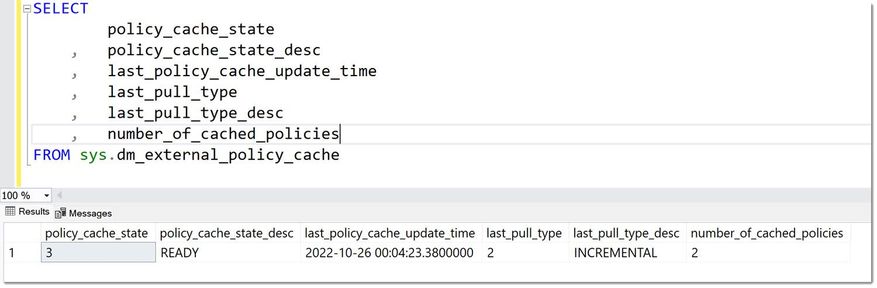
That leads us to another topic:
Are the policies on my server the most current?
Policies that are defined and published in Purview are downloaded periodically, not continuously. On average it will take about 2-3 minutes for a new policy to appear in SQL.
The DMV sys.dm_external_policy_cache that I introduced will let you know the last time in UTC that the SQL engine checked and, if necessary, downloaded all policies that are applicable to this server.
It also tells you the number of policies that have been downloaded and by that currently apply to this server.
How to ensure policies are fresh during troubleshooting
Since it can take a few minutes for freshly published policies to be downloaded to the SQL Server, to help speed up troubleshooting and testing, we provide you a system stored procedure that forces the engine to download any new policies when run: sys.sp_external_policy_refresh (BOL: sp_external_policy_refresh (Transact-SQL))
It updates the Purview cache on the whole instance, for every database.
EXEC sys.sp_external_policy_refresh @type = ‘Reload’ — aka FULL
“Reload” forces the engine to flush and “Reload” the policy cache entirely.
Note
If there are any ongoing pull requests, by the background task or by another user, the requested pull waits until the former task is finished and starts a new pull. This ensures that the result of calling this procedure explicitly always results in a fresh pull (the former may have been requested many seconds earlier and thus not contain what the user expects).
How to determine who can do what: allowed operations
Now that you are sure that you have the latest version of all policies applied at your server, you want to understand which AAD Accounts have access via policies and which activities they can perform.
Note
External policies use so-called Actions to define which operations the policy allows to perform. The difference between Actions and permissions are explained in this post: Revamped SQL Permission system for Principle of Least Privilege and external policies – internals
Policies are stored in memory using JSON format. This data is not exposed at this time.
However, to facilitate determining who has access and can do what, policies are parsed and made available in relational format through a set of DMVs.
All these new DMVs come in pairs of two: one DMV that contains policies that apply to the whole server and one that only shows policies that apply to the current database.
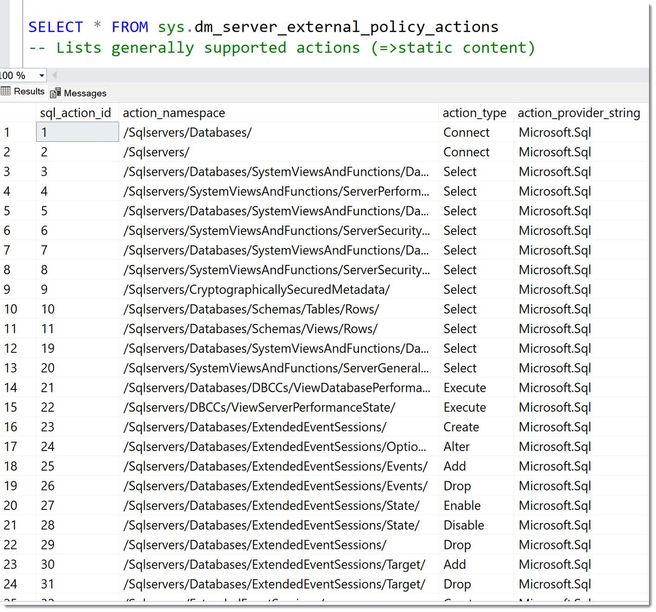
sys.dm_server_external_policy_actions and sys.dm_database_external_policy_actions
List all available Data actions, independently of them being used or not (basically static, returns what could be used)
The result will look like this:
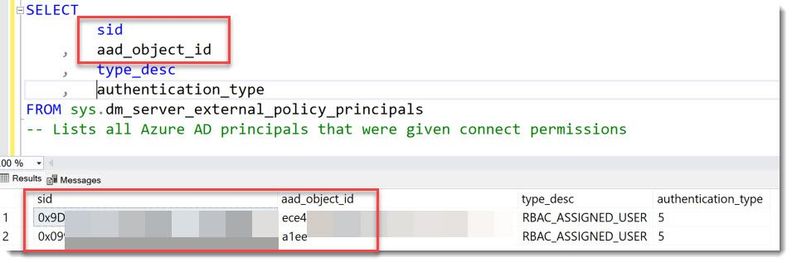
sys.dm_server_external_policy_principals and sys.dm_database_external_policy_principals
Contain a list of all principals (all types of AAD Accounts) that have at least the Connect-Action assigned to them.
Concerning the SID
Currently the external_policy_DMVs only return SIDs not the User names from AAD. And there are 2 formats in which we expose them:
- The column sid: it contains the SID in the format that SQL Server uses and can be used to join with for example sys.dm_exec_sessions and other objects that return Windows or AAD Login SIDs.
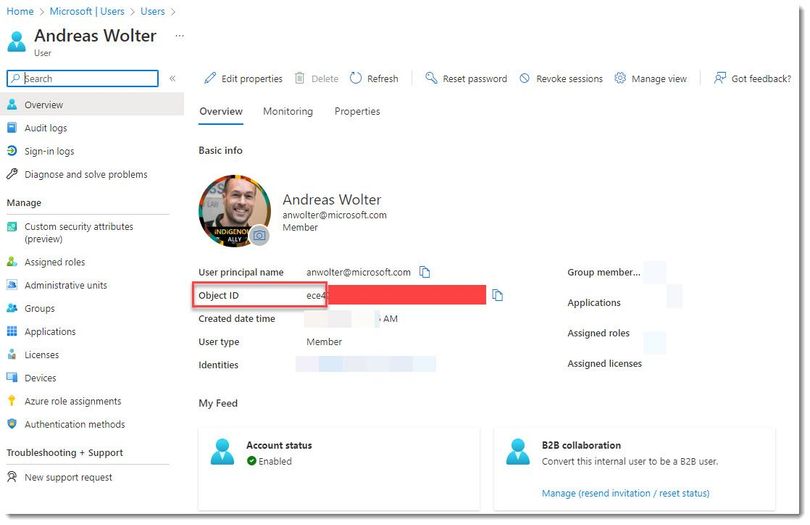
- The column aad_object_id: this column contains the SID that is used by Azure Active Directory for the Object ID. The reason is that this is the format that Microsoft Purview policies use internally.
You can see the Object ID belonging to each account in the Azure portal for example here:
sys.dm_server_external_policy_roles and sys.dm_database_external_policy_roles
All external roles (aka Action Groups in Purview) that are in use for the current scope (server or database)
sys.dm_server_external_policy_role_members and sys.dm_database_external_policy_role_members
Link external_principals with external_roles -> can be used to join those DMVs
This DMV also contains the scope at which the role is applied. Remember that your server may reside in some Resource Group in Azure where the policies are applied, instead of policies being applied on a per-server basis (that would usually be a bad design choice).
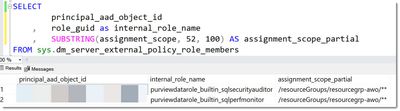
sys.dm_server_external_policy_role_actions and sys.dm_database_external_policy_role_actions
Link external_actions with external_roles -> can be used to join those DMVs
How to query all at once:
To get a useful, informative result, you will want to join those views. To spare you that work, we have created one more set of DMVs that do that for you:
sys.dm_server_external_policy_principal_assigned_actions and sys.dm_database_external_policy_principal_assigned_actions
This set of views joins all 5 views that I explained above and as a result lists the AAD accounts (currently just the SIDs) together with the external roles they are assigned to and the data actions that those roles provide.
The result can look like this:
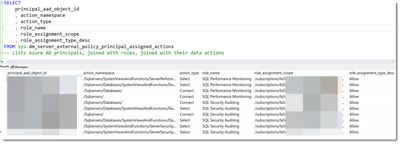
Now you can see from one query, which AAD Account (the SIDs) has which Actions granted to it and which role this is coming from and on what level of the Resource hierarchy this role is applied to.
How to detect Users connecting via policy-based permissions
Often, as a DBA or Auditor, you will want to understand how a certain User that you see in the system was able to connect and what its permissions are.
In this case you are most likely looking at either sys.dm_exec_sessions (sys.dm_exec_sessions (Transact-SQL) ), often joined with sys.dm_exec_requests ( sys.dm_exec_requests (Transact-SQL) ), both being DMVs that exist since a long time before external policies came into play.
Since policy-backed accounts are not persisted in SQL Server Catalog views like sys.server_principals or sys.database_principals, you would now start using sys.dm_database_external_policy_principals and sys.dm_server_external_policy_principals to make sure to find these accounts. And starting from there you can find out which Actions they have been assigned – using the DMVs that I explained above.
To join sys.dm_exec_sessions with the new external_policy-DMVs you can use the column security_id (aka SID).
In the following screenshot you can see all currently logged in AAD Accounts that have a Policy assigned to them as indicated by the “RBAC_ASSIGNED_USER” in the type-field.
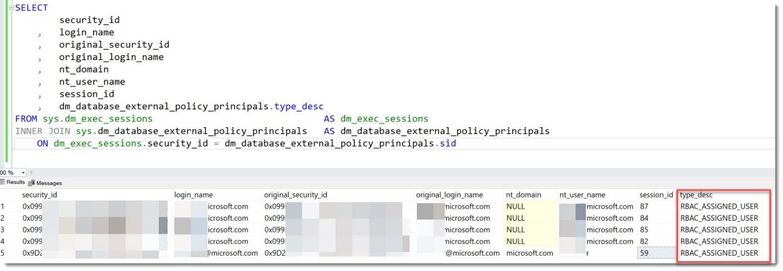
Of course you will still also enumerate all accounts that may exist as traditional “External Login from Azure Active Directory” using sys.server_principals.
It is quite possible that an AAD Account has a Login in SQL in addition to a Policy assigned to it. So don’t be surprised to find entries in both the new external_policy– and the old server_principals system views.
Here is how that could look:
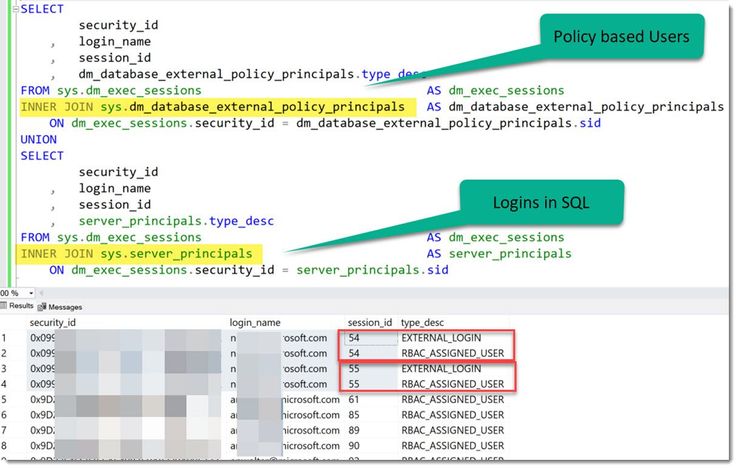
As you can see marked in red boxes, the sessions 54 and 55 are listed twice, since I am joining with both DMVs and find an entry for both a Login based on AAD (EXTERNAL_LOGIN) and the same account also is assigned to a Policy, hence “RBAC_ASSIGNED_USER” as the metadata calls it.
This is logical and important, since the traditional Login (and potential Database-Users) can have additional permissions granted directly in SQL.
How to check for possible performance-impact on the system or queries
Lastly, once we understand that hopefully all access makes sense, there are cases where you will want to understand which possible impact the policy cache, the updates and calls to it may have.
There are 3 areas to look at.
DMVs
Besides sys.dm_external_policy_cache which I explained above, you can monitor the Memory Clerk that the Purview SDK uses through the existing sys.dm_os_memory_clerks.
That will show you the amount of memory used by the SDK. You can find the Memory clerk with this query:
SELECT pages_kb/1024.0 AS [SizeMB], *
FROM sys.dm_os_memory_clerks
WHERE type = ‘MEMORYCLERK_EXTERNAL_GOVERNANCE_AUTHORIZATION_ENGINE’
Note on Preview-version
In the Preview-version and currently in Azure SQL Database, this Clerk-type is named “MemoryClerk RBAC” for historical reasons. Below this article I have listed all object names that are used in the Preview version.
Wait-Types
Analyzing Wait-Stats is an essential part of system-investigation. Waits are a normal part of any system but depending on the operation that the system is waiting for, abnormal high waits can point to underlying issues.
Server-wide waits are queried via sys.dm_os_wait_stats and in Azure SQL Database using sys.dm_db_wait_stats or on a session-level via sys.dm_exec_session_wait_stats. If you are not familiar with this concept, start here: sys.dm_os_wait_stats (Transact-SQL) | Microsoft Learn
The following Wait-types have been introduced in the preview version of Purview integration:
|
Wait Type |
Description |
|
WAIT_EXTERNAL_GOVERNANCE_PERMCACHE_RESOURCELOCK |
Occurs during a read/write lock on the permission cache, used for the response from the Purview SDK on a permission-lookup. |
|
WAIT_EXTERNAL_GOVERNANCE_PERMCACHE_DECISIONLOCK |
Occurs during a read/write lock on the permission cache, used for the response from the Purview SDK during evaluation of an AAD principal for a data action. |
|
WAIT_EXTERNAL_GOVERNANCE_POLICY_AAD_GROUP_INFO |
Occurs during waiting on internal lock on a map for caching AAD Group IDs for AAD Users. |
|
PURVIEW_POLICY_SDK_PREEMPTIVE_SCHEDULING |
Occurs during calls to Purview SDK. Scheduling is switched to preemptive mode. It will occur after PWAIT_PREEMPTIVE_OS_AUTHENTICATEDWEBCALL. |
|
WAIT_EXTERNAL_GOVERNANCE_POLICY_PROVIDER |
Occurs during a read/write lock on the policy provider cache while accessing the stored policies in memory. |
|
EXTERNAL_GOVERNANCE_POLICY_UPDATE |
Occurs during updates of the policy cache on a pull task run. |
|
WAIT_EXTERNAL_GOVERNANCE_POLICY_SESSION_AUDIT |
Lock to synchronize access to an active session’s audit information containing audited external permission evaluation and their outcome together with applicable policy id and version. |
|
WAIT_EXTERNAL_GOVERNANCE_POLICY_SESSIONS_AUDIT |
Lock to synchronize allocation of, or access to Purview permissions audit information object for a session. |
|
EXTERNAL_GOVERNANCE_PULL_TASK |
Occurs if there is a background pull task running and a user manually initiates a pull at the same time. This wait type shows up until the background task is done, before the user initiated one can be started. |
Therefore, a query to retrieve just those could look like:
SELECT * FROM sys.dm_os_wait_stats
WHERE wait_type IN
( ‘WAIT_EXTERNAL_GOVERNANCE_PERMCACHE_RESOURCELOCK’
, ‘EXTERNAL_GOVERNANCE_PULL_TASK’
, ‘EXTERNAL_GOVERNANCE_ATTR_SYNC_BACKGROUND’
, ‘PURVIEW_POLICY_SDK_PREEMPTIVE_SCHEDULING’
, ‘WAIT_EXTERNAL_GOVERNANCE_POLICY_AAD_GROUP_INFO’
, ‘WAIT_EXTERNAL_GOVERNANCE_PERMCACHE_RESOURCELOCK’
, ‘WAIT_EXTERNAL_GOVERNANCE_PERMCACHE_DECISIONLOCK’
, ‘WAIT_EXTERNAL_GOVERNANCE_POLICY_PROVIDER’
, ‘WAIT_EXTERNAL_GOVERNANCE_POLICY_SESSION_AUDIT’
, ‘WAIT_EXTERNAL_GOVERNANCE_POLICY_SESSIONS_AUDIT’
);
From those, the one that will most likely be on top always, is PURVIEW_POLICY_SDK_PREEMPTIVE_SCHEDULING. Since this happens in a background-process (unless you force the cache update manually), this should normally not be an issue. On my server I have a max wait time of 15 ms over multiple weeks.
Extended Events
All the information from DMVs is looking at data at a certain point in time.
So for example you can get the timestamp of the last time that the cache was updated, and the wait-time accumulated until when your query is running.
But sometimes you will want to run a so-called trace, to log specific events over a certain timespan. That’s where Extended Events aka XEvents come into play. To assist you in tracing policy related information, we created the following new events that can be captured:
|
XEvent and Description |
Event Fields |
|
external_governance_policy_pulltask_started * XEvent for policy pull start |
policy_pull_type – FULL = Reload, DELTA = Update service_endpoint_uri |
|
external_governance_policy_pulltask_retries * XEvent for policy pull diagnostics |
Message – Internal status message retry_number |
|
external_governance_policy_pulltask_finished * XEvent for policy pull finish |
modified_policy_elements_information – these fields are only useful for internal Microsoft engineers |
|
external_governance_call_to_authorization_engine * a call to external governance SDK is made |
database_id – self-explanatory data_action – internally used ID for Data action – i.e. 0 = Connect on Database, 1 = Connect on Server external_governance_decision – 0 = Permit, 1 = Deny |
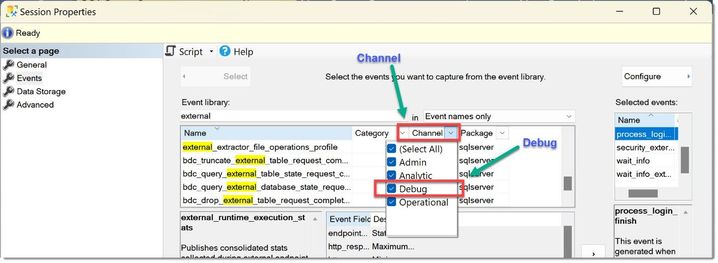
All these events from external governance tasks are under the Debug-channel. Therefore, if you are searching for these events in the UI, you need to activate that channel to see them – as shown in the below screenshot:
In addition to new events we also include a new field in the process_login_finished–event to help you understand whether a connection was allowed or denied due to policy-based permissions.
|
Existing event |
New Event Field |
|
process_login_finish |
external_governance_policy_authorization – this returns one of 3 values, depending on if the session that logged in was authenticated via an external policy Connect-Action: 0 = NotApplicable, 1 = Permit or 2 = Deny |
To help you get started I am also attaching a file that contains an XEvent session including all of these events to this article.
Here is an example result of tracing a single policy-update call with XEvents:
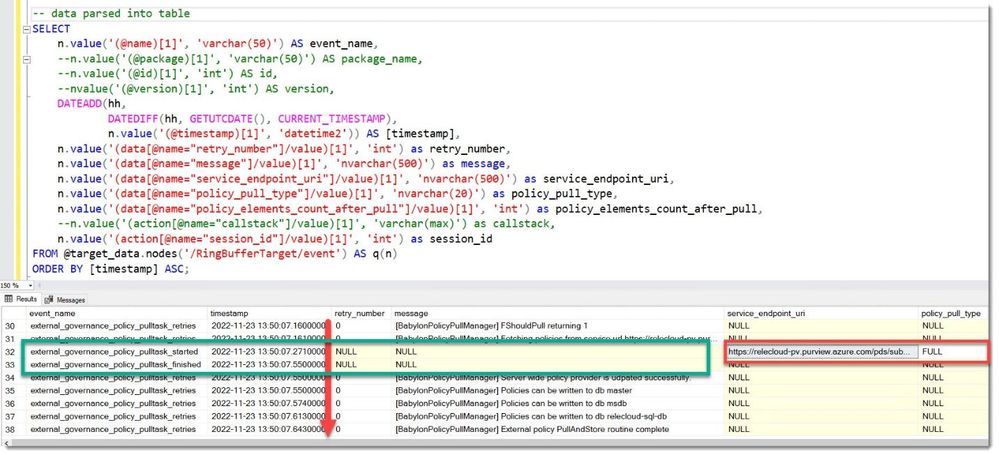
Marked in red you can see the Pull type = “Full” which corresponds to “Reload” and the Endpoint URI of the Purview Service used by my server.
The green box marks the events that encompass the actual “pulling” of policies from the Purview service. The events are external_governance_policy_pulltask_started and external_governance_policy_pulltask_finished. The events before are part of the initialization process and those after cover the updates to the database-specific caches.
Note
In the example I am using the RingBuffer-Target for XEvents which stores the traced events in memory. That is sufficient for a low-impact ad-hoc analysis. For longer running traces you should work with the file-target.
XEvents are stored in XML format, so to present it in tabular format I am using the nodes-Method for the XML data type.
Further reading
XEvents overview – SQL Server, Azure SQL Database, and Azure SQL Managed Instance | Microsoft Learn
nodes() Method (xml Data Type) | Microsoft Learn)
Hopefully this is useful.
As this is a new functionality, the security team is very interested in feedback concerning usability and visibility and what we can do to make your life as DBA, Auditor or Developer easier. You can reach out to me using my Firstname dot LastName At Microsoft.com
Happy securing
Andreas
Thank you to the following people for help with this article:
Vlad Rodriguez (Senior Program Manager Purview), Joshua Glassmyer (Program Manager Azure SQL Security), Jakub Szymaszek (Principal Program Manager Azure SQL Security), Srdan Bozovic (Senior Program Manager Azure SQL Security), Sailesh Duvvuri (Senior Software Engineer Purview)
Appendix: Preview release names
Memory Clerk in Azure SQL Database Preview release:
SELECT pages_kb/1024.0 AS [SizeMB], *
FROM sys.dm_os_memory_clerks
WHERE type = ‘MEMORYCLERK_RBAC’
Wait-Type names in Azure SQL Database Preview release:
|
Wait Type |
Description |
|
WAIT_EXTGOV_PERMCACHE_RESOURCELOCK |
Occurs during a read/write lock on the permission cache, used for the response from the Purview SDK on a permission-lookup. |
|
WAIT_EXTGOV_PERMCACHE_DECISIONLOCK |
Occurs during a read/write lock on the permission cache, used for the response from the Purview SDK during evaluation of an AAD principal for a data action. |
|
RBAC_AAD_GROUP_INFO |
Occurs during waiting on internal lock on a map for caching AAD Group IDs for AAD Users. |
|
PURVIEW_POLICY_SDK_PREEMPTIVE_SCHEDULING |
Occurs during calls to Purview SDK. Scheduling is switched to preemptive mode. It will occur after PWAIT_PREEMPTIVE_OS_AUTHENTICATEDWEBCALL. |
|
WAIT_RBAC_PROVIDER |
Occurs during a read/write lock on the policy provider cache while accessing the stored policies in memory. |
|
BABYLON_POLICY_UPDATE |
Occurs during updates of the policy cache on a pull task run. |
|
WAIT_RBAC_SESSION_AUDIT |
Lock to synchronize access to an active session’s audit information containing audited external permission evaluation and their outcome together with applicable policy id and version. |
|
WAIT_RBAC_SESSIONS_AUDIT |
Lock to synchronize allocation of, or access to Purview permissions audit information object for a session. |
|
BABYLON_PULL_TASK |
Occurs if there is a background pull task running and a user manually initiates a pull at the same time. This wait type shows up until the background task is done, before the user initiated one can be started. |
Matching SQL query:
SELECT * FROM sys.dm_os_wait_stats
WHERE wait_type IN
( ‘WAIT_EXTGOV_PERMCACHE_RESOURCELOCK’
, ‘WAIT_EXTGOV_PERMCACHE_DECISIONLOCK’
, ‘RBAC_AAD_GROUP_INFO’
, ‘PURVIEW_POLICY_SDK_PREEMPTIVE_SCHEDULING’
, ‘WAIT_RBAC_SESSION_AUDIT’
, ‘WAIT_RBAC_SESSIONS_AUDIT’
, ‘WAIT_RBAC_PROVIDER’
, ‘BABYLON_POLICY_UPDATE’
);
XEvent names in Azure SQL Database Preview release:
|
Xevent and Description |
|
external_policy_pulltask_started XEvent for policy pull start |
|
external_policy_pulltask_retries XEvent for policy pull diagnostics |
|
external_policy_pulltask_finished XEvent for policy pull finish |
|
security_external_governance_call a call to external governance SDK is made |
The ##MS_…## Server Roles in SQL Server 2022 and Azure SQL: What Each Role Can Do
New server roles for Azure SQL Database and SQL Server 2022 in Public Preview: Database Management without admin-access
We are now releasing a new set of server roles which support server- and database management without using admin-accounts and in addition make administration at scale even easier to Public Preview.
The 4 additional roles are:
- ##MS_DatabaseConnector##
- ##MS_SecurityDefinitionReader##
- ##MS_DatabaseManager##
- ##MS_LoginManager##
– September 2021 we announced the first set of new server roles for Azure SQL Database: Server roles for Azure SQL Database: Database Management without admin-access
the previously released roles are:
- ##MS_DefinitionReader##
- ##MS_ServerStateReader##
- ##MS_ServerStateManager##
Benefit
The new server-roles that can be assigned to server logins to enable customers to assign and delegate job functions for server-wide metadata access and access to certain management commands without requiring Server Admin or AAD Admin privileges. This helps comply with the Principle of Least Privilege and implement role separation (sometimes also interchangeably referred to as Separation of Duties).
Technical background
Each of these new server-roles includes a specific set of permissions. In SQL Database those permissions cannot be assigned individually on the server scope but using those roles one can grant them to a Login. This is a new method to grant server permissions across a logical server and all databases hosted on that logical server in Azure SQL Database, aside from assigning Server/AAD Admin, which in many cases is considered too powerful.
In the following let’s have a look at each role individually:
##MS_SecurityDefinitionReader##
The ##MS_SecurityDefinitionReader##-role predominantly will be useful for read-only server-auditing where an auditor will need to see the contents of system-related static system metadata such as Login and User names, permissions of principals and role membership.
It has VIEW ANY SECURITY DEFINITION permission on the server, which covers and hence includes the VIEW SECURITY DEFINITION permission on any database that a principal in that role has access to.
##MS_DatabaseConnector##
This role is likely the most important new role as it allows members to connect to any database without requiring a User-account in the respective databases to connect to. In combination with the other new server roles, this essentially leads to the server level role-based permissions to inherit to the respective database scoped permissions.
This is because it holds the permission – holds CONNECT ANY DATABASE on server-scope, which then inherits the CONNECT permission on each database.
i.e., a member of ##MS_DatabaseConnector## + ##MS_ServerStateReader## will have the permission VIEW SERVER STATE + VIEW DATABASE STATE on all databases, without requiring Users to be created. This greatly simplifies permission assignment via roles at scale.
Tipp: To exclude specific databases on a given server from this “grant access to all”-concept, you can proceed as follows: create matching User-accounts for the given login in those databases and then DENY the CONNECT permission to the database-user. This DENY permission will overrule the GRANT CONNECT permission coming from this role.
The ability to grant the Connect-permission to all databases (without further permissions) makes this role the ideal counterpart for ##MS_ServerStateReader##, ##MS_DefinitionReader## and ##MS_SecurityDefinitionReader## server roles.
The following diagram shows how a Login “Juanita” is member of both the ##MS_DatabaseConnector## (green in diagram) and the ##MS_ServerStateReader## (blue) roles and in result can connect to any database and read any Server and database level DMV (Dynamic Management View).

The diagram shows that in addition to the Server level permissions (CONNECT ANY DATABASE and VIEW SERVER STATE), Juanita is also granted the respective inherited database-permissions (CONNECT and VIEW DATABASE STATE).
##MS_DatabaseManager##
Members of the ##MS_DatabaseManager## fixed server role can create and delete databases. A member of the ##MS_DatabaseManager## role that creates a database, becomes the owner of that database, which allows that user to connect to that database as the dbo user. The dbo user has all database permissions in the database. Members of the ##MS_DatabaseManager## role don’t necessarily have permission to access databases that they don’t own.
For Azure SQL Database, it is recommended to use this server role instead of the special dbmanager database level role that exists in master (Azure SQL DB only) and was previously used to reach the same goals but required a User account in master-database.
##MS_LoginManager##
Members of the ##MS_LoginManager## fixed server role can create and delete logins.
Just as with the ##MS_DatabaseManager##-role, for Azure SQL Database, it is recommended to use this server role over the special loginmanager database level role that exists in master and was previously used to reach the same goals but required a User account in master-database.
Summary
The new server roles in conjunction with the previous set enable customers to grant specific lower privileges to personnel that should not have full admin-permissions and by using the ##MS_DatabaseConnector##-role can do so in a scalable manner: for a whole logical server in Azure SQL Database.
When it comes to SQL Server 2022 (now in Public Preview), these roles could be imitated by creating custom server roles which are available in SQL Server, but including them as built-in roles the same way as for Azure SQL DB will hopefully enable simpler management from cloud to on-prem and for migration back & forth. Also we are aware that some customers often prefer to use built-in roles over custom roles per principle.
Limitations
- Role assignments may take up to 5 minutes to become effective. In addition, for existing sessions, changes to server role assignments do not take effect until the connection is closed and re-opened. This is due to distributed architecture between the master database and other databases on the same logical server.
Partial workaround: to reduce the up to 5-minute waiting period and ensure that server role assignments are current in a database, a Server Admin/AAD Admin can run DBCC FLUSHAUTHCACHE in the user database(s) on which the login has access. Currently logged on users still need to reconnect after this for the membership-changes to take effect on them. - These roles can be assigned to SQL Logins and AAD Logins. However, currently Group-based AAD Logins are not yet supported. This is functionality will be delivered later.
Further references:
- Link to documentation for the new server-roles in Azure SQL DB: Server roles – Azure SQL Database | Microsoft Docs
- Server-level roles – SQL Server | Microsoft Docs
- DBCC FLUSHAUTHCACHE (Transact-SQL) – SQL Server | Microsoft Docs
- What is a server in Azure SQL Database and Azure Synapse Analytics? | Microsoft Docs
- Azure SQL databases in logical servers, elastic pools, and managed instances – Microsoft Tech Community
- GRANT Database Permissions (Transact-SQL) – SQL Server | Microsoft Docs
- The Principle of Least Privilege (POLP) – Microsoft Tech Community
- First announced set of server roles: Server roles for Azure SQL Database: Database Management without admin-access – Microsoft Tech Community
Update 2026: Emad Al-Mousa found ways for members of ##MS_DatabaseManager## to escalate to sysadmin (CVE-2025-24999). The first one is fixed in the security updates for SQL Server 2022 CU23 and SQL Server 2025 CU2. I explain the attack paths and what they mean for the role’s ownership-based model in SQL Server Privilege Escalation via DatabaseManager-role and Part 2: The Ownership-Based Security Model.
Private Preview: controlling access to Azure SQL at scale with policies in Purview
Announcement: Purview policy based access control for Azure SQL at scale – Private Preview
I am excited to present a new way to control access to resources by assigning policies in Azure Purview to Azure SQL Database.
Benefit
Controlling access to database servers and databases – especially when in a modern cloud-based enterprise there can be hundreds and thousands of databases laid out in a subscription – comes with multiple challenges, such as:
- Having to deploy the permission-assignments individually
- Standardizing permission assignments
- Keeping track of current permissions and identifying potential violations
- While doing that, also adhere to the Principle of Least Privilege
Using policies in Azure Purview, customers can create policies that allow Azure Active Directory Groups and AAD Users to access Azure SQL Database within a subscription.
These policies can be assigned at any level of the resource hierarchy (individual database, server, resource group or even whole subscription), and by that apply effectively to all SQL Servers and databases within the given resource scope.
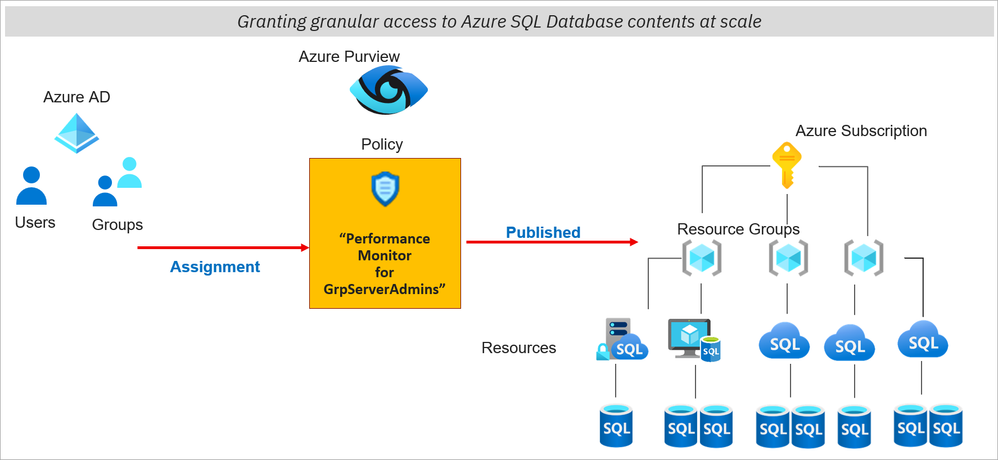
Everything is deployed by Rest-API calls, which removes the need to run T-SQL in subsequent PowerShell scripts.
At the same time, access to the databases, since it is controlled from outside of the SQL engine, does not get mirrored from a primary database to its read-only replicas: what matters is where the database resides within the subscription hierarchy. This enables scenarios where Users need access to only either the read-only replica or the primary database but must not connect to the other copy of the database.
Covered functionalities
This first private preview covers the following use-cases:
SQL Performance Monitoring
A predefined set of permissions (called Action-Groups) that grant access to system metadata, that is commonly used for Performance Monitoring tasks, via a set of system views that are covered under these new permissions
SQL Security Auditing
A predefined set of permissions that grant access to system metadata, that is commonly used for Security Auditing tasks, via a set of system views that are covered under these new permissions
Technical background
For Purview Policies to have effect on a given database in Azure SQL Database, 3 things need to come together:
- The logical server must allow external policies to have effect – this requires owner-level permissions
At this stage, all databases under that logical server will in addition to the existing SQL permissions also understand new permissions that are coming from Purview Policies.
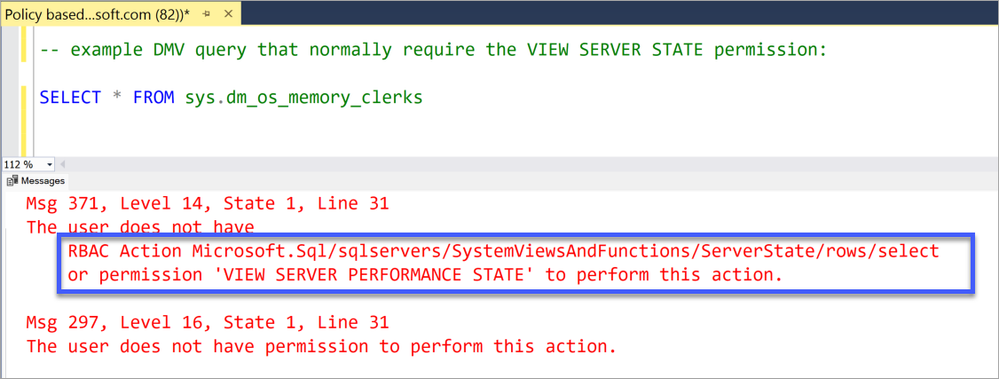
You can see this in this screenshot, where the queried DMV requires either the traditional SQL permission VIEW SERVER PERFORMANCE STATE or the new RBAC Action Microsoft.Sql/sqlservers/SystemViewsAndFunctions/ServerState/rows/select
- The logical server must be registered in an Azure Purview Account
Together with step 1 this enables a 4-eye principle as it is required for SoD-compliant environments.
- A policy, using one of the 2 built-in Action-Groups must be created and published in Azure Purview Studio
Call to Action
At this point we are opening a private preview for a small audience only. If you would like to take part and have an early hands-on experience with this new capability, please use the following link to let us know, and we will get back to you when there is a slot available in the limited private preview.
Further references
Security: The Principle of Least Privilege (POLP) – Microsoft Tech Community
Introduction to Azure Purview – Azure Purview | Microsoft Docs
Quickstart: Create a Purview account in the Azure portal – Azure Purview | Microsoft Docs
Azure Active Directory documentation | Microsoft Docs
Acknowledgement
This new capability is possible thanks to the collaboration between the SQL Security Engineering team and the Purview Data governance team. Many people have been involved across continents and time zones. Thank you all for your hard work!
Server roles for Azure SQL Database: Database Management without admin-access
Server roles for Azure SQL Database: Database Management without admin-access
Until now, in Azure SQL Database, to gain access to server-wide information like system-wide wait-stats, resource stats etc., the Server Admin or AAD Admin was the only account with sufficient permissions since server-level permissions are not grantable in SQL Database.
Today I am happy to announce that we are bringing built-in roles that in effect hold permissions applicable to all databases including databases residing in elastic pools a on a logical server for Azure SQL Database. This extends to the logical master-database which contains certain system-wide information. We are starting with 3 new roles:
- ##MS_DefinitionReader##
- ##MS_ServerStateReader##
- ##MS_ServerStateManager##
Benefit
The new server-roles that can be assigned to server logins to enable customers to assign and delegate job functions for server-wide metadata access and access to certain management commands without requiring Server Admin or AAD Admin privileges. This helps comply with the Principle of Least Privilege and implement role separation.
Technical background
Server-roles are not a new concept in the SQL Server universe, but for Azure SQL Database, our PaaS service offering, the server as such is just a logical concept. More on this here: What is a server in Azure SQL Database and Azure Synapse Analytics? | Microsoft Docs and Azure SQL databases in logical servers, elastic pools, and managed instances – Microsoft Tech Community.
Because of this architectural difference, the same mechanics as for Managed Instance or SQL Server in a VM do not apply: Databases residing on the same logical server may not reside on the same physical server. This poses some challenges, but I am happy that we can bring an almost identical experience that works for the other Service offerings as well: Server level roles with permissions that have effects on any database on the logical server.
Each of these new server-roles includes a specific set of permissions. In SQL Database those permissions cannot be assigned individually on the server scope but using those roles one can grant them to a SQL Login. This is a new method to grant server permissions across a logical server and all databases hosted on that logical server in Azure SQL Database, aside from assigning Server/AAD Admin.
In the following let’s have a look at each role individually:
##MS_DefinitionReader##
The ##MS_DefinitionReader##-role predominantly will be useful for read-only server-auditing where an auditor will need to see the contents of static system metadata such as Login/principal names, Firewall settings, permissions of principals and of course object definition (code). It will often be combined with membership in the ##MS_ServerStateReader##-role.
It has VIEW ANY DEFINITION permission on the server, which covers and hence includes the VIEW DEFINITION permission on any database that a principal in that role has access to.
Here the results of sys.fn_my_permissions(NULL, ‘SERVER’) – called from the master-database and sys.fn_my_permissions(NULL, ‘DATABASE’) – called from a user-database:

Members of the ##MS_DefinitionReader## fixed server role can read all catalog views that are covered by VIEW ANY DEFINITION, respectively VIEW DEFINITION on any database on which the member of this role has a user account.
##MS_ServerStateReader##
The ##MS_ServerStateReader##-role is ideal for read-only performance Monitoring and troubleshooting access. It will often be combined with membership in the ##MS_DefinitionReader##-role to see the actual names and definition (code) of objects involved.
It has VIEW SERVER STATE-permission on the Server which covers and hence includes the VIEW DATABASE STATE on any database that a principal in that role has access to.
Here the results of sys.fn_my_permissions(NULL, ‘SERVER’) – called from the master-database and sys.fn_my_permissions(NULL, ‘DATABASE’) – called from a user-database:

Members of the ##MS_ServerStateReader## fixed server role can read all dynamic management views (DMVs) and functions that are covered by VIEW SERVER STATE, respectively VIEW DATABASE STATE on any database on which the member of this role has a user account.
This role allows querying several DMVs that exist solely in the master database such as sys.resource_stats that specifically contain information concerning the whole server, or sys.elastic_pool_resource_stats for all elastic pools on a logical server.
To make this role more useful and generally help customers comply with the Principle of Least Privilege and implement proper role-separation, we changed the permission requirements for several DBCC commands. Those formerly requiring elevated privileges are now covered by VIEW SERVER STATE – the permission which this role holds:
- DBCC INPUTBUFFER()
- DBCC SQLPERF (LOGSPACE)
- DBCC SQLPERF (NETSTATS)
##MS_ServerStateManager##
The ##MS_ServerStateManager##-role is useful for delegating management tasks without requiring to assign full admin permissions.
It has ALTER SERVER STATE on the server. ALTER SERVER STATE also covers the VIEW SERVER STATE permission on the server and by that the VIEW DATABASE STATE on any database that a principal in that role has access to.
Here the results of sys.fn_my_permissions(NULL, ‘SERVER’) – called from the master-database and sys.fn_my_permissions(NULL, ‘DATABASE’) – called from a user-database:

Members of the ##MS_ServerStateManager## fixed server role have the same permissions as the ##MS_ServerStateReader## role. In addition, it holds the ALTER SERVER STATE permission, which allows access to several management operations, such as: DBCC FREEPROCCACHE, DBCC FREESYSTEMCACHE (‘ALL’), DBCC SQLPERF():
- DBCC FREEPROCCACHE;
- DBCC FREESYSTEMCACHE (‘ALL’);
- DBCC SQLPERF(); with the option to clear the wait- and latch-stats (this is only available on the master-database and has no effect on the wait-stats of the user databases which reside on different physical instances.)
- DBCC SQLPERF(“sys.dm_os_wait_stats”, CLEAR);
- DBCC SQLPERF(“sys.dm_os_latch_stats”, CLEAR);
Limitations
- Role assignments may take up to 5 minutes to become effective. In addition, for existing sessions, changes to server role assignments do not take effect until the connection is closed and re-opened. This is due to distributed architecture between the master database and other databases on the same logical server.
Partial workaround: to reduce the up to 5-minute waiting period and ensure that server role assignments are current in a database, a Server Admin/AAD Admin can run DBCC FLUSHAUTHCACHE in the user database(s) on which the login has access. Currently logged on users still have to reconnect after this for the membership-changes to take effect on them.
Further references:
- Link to documentation for the new server-roles in Azure SQL DB: Server roles – Azure SQL Database | Microsoft Docs
- DBCC FLUSHAUTHCACHE (Transact-SQL) – SQL Server | Microsoft Docs
- What is a server in Azure SQL Database and Azure Synapse Analytics? | Microsoft Docs
- Azure SQL databases in logical servers, elastic pools, and managed instances – Microsoft Tech Community
- GRANT Database Permissions (Transact-SQL) – SQL Server | Microsoft Docs
- The Principle of Least Privilege (POLP) – Microsoft Tech Community
Acknowledgement
Big kudos to all the team-members involved in this seemingly small addition that is much more complex than apparent: Maciej Szeszko, Steven Gott, Nikolas Ogg from engineering and Dimitri Furman for being a great helper and advisor
Full day PreCon Practical Performance Analysis in Melbourne at Asia & Australia Tour 2018
As it has almost become a habit by now for me, I will be touring Asia this summer. This year not only Asia, but for the first time also Australia. (There, however, is winter, which sometimes leads to funny confusion in agreements until you get used to this.) 1st stop: Singapore – Azure SQL Database […]
Tracing with XEvents in Azure SQL Database
Being Developer, Administrator or simply Support for an Azure SQL Database based Application, there are those moments when the Azure-provided Dashboard-capabilities are not sufficient and you need to conduct a throughout trace of certain statements occurring.
SQL Server in Microsoft Azure: How to gain performance by flexibility and save costs at the same time
This is the first time that I am tackling Microsoft Azure in an article. (Microsoft.com: What is Microsoft Azure?) A plethora of services is provided by Microsoft Azure by now, of which the hosting of virtual machines running on an SQL Server service is one. This is what we call IaaS (Infrastructure as a Service).