Andreas Wolter
  • Consulting & Services
    • SQL Server Security Assessment by Andreas Wolter
    • SQL Server Health Check
    • Performance Analysis
    • SQL Server Discovery
    • Air-Gapped SQL Server
  • My Customers
  • About
    • Conferences
    • Certifications
    • Training
  • Blog
  • Contact
  • Click to open the search input field Click to open the search input field Search
  • Menu Menu

Tag Archive for: Reporting Services

Posts

Reporting Services 2016 – Back in the game: the new capabilities & features

3. April 2016/0 Comments/in Business Intelligence

It has been years since my last publications and presentations on Reporting Services. This is no surprise, because since the 2008 R2-release nothing has happened there. With SQL Server 2016, the Reporting Services finally get attention again, as I had preannounced in passing already last May („SQL Server 2016 – the Security & Performance Release“). […]

Read more
https://andreas-wolter.com/wp-content/uploads/2016/04/Reporting_Services_2016_sunburst_previewpic.png 271 403 Andreas Wolter https://andreas-wolter.com/wp-content/uploads/2026/10/Andreas-Wolter-Data_Security_Architect-dark.png Andreas Wolter2016-04-03 13:53:082017-11-28 13:59:59Reporting Services 2016 – Back in the game: the new capabilities & features

Report Builder 3.0 vs. BIDS / Data Tools Report Projects

16. September 2013/1 Comment/in Business Intelligence

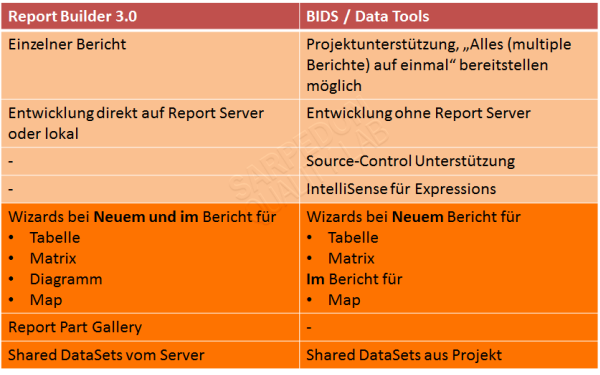
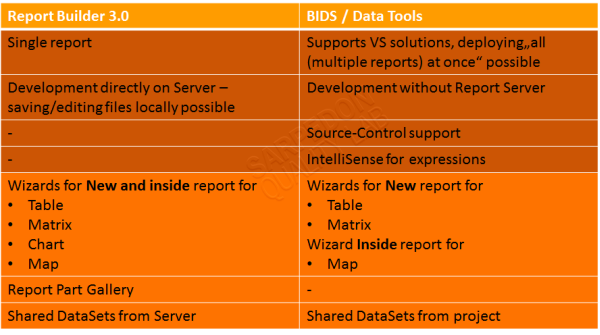
This article just serves as a reference to the question that arises occasionally, when showing how fast one can develop a single report using Report Builder alone: Why should I prefer Business Intelligence Development Studio (BIDS), respectively SQL Server Data Tools over the Report Builder?

Both tools have pro’s and con’s to consider. Above all, the decision depends much on the audience/type of user being served.

I first presented this topic in my session “Report Builder – What’s in it for You“ at PASS Summit in Seattle/USA 2010 (In fact this session was voted into the Top 5 sessions in category “BI Information Delivery” 🙂 ) Since I have been talking about this topic recently, I remembered this slide and decided I should just put it online as a reference for all.

Here you have the (complete) feature comparison, focussing on only the differences – aside from visual and workflow-differences (valid for SQL Server 2008 R2 – SQL 2012):

– English version on bottom –

happy report developing

Andreas

https://andreas-wolter.com/wp-content/uploads/2026/10/Andreas-Wolter-Data_Security_Architect-dark.png 0 0 Andreas Wolter https://andreas-wolter.com/wp-content/uploads/2026/10/Andreas-Wolter-Data_Security_Architect-dark.png Andreas Wolter2013-09-16 12:00:002026-10-28 22:49:20Report Builder 3.0 vs. BIDS / Data Tools Report Projects

Sessions at the SQLCon 2011

15. May 2011/in Conferences & Speaking, Business Intelligence

This year, too, I am going to be present with two sessions until now at the SQL Con 2011 (26-29 September) in Mainz. Update (09/2011): I cancelled the presentation on “Reporting Services in SQL Server Denali” in favor of a topic I feel even more strongly about. (Besides, the Reporting Services themselves will hardly go […]

Read more
https://andreas-wolter.com/wp-content/uploads/2014/11/1109_BASTA_SQLCon.gif 128 128 Andreas Wolter https://andreas-wolter.com/wp-content/uploads/2026/10/Andreas-Wolter-Data_Security_Architect-dark.png Andreas Wolter2011-05-15 10:26:392017-11-15 11:14:10Sessions at the SQLCon 2011

Standardizing and Centralizing Report Design (or: creating style sheets for reports) Part 3: The Style-Template

21. March 2011/0 Comments/in Business Intelligence

In the first part we learned how to integrate a Layout-Template into BIDS. The second technique in this series we are looking at will be using the “Style-Template”.

What is a Style-Template?:

Style-Templates are a set of definitions such as font size, font type, font color, background color, border styles, etc., which is being used from within the “Add New Report” wizard inside Business Intelligence Development Studio.

Report Layout-Templates are shown in the Project-Dialogue “Add“ – “New Item“ .

image

This is where you usually chose among those beautiful styles, that Microsoft provides you with (Slate, Forest, Corporate, Ocean, Bold, Generic) Open-mouthed smile.

image

But: you can include your own style definition!

And this is how we can create a Style-Template:

1) Open the file StyleTemplates.xml from the following location (watch for your locale specific folder at the end) using your favorite XML Editor (notepad is sufficient):

for Reporting Services 2005

•%ProgramFiles%Microsoft Visual Studio 8Common7IDEPrivateAssembliesBusiness Intelligence WizardsReportsStylesen

for Reporting Services 2008 x64

•%ProgramFiles%Microsoft Visual Studio 9.0Common7IDEPrivateAssembliesBusiness Intelligence WizardsReportsStylesen

for 32-bit Reporting Services 2008

  • C:Program Files (x86)Microsoft Visual Studio 9.0Common7IDEPrivateAssembliesBusiness Intelligence WizardsReportsStylesen

2) I strongly advice you create a backup of StyleTemplates.xml before you edit it:

3) Look for a complete “StyleTemplate”-node like “<StyleTemplate Name=”Slate”> … </StyleTemplate>” and copy it to the end, just before the Generic-Style (<StyleTemplate Name=”Generic”>)

4) Rename the copied definition

5) Now you can start changing colors, border styles, fonts etc.

You will find out, that not everything will be accepted. There is no documentation and so far this is what I can give you as a set of rules I found out the hard way – hope it helps saving you time:

Rules of engagement for producing a Style-Template:

  • Backup StyleTemplates.xml before editing it!
  • Watch out for whitespaces and line breaks. Otherwise you will get Error messages such as “Red is not a valid color”.
  • Not all Attributes are supported and give you an error when running the wizard.
    • I.e. <TopBorder> etc.
  • Some fail silently like “<BorderWidth>”
  • Color values have no spaces between words
    • “Dark Olive Green” is coded “DarkOliveGreen”
  • Font names can include spaces
    • <FontFamily>Times New Roman</FontFamily>
  • TextAlign does not work in “Table Header” – sometimes align in header rows is out of order for no reason
  • default font for table does not work here either

Sample Style-Template code:

<StyleTemplate Name=”Pizza_Time”>
<Label>Pizza_Time</Label>
<Styles>
<Style Name=”Title”>
<FontFamily>Tahoma</FontFamily>
<FontSize>20pt</FontSize>
<Color>Red</Color>
<TextDecoration>Underline</TextDecoration>
</Style>
<Style Name=”Page Group Level 1″>
<FontFamily>Tahoma</FontFamily>
<FontSize>14pt</FontSize>
</Style>
<Style Name=”Page Group Level 2″>
<FontFamily>Tahoma</FontFamily>
<FontSize>12pt</FontSize>
</Style>
<Style Name=”Page Group Level 3+”>
<FontFamily>Tahoma</FontFamily>
<FontSize>10pt</FontSize>
</Style>
<Style Name=”Table”></Style>
<Style Name=”Matrix”></Style>
<Style Name=”Table Header”>
<BackgroundColor>Tomato</BackgroundColor>
<FontFamily>Tahoma</FontFamily>
<FontSize>11pt</FontSize>
<FontWeight>Bold</FontWeight>
<Color>White</Color>
<BorderStyle>
<Default>Solid</Default>
</BorderStyle>
<BorderColor>
<Default>DimGray</Default>
</BorderColor>
</Style>
<Style Name=”Group Level 1″>
<FontFamily>Tahoma</FontFamily>
<FontSize>11pt</FontSize>
<FontWeight>Bold</FontWeight>
<Color>DarkOliveGreen</Color>
<BackgroundColor>Wheat</BackgroundColor>
<BorderStyle>
<Default>Solid</Default>
</BorderStyle>
<BorderColor>
<Default>DimGray</Default>
</BorderColor>
</Style>
<Style Name=”Group Level 1 Textbox”>
<FontFamily>Tahoma</FontFamily>
<FontSize>11pt</FontSize>
<FontWeight>Bold</FontWeight>
<Color>DarkOliveGreen</Color>
<BackgroundColor>Wheat</BackgroundColor>
<BorderStyle>
<Default>Solid</Default>
</BorderStyle>
<BorderColor>
<Default>DimGray</Default>
</BorderColor>
</Style>
<Style Name=”Group Level 2″>
<FontFamily>Tahoma</FontFamily>
<FontSize>10pt</FontSize>
<FontWeight>Bold</FontWeight>
<Color>DarkOliveGreen</Color>
<BackgroundColor>LightSalmon</BackgroundColor>
<BorderStyle>
<Default>Solid</Default>
</BorderStyle>
<BorderColor>
<Default>DimGray</Default>
</BorderColor>
</Style>
<Style Name=”Group Level 2 Textbox”>
<FontFamily>Tahoma</FontFamily>
<FontSize>10pt</FontSize>
<FontWeight>Bold</FontWeight>
<Color>DarkOliveGreen</Color>
<BackgroundColor>LightSalmon</BackgroundColor>
<BorderStyle>
<Default>Solid</Default>
</BorderStyle>
<BorderColor>
<Default>DimGray</Default>
</BorderColor>
</Style>
<Style Name=”Detail”>
<FontFamily>Tahoma</FontFamily>
<FontSize>10pt</FontSize>
<FontWeight>Bold</FontWeight>
<Color>White</Color>
<BackgroundColor>LimeGreen</BackgroundColor>
<BorderStyle>
<Default>Solid</Default>
</BorderStyle>
<BorderColor>
<Default>DimGray</Default>
</BorderColor>
</Style>
</Styles>
</StyleTemplate>

You can of course include several sets of Style-Templates.

How to test?

Just run the “Add new Report”-wizard from inside BIDS, and you will see your own style appear in the list. Unfortunately there will be no picture-preview for user defined styles, so use a descriptive name.

image

And again, just like the Layout Templates, you could xcopy deploy this folder to all your Developers machines.

How about “centralizing”?

  • Just as Report Layout Templates you can “xcopy deploy” this folder regularly to all your Developers machines.
  • But again: once the reports are created, and you make a change to the originating template, existing reports will not be touched.

How about “standardizing”?

  • If you “xcopy deploy” this folder regularly to all your Developers machines, all developers can easily use the same colors and fonts for newly created tables & matrixes.

In short: What Style-Templates can be used for:

  • If you like using the „New Report“-wizard for quickly starting a report:
  • Have the first Table or Matrix finalized with the corporate-design colors and font-styles
  • Includes a report-title and body-color

Note:

  • Does NOT apply to elements added thereafter
  • Once the report is created, the style is hard-coded

References:

the only reference with code samples on the web is this post from 2004 here by a Microsoft guy:
http://www.ms-news.net/f3037/styletemplates-xml-tags-2920674.html#post9344712

The second link I’ll provide just gives a general overview over the two methods “Report (Layout) Template” and “Report Style Template”:
http://blogs.microsoft.co.il/blogs/yanivy/archive/2010/08/03/create-custom-templates-and-styles-for-ssrs-2008.aspx

In the next Part of the series, I will show how to use custom code for managing style.

Andreas

Sarpedon Quality Lab

https://andreas-wolter.com/wp-content/uploads/2026/10/Andreas-Wolter-Data_Security_Architect-dark.png 0 0 Andreas Wolter https://andreas-wolter.com/wp-content/uploads/2026/10/Andreas-Wolter-Data_Security_Architect-dark.png Andreas Wolter2011-03-21 12:00:002026-10-28 22:49:10Standardizing and Centralizing Report Design (or: creating style sheets for reports) Part 3: The Style-Template

Standardizing and Centralizing Report Design (or: creating style sheets for reports) Part 2: The Layout-Template

13. March 2011/0 Comments/in Business Intelligence

As a first technique in this series we will look at what I will call “Layout template”.

I chose the Term “Layout-Template” for two reasons:

first: the main thing that they can be used for is, to define general report sizing, footer and header elements – in other words, the overall layout of the report.

secondly: in the next part of this series we will see a different type of template which will actually be called “Style-Template”.

So, what is a Layout-Template?:

A Report Template can be as simple as a standard report with a certain page width and height, certain colors, a standard company logo etc., which can be copied over and over again.

Here the Problem is, how to avoid to overwrite the defined Report Template unintentionally, and, how to make it easily available.. even (report-)project-independent.

And this is where “Layout-Templates” come at hand.

Report Layout-Templates are shown in the Project-Dialogue “Add“ – “New Item“ .

image

There you can choose a Template and it will create a copy local to your project – and not overwrite the Rdl at its original location.

And this is how we create a Report Layout-Template:

1) Simply create a regular report, configure size, header and footer and so on. You could create a data region, but it would make little sense – just as a sample maybe.

2) Then you put the .rdl-file in the following location:

for Reporting Services 2005

  • %ProgramFiles%Microsoft Visual Studio 8Common7IDEPrivateAssembliesProjectItemsReportProject

for Reporting Services 2008 x64

  • %ProgramFiles%Microsoft Visual Studio 9.0Common7IDEPrivateAssembliesProjectItemsReportProject

for 32-bit Reporting Services 2008

  • C:Program Files (x86)Microsoft Visual Studio 9.0Common7IDEPrivateAssembliesProjectItemsReportProject

3) and when you right-click at the reports-node in your project, click “Add“ and then chose “New Item“, your Report Templates will appear in the “Add New Item” box:

image

That’s it. Very simple.

How about “centralizing”?

  • You can “xcopy deploy” this folder regularly to all your Developers machines.
  • But: once the reports are created, and you make a change to the originating template, existing reports will not be touched.

How about “standardizing”?

  • If you “xcopy deploy” this folder regularly to all your Developers machines, all your reports should have the same Layout in terms of sizing, header&footer.

In short: What Layout-Templates can be used for:

  • Having predefined report size, (i.e. landscaped and portrait version)
  • Include report-header and footer with corporate design and navigational elements
  • Can even include sample data-regions with appropriate fonts and colors

In the next Part of the series, you will see how to create and use a Style-Template.

Andreas

Sarpedon Quality Lab

https://andreas-wolter.com/wp-content/uploads/2026/10/Andreas-Wolter-Data_Security_Architect-dark.png 0 0 Andreas Wolter https://andreas-wolter.com/wp-content/uploads/2026/10/Andreas-Wolter-Data_Security_Architect-dark.png Andreas Wolter2011-03-13 12:00:002026-10-28 22:49:08Standardizing and Centralizing Report Design (or: creating style sheets for reports) Part 2: The Layout-Template

Standardizing and Centralizing Report Design (or: creating style sheets for reports) Part 1: The possibilities

10. March 2011/0 Comments/in Business Intelligence

While SQL Server 2011 (Denali) is at horizon, bringing up many changes in the way reports will be developed, Developers using SQL Server 2005, 2008 or 2008 R2 are still faced with on problem from the very first report on: How can I make not only development easier by having a template for reports at hand, but also, how to manage it.

Whereas in the area of webdesign, it is absolutely common to have a (cascading) style sheet to be referred to in all website-documents, in reporting services this concept does not exist.
While this is very annoying and it seems that it should be easy to implement at first, one has to remember, that Reporting Services does not just render to html, but at the same time Reporting Services have to be equally prepared to render Reports to Excel-Files, pdf-Files, TIFF-Image-Files, among others. So using the same technique as websites do, would simply to narrow.
There is a case at Microsoft Connect, where you can vote on this feature to get implemented in an upcoming version: http://connect.microsoft.com/SQLServer/feedback/details/253976/add-style-or-stylesheet-or-template-to-reporting-services-reports

In short: In Reporting Services there is no such one thing as ONE and only style sheet that does all magic for you.
This blog-series is intended to show you the existing techniques, and how to combine them. In the end your effectiveness in creating an managing Reports style-wise can be improved by a magnitude. But: there is work to do beforehand.

I spend quite a while, reading other blogs, the rare documentation and doing my own tests. Finally I had the honor of presenting a whole session on this matter at the European PASS Conference 2009.

In the following posts I will concentrate on the existing techniques I identified as the most useful techniques and combination.

Those are the techniques I will focus on:

The Basic Techniques:

  • Layout-Templates
  • Style-Templates

Custom methods:

  • Using Custom Code
  • Using an Assembly
  • Using plain T-SQL

Combining techniques:

  • Style Template + Layout Template
  • Style Template + Custom style + Layout Template

Reporting Services 2008 R2 techniques

  • Shared DataSet
  • Report Part

I also tested using XML-Files as well as making a webservice-call to get Style-data, but this turned out to be rather pathological and is therefore left out from further consideration.

In the next Part of the series, I will show how to create and use a Layout-Template.

Andreas

Sarpedon Quality Lab

https://andreas-wolter.com/wp-content/uploads/2026/10/Andreas-Wolter-Data_Security_Architect-dark.png 0 0 Andreas Wolter https://andreas-wolter.com/wp-content/uploads/2026/10/Andreas-Wolter-Data_Security_Architect-dark.png Andreas Wolter2011-03-10 12:00:002026-10-28 22:49:06Standardizing and Centralizing Report Design (or: creating style sheets for reports) Part 1: The possibilities

Addresses for geographical Data, ESRI-Shapefiles and other SQL Server geographical related stuff

10. June 2010/0 Comments/in Business Intelligence

SQL Server 2008 R2 Reporting Services supports the visualization of geographical data in 3 ways.

  • Datasets, based on the built-in .Net System-datatypes “geography” and “geometry”, which have been around since SQL Server 2008
  • via built-in maps – but only for the United States
  • via ESRI-Shapefiles, which one has to provide on his own

Now, where can you get those Shape-files?

Other, than in the USA where gathered data belongs to the people, with no cost (Census Bureau Geography), in other countries, such as in Germany, it is by far not easy, to even get such datat all.

In the following, I am collecting internet-sites, where one can find geographical data. I’d be happy to include more URLs, if you found a good one, to share.

Spatial Data at MIT
libraries.mit.edu/gis/data/index.html

several links to other map-data, even outside US

MapCruzin.com
www.mapcruzin.com/…

free maps from around the world. political as well as physical, some even down to street-/building-level

Natural Earth
www.naturalearthdata.com/downloads/

several maps of the world with borders and physical structure

Bundeswahlleiter
www.bundeswahlleiter.de/…

maps of German “Wahlkreise”, nice to play around with. They even include votes per area

www.datendieter.de

various kinds of datasets, also geographical, mainly German – mostly for a fee, but some is also free

drupal.org/node/19983

Cities of the world database donated by MaxMind.com

dev.maxmind.com/geoip/legacy/geolite/

GeoLite Free Downloadable Databases

efele.net/maps/tz/world/

A shapefile of the TZ timezones of the world

www.earthtools.org/webservices.htm#timezone

Time Zone and Local Time – This service responds with the time zone and local time at the given latitude and longitude.

Miscellaneous:

  • Map Projection
    www.anychart.com/products/anychart/docs/users-guide/map-projections.html
    An overview over map projection types

Other:

MsSQLSpatial

mssqlspatial.codeplex.com/

spatial datatype-extension for SQL Server 2005

Spatial Tools with Shapefile Uploader

www.sharpgis.net/page/SQL-Server-2008-Spatial-Tools.aspx

Tools for importing ESRI-Shapefiles into SQL Server as well as for looking at the data

Geocoding

The other option to show geospatial data in Reports, is to just use plain geometry/geography data. Here are some resources that help in getting access to such and/or converting/”geocoding” data:

The Google Geocoding API

developers.google.com/maps/documentation/geocoding/

Rob Farley shows how you can geocode you address-data using bing-maps and powershell:

sqlblog.com/blogs/rob_farley/archive/2010/05/23/fetching-latitude-and-longitude-co-ordinates-for-addresses-using-powershell.aspx

A nice walk-through in geocoding using SSIS and Google Geocoding API by Jeffrey Verheul:

devjef.wordpress.com/2013/02/05/enriching-your-dataset-the-ssis-way/

Discussion on Mapping From City Name to Latitude and Longitude & Mapping From Latitude and Longitude to City with further links: stackoverflow.com/questions/23572/latitude-longitude-database

Further good articles concerning geographical data and SQL Server:

Creating your own SSRS map using Visio

blog.oraylis.de/2010/07/creating-your-own-ssrs-map-using-visio/

Using Visio and SSRS Map Reports for Store Layouts etc.

blog.oraylis.de/2010/06/using-visio-and-ssrs-map-reports-for-store-layouts-etc/

Using ESRI ShapeFiles with SSI

ssis-components.net/post/2010/04/11/ESRI-ShapeFiles-verarbeiten.aspx

For importing shape-files into SQL Server, see this blog-post at MSDN: blogs.msdn.com/seanboon/archive/2009/11/17/sql-server-2008-r2-map-tips-how-to-import-shapefiles-into-sql-server-and-aggregate-spatial-data.aspx

Achieve Spatial Data Support in SSIS:
www.sql-server-performance.com/articles/biz/spatial_data_support_ssis_p1.aspx

Bridge The Gap between Bing and Google Maps using SSIS
www.sql-server-performance.com/articles/biz/bing_google_maps_p1.aspx

Heat Maps as Reports

prologika.com/CS/blogs/blog/archive/2009/08/30/heat-maps-as-reports.aspx

Stacia Misner shows in her blog, how to include your maps in the Map-Gallery for the Map-Builder-Wizard:

blog.datainspirations.com/2010/08/31/do-it-yourself-map-gallery-in-sql-server-2008-r2-reporting-services/

If you are working with Polygons & Multpolygons, you should know how to check and correct an instance of geometry data for validity with .STValid() and .MakeValid() ad Jeffrey Verheul is showing is his post here:

devjef.wordpress.com/2012/06/29/strange-behavior-of-spatial-data/

Have fun with Reporting Services 2008 R2

Andreas

Sarpedon Quality Lab

https://andreas-wolter.com/wp-content/uploads/2026/10/Andreas-Wolter-Data_Security_Architect-dark.png 0 0 Andreas Wolter https://andreas-wolter.com/wp-content/uploads/2026/10/Andreas-Wolter-Data_Security_Architect-dark.png Andreas Wolter2010-06-10 12:00:002026-10-28 22:49:02Addresses for geographical Data, ESRI-Shapefiles and other SQL Server geographical related stuff

Reporting Services 2005 on Windows Server 2008 (+ Vista) or Windows 2008 R2 (+ Windows 7) – IIS configuration

4. April 2009/0 Comments/in Business Intelligence

Many still use SQL Server/Reporting Services 2005 although sometimes alread on Windows Server 2008 / Vista / Windows 7.

I absolutely do recommend upgrading to SQL Server 2008. There are many advantages in the combination – be it security or performance (Security, Performance, No need for IIS) – but if you can’t uprade right now, you do need to install IIS for Reporting Services 2005 to run.

I have seen recommendations (even on a Microsoft blog) where they tell you to install EVERY Role Service for IIS – but that is untrue and against basic security principles.

I always always recommend “install as little as possible, but just as much as required“.

You do not need an FTP-Server to run Reporting Services! – Natural to most. But when it comes to less known features like, CGI , SSI, Tracing..?.. most aren’t so sure.

So here is the definite list of required role services for IIS. I tried to leave of everything I could, and this turned out:

Web Server
Common HTTP Features
Static Content
Default Document
HTTP Errors
HTTP Redirection
Application Development
ASP.NET
.NET Extensibility
ASP
ISAPI Extensions
ISAPI Filters
Health and Diagnostics
HTTP Logging
Request Monitor
Security
Windows Authentication
Request Filtering
Performance
Static Content Compression
Management Tools
IIS Management Console
IIS 6 Management Compatibility
IIS 6 Metabase Compatibility
IIS 6 WMI Compatibility
IIS 6 Scripting Tools
IIS 6 Management Console

I also attach a cmd-file. This file will install all the required packages by itself. You do not need to don any IIS Installation beforehand. It’s using the new Package Manager available on Windows Server 2008. Just remove the .txt after you checked it out ;-

If You are using Windows Server 2008 R2/Windows 7 with IIS 7,5, Package Manager is deprecated. Instead use Deployment Image Servicing and Management as described here: http://blogs.msdn.com/b/habibh/archive/2009/08/14/how-to-install-iis-7-5-on-windows-7-using-the-command-line.aspx

I also prepared a file using DISM, which you can download here.

For Some reason though the Packetmanager installs “Directory Browsing, which is NOT required (bull***) – you should remove it manually. This seems to be a bug with Package Manager.

At the end it should look like this:
IIS on Windows Server 2008 for Reporting Servives 2005

IIS will be properly detected (and we know for sure, that “Directory Browsing” is not a requirement”):

System_Configuration_Check_Sql_Server_2005_Setup_IIS_Reporting_Services

There is still something however:

After you installed and navigate to http://YourServername/Reports

You will get an error: “unable to connect to remote server”

when checking the Logfile “ReportServerWebApp” it says:

w3wp!ui!7!22.10.2008-10:24:47:: e ERROR: Unable to connect to the remote server
w3wp!ui!7!22.10.2008-10:24:47:: e ERROR: HTTP status code –> 500
——-Details——–
System.Net.WebException: Unable to connect to the remote server —> System.Net.Sockets.SocketException: No connection could be made because the target machine actively refused it 127.0.0.1:443
at System.Net.Sockets.Socket.DoConnect(EndPoint endPointSnapshot, SocketAddress socketAddress)
at System.Net.Sockets.Socket.InternalConnect(EndPoint remoteEP)
at System.Net.ServicePoint.ConnectSocketInternal(Boolean connectFailure, Socket s4, Socket s6, Socket& socket, IPAddress& address, ConnectSocketState state, IAsyncResult asyncResult, Int32 timeout, Exception& exception)
— End of inner exception stack trace —

Solution:

In IIS 7 Manager, highlight the ReportServer application (Not “Reports”)

go to Handler Mappings, click “Edit Feature Permissions” in the “Actions Pane”, and enable “Script and Execute“.

(Image no longer available)

You are all set – it should be running just fine now.

Everything described here also applies for running Reporting Services 2005 on Windows Vista (SP1).

Download to IIS 7 Setup-File using Package Manager (rename to .cmd or .bat)

Download to IIS 7.5 Setup-File using DISM (rename to .cmd or .bat)

I also found a nice explaination of the IIS-Setup here: http://learn.iis.net/page.aspx/130/understanding-setup-in-iis-7/

Andreas Wolter Training & Consulting

https://andreas-wolter.com/wp-content/uploads/2026/10/Andreas-Wolter-Data_Security_Architect-dark.png 0 0 Andreas Wolter https://andreas-wolter.com/wp-content/uploads/2026/10/Andreas-Wolter-Data_Security_Architect-dark.png Andreas Wolter2009-04-04 12:00:002026-10-28 22:48:56Reporting Services 2005 on Windows Server 2008 (+ Vista) or Windows 2008 R2 (+ Windows 7) – IIS configuration

Security Assessment Community Edition

Learn about my free Community Edition script.

Recent
  • Sample result in SSMS: local NTLM connections over shared memory from SQL01, and NTLM connections over TCP from a reporting server, an ETL server and a workstation
    NTLM Deprecation and SQL Server: How to Find NTLM Connections...18. November 2026 - 17:01in: Security
  • SQL Server Consolidation: $3M+ in Projected Savings and...30. September 2026 - 15:47in: Architecture & High Availability, Security
  • Using a Database Server as a Honeypot for Threat Detect...18. September 2026 - 16:00in: Security
  • Azure Arc for SQL Server: “Least Privilege” Mode Still...8. September 2026 - 15:56in: Security
  • When SIEM Enrichment Becomes False Attribution3. September 2026 - 14:26in: Security
Comments
  • Thanks Scott. Goof feedback. NETSTAT is a useful addition,...21. November 2026 - 15:44 by Andreas Wolter
  • I would go a little deeper with how to troubleshoot SQL...21. November 2026 - 15:15 by Scott O
  • Protecting database data at rest is essential for maintaining...21. October 2026 - 2:23 by Viska
  • Thanks Now Microsoft could document them as well, and put...19. August 2026 - 16:26 by Andreas Wolter
  • List of Action_IDs for Filter https://sqlquantumleap.com/reference/server-audit-filter-values-for-action_id/ Great...18. August 2026 - 0:59 by Peter Dünsch

Articles

Analysis Services Auditing Availability Groups Azure Best Practices Certification Columnstore Consolidation Deadlocks & Blocking Encryption Extended Events Get-SqlSafe In-Memory OLTP Indexing Least Privilege PASS Summit Patching Performance Analysis Permissions Privilege Escalation Reporting Services Security Principles Spatial Data SQLBits SQL Injection SQLSaturday SQL Server 2012 SQL Server 2014 SQL Server 2016 SQL Server 2022 SQL Server 2025 SQL Trace & Profiler sysadmin & Server Roles Threat Detection Vulnerabilities Workshop & PreCon
© 2026 Andreas WolterContactImprintPrivacy PolicyLinkedInRSS
Scroll to top Scroll to top Scroll to top
Manage Consent
To provide the best experiences, we use technologies like cookies to store and/or access device information. Consenting to these technologies will allow us to process data such as browsing behavior or unique IDs on this site. Not consenting or withdrawing consent, may adversely affect certain features and functions.
Functional Always active
The technical storage or access is strictly necessary for the legitimate purpose of enabling the use of a specific service explicitly requested by the subscriber or user, or for the sole purpose of carrying out the transmission of a communication over an electronic communications network.
Preferences
The technical storage or access is necessary for the legitimate purpose of storing preferences that are not requested by the subscriber or user.
Statistics
The technical storage or access that is used exclusively for statistical purposes. The technical storage or access that is used exclusively for anonymous statistical purposes. Without a subpoena, voluntary compliance on the part of your Internet Service Provider, or additional records from a third party, information stored or retrieved for this purpose alone cannot usually be used to identify you.
Marketing
The technical storage or access is required to create user profiles to send advertising, or to track the user on a website or across several websites for similar marketing purposes.
  • Manage options
  • Manage services
  • Manage {vendor_count} vendors
  • Read more about these purposes
View preferences
  • {title}
  • {title}
  • {title}