
Posts
To rename or not, that is the question – how to protect SQL Server’s built-in sysadmin account sa
Updated: May 2026
This article has been updated to reflect the SQL Server 2025 behavior change around disabled login failures.
This is another one of those subjects that keep circulating: should you rename your sa account?
Plenty of “security check” scripts swear you should. Meanwhile, when you talk to actual humans in the real world, you’ll notice that almost nobody does it. (Funny how that works.)
So what does Sarpedon Quality Lab® recommend – and why? Our answer (read to the end) may surprise you.
Some background first
This discussion goes back to the 2000’s, when SQL Server installations around the globe were breached simply by connecting to port 1433 using the username “sa”, the default sysadmin account – often with no password (which was the default for many installations back then).
Fast forward to 2022, with ransomware on the rise: the “BlueSky” ransomware specifically brute-forced the sa account of its victims and “FreeWorld” did the same in 2023. The list goes on.
Since Microsoft SQL Server’s default sysadmin account is “sa”, it’s always the first target.
Today, everyone knows you need a strong password, but what else can be done to prevent falling victim to brute-force attacks?
Let’s get the most obvious solutions out of the way:
- Don’t expose your database server to the internet. This is the most obvious and effective measure against external attacks.
- Disable SQL Authentication. Using Windows AD accounts with Kerberos authentication is a better choice. Kerberos not only handles secure authentication but also validates the server’s identity to the client – provided it’s configured correctly.
But what if we need to use SQL Authentication?
Options to protect the sa-acount in SQL Server
Assuming we must keep mixed Mode Authentication enabled, we can do 3 things with the sa-account:
- Rename sa
- Disable sa – note that this does not prevent impersonation from within the SQL engine (DISABLE and DENY LOGIN, DENY USER & Effect on Impersonation and Permissions)
- Set a super strong password – up to 128 characters are supported
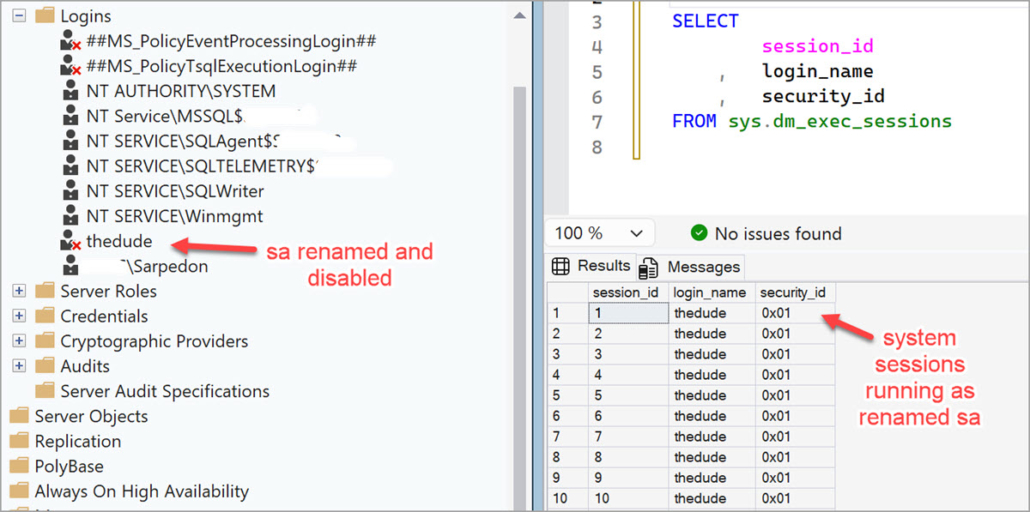
In the following screenshot you can see, that with sa renamed to “thedude”, system sessions use the new name since the SID does not change. The same applies to objects that were owned by sa – system tables use the SID for referential integrity, hence the rename itself goes smoothly: SQL Agent jobs and other objects display the new name of the owner when it was sa before.
Renaming sa Pros and Cons
While renaming the sa account is technically simple, the reality is a bit more nuanced.
Pros:
- Brute‑force attacks are extremely common, and letting an attacker waste time hammering a non‑existent sa account can buy you valuable time for detection and containment.
- Note: Note: The client always receives the same generic error message – “Login failed for user”, error 18456 – whether the password is wrong or the login doesn’t exist. Only the error state (visible in the SQL Server Error Log) reveals the real cause.
- Figuring out the new name of sa requires access to SQL Server in the first place.
- The SID of the original sa account is fixed at 0x01 and cannot be changed, but an attacker would still need to already have SQL Server access to query system views and discover the renamed account. At that point, you’re dealing with a completely different attack vector.
- The alternative – capturing TDS packets on the network and waiting for a real sa session – is theoretically possible, but it’s hardly the first thing an attacker would invest resources in.
- You are a federal agency like the U.S. Department of Defense (DoD) or work for one of the agencies: The STIG (Security Technical Implementation Guide) for SQL Server, published by the Defense Information Systems Agency (DISA) requires it.
Cons:
- Many real‑world applications still require sa for parts of their workflow – sometimes only during setup, sometimes during ongoing operations.
Yes, vendors should fix this and never require sa, but as long as this remains common practice, renaming sa cannot be recommended universally for every customer.
- Scripts and processes often rely on standard ownership by sa, such as database owner, Always On Availability Group owner, or other server level objects.
- This requires strict process control during deployments to ensure the alternative name is always used consistently.
- Even Microsoft components occasionally expect sa by name.
Replication, certain patches, or other subsystems have been known to fail when sa has been renamed. You cannot blindly assume everything will continue working.
- The new name may already be known.
If an attacker has compromised a less critical SQL Server in the same environment, and the renamed sa account is standardized across servers, the benefit evaporates.
- It can cause confusion.
Renamed accounts can complicate troubleshooting – e.g., working with Agent job owners, auditing login sessions, and generally supporting the SQL Server.
Storytime
While I worked on the Microsoft SQL Server security team, we started a project to explore ways to eliminate the attack vector that sa represents.
As with so many things, however, the project was eventually abandoned – not due to lack of desire, but because of resource constraints and the complexity of changing an account that’s widely used, not only internally but also by various satellite services of SQL Server.
So, dear reader… consider yourself warned 😉.
Disabling sa
If sa is disabled, it cannot be used to log in.
But there was an important issue before SQL Server 2025:
SQL Server returned a distinct error message when a login existed but was disabled:

(Error 18470)
That made it visible to an attacker that sa existed but was unavailable. In practical terms, brute-force tooling could stop wasting time on sa and move on to other targets much sooner.
To be fair, this depends on the sophistication of the attack code. But the signal was there.
Update from May 2026:
With SQL Server 2025, Microsoft addressed this behavior. A disabled login now returns the generic login failure message instead:
Login failed for user ‘sa’.
(Error 18458)
That is good for defenders. Failed sa login attempts can still be monitored and treated as an attack signal, without revealing to the attacker whether the login is disabled.
Conclusion
Of course there is no one answer that will be best for everyone. But here are our guidelines:
Renaming sa
In a perfectly controlled and managed system, renaming sa would be useful to avoid this obvious target, especially since until SQL Server 2022, disabling it immediately signals to an attacker to look elsewhere.
However, in the real world, it is difficult – sometimes impossible – to ensure that no dependencies on the name sa exist in applications, code, jobs, or other database objects. Renaming can therefore introduce risks. If you are supporting a federal agency, for example, you may need to implement workarounds, such as temporarily renaming it back to sa for certain operations.
Disabling sa
Disabling sa is technically a useful option, effectively rendering all attacks on the account futile. However, since before SQL Server 2025, the resulting error message explicitly discloses that the account is disabled, I hesitate to recommend it universally.
In many cases it just won’t matter: because in environments that security is taken seriously, there will be monitoring in place, so any brute-force attack will be noticed quickly. And in combination with a loooong complex password, it does not make any difference if it is disabled or just unbreachable.
With the change in SQL Server 2025, the error message does not disclose anything any more, so if you just feel better by disabling it, go ahead.
What Sarpedon Quality Lab recommends – it may surprise you
1) Set a very long password
Use at least 40 characters, up to SQL Server’s maximum of 128 characters. Include numbers and both uppercase and lowercase letters.
Use special characters sparingly. While SQL Server is fine they can create avoidable edge cases with tooling, automation, copy/paste, password vaults, or connection strings.
Length is what matters most here.
2) Closely monitor sa login activity
Monitor failed login attempts against sa.
And also monitor successful sa logins.
Ideally, there should be none during normal operations. If sa succeeds interactively, that should stand out. – Using sa for daily work is strongly recommended against.
3) Do not rename sa as a general recommendation
Given the large and highly heterogeneous customer base we work with, we do not recommend renaming sa as a default practice.
It may look attractive from an obscurity perspective, but it introduces too much operational risk: scripts, vendor tooling, monitoring, documentation, support procedures, and emergency access assumptions may all break or become harder to reason about.
And let’s just say Microsoft is not exactly arguing with us on this one. 😉
4) Enable or disable sa: make it a control decision, not a ritual
Before deciding whether to disable sa, verify that points 1 and 2 are covered:
-
- sa has a very long, non-shared, vaulted password.
- sa login activity is monitored.
- Successful sa logins are the exception and investigated.
If you cannot verify those conditions, disable sa.
If those conditions are covered, disabling sa will not materially change the risk profile.
Before SQL Server 2022:
Keeping sa enabled with a strong password and close monitoring can have one practical advantage: failed brute-force attempts continue to generate useful signals. Disabling it may simply tell an attacker that brute-forcing sa is futile.
SQL Server 2025 and later:
If the password and monitoring controls are in place, the enable/disable decision matters much less. At that point, it is mostly an operational policy choice rather than a major security differentiator.
Ending thoughts and wishes to the SQL Server team
Hopefully, this guidance helps those who need to make that decision to justify it.
Requests to Microsoft:
- Surface “Login disabled” simply an error state
A failed login should not reveal why it failed, so attackers gain no insight during brute-force attempts. This seems like low-hanging fruit and could even be delivered in a CU.
Thank you to Microsoft for listening and addressing this. - Limit or block the use of SA
As I have written before (My 7 wishes for access control in SQL Server and Azure SQL security), SQL Authentication won’t go away for at least another decade or two. Customers need better guardrails to avoid using sa at all.
Additionally, the database engine remains vulnerable as long as internal processes run unchecked under sysadmin, as highlighted by recent CVEs – for example: https://support.microsoft.com/en-us/topic/kb5063756-description-of-the-security-update-for-sql-server-2022-gdr-august-12-2025-f56e3677-84b7-4ba3-ab13-b33fcfabb212
Happy securing
Andreas
Thanks to my colleagues for reviewing and keeping me honest:
Thomas Grohser, SQL Server Infrastructure Architect and recognized expert in SQL Server security
Ralf Dietrich, Database security and forensics expert
Links for further reading:
- DISABLE and DENY LOGIN, DENY USER & Effect on Impersonation and Permissions
https://andreas-wolter.com/en/disable-and-deny-login-deny-user-effect-on-impersonation-and-permissions/
- SQL Server Error 18456
https://learn.microsoft.com/en-us/sql/relational-databases/errors-events/mssqlserver-18456-database-engine-error?view=sql-server-ver17
- Are Your Passwords in the Green?
https://www.hivesystems.com/blog/are-your-passwords-in-the-green
- BlueSky ransomware
https://thedfirreport.com/2023/12/04/sql-brute-force-leads-to-bluesky-ransomware/ - FreeWorld ransomware
https://www.helpnetsecurity.com/2023/09/06/ms-sql-cyberattack/ ).
The ##MS_…## Server Roles in SQL Server 2022 and Azure SQL: What Each Role Can Do
New server roles for Azure SQL Database and SQL Server 2022 in Public Preview: Database Management without admin-access
We are now releasing a new set of server roles which support server- and database management without using admin-accounts and in addition make administration at scale even easier to Public Preview.
The 4 additional roles are:
- ##MS_DatabaseConnector##
- ##MS_SecurityDefinitionReader##
- ##MS_DatabaseManager##
- ##MS_LoginManager##
– September 2021 we announced the first set of new server roles for Azure SQL Database: Server roles for Azure SQL Database: Database Management without admin-access
the previously released roles are:
- ##MS_DefinitionReader##
- ##MS_ServerStateReader##
- ##MS_ServerStateManager##
Benefit
The new server-roles that can be assigned to server logins to enable customers to assign and delegate job functions for server-wide metadata access and access to certain management commands without requiring Server Admin or AAD Admin privileges. This helps comply with the Principle of Least Privilege and implement role separation (sometimes also interchangeably referred to as Separation of Duties).
Technical background
Each of these new server-roles includes a specific set of permissions. In SQL Database those permissions cannot be assigned individually on the server scope but using those roles one can grant them to a Login. This is a new method to grant server permissions across a logical server and all databases hosted on that logical server in Azure SQL Database, aside from assigning Server/AAD Admin, which in many cases is considered too powerful.
In the following let’s have a look at each role individually:
##MS_SecurityDefinitionReader##
The ##MS_SecurityDefinitionReader##-role predominantly will be useful for read-only server-auditing where an auditor will need to see the contents of system-related static system metadata such as Login and User names, permissions of principals and role membership.
It has VIEW ANY SECURITY DEFINITION permission on the server, which covers and hence includes the VIEW SECURITY DEFINITION permission on any database that a principal in that role has access to.
##MS_DatabaseConnector##
This role is likely the most important new role as it allows members to connect to any database without requiring a User-account in the respective databases to connect to. In combination with the other new server roles, this essentially leads to the server level role-based permissions to inherit to the respective database scoped permissions.
This is because it holds the permission – holds CONNECT ANY DATABASE on server-scope, which then inherits the CONNECT permission on each database.
i.e., a member of ##MS_DatabaseConnector## + ##MS_ServerStateReader## will have the permission VIEW SERVER STATE + VIEW DATABASE STATE on all databases, without requiring Users to be created. This greatly simplifies permission assignment via roles at scale.
Tipp: To exclude specific databases on a given server from this “grant access to all”-concept, you can proceed as follows: create matching User-accounts for the given login in those databases and then DENY the CONNECT permission to the database-user. This DENY permission will overrule the GRANT CONNECT permission coming from this role.
The ability to grant the Connect-permission to all databases (without further permissions) makes this role the ideal counterpart for ##MS_ServerStateReader##, ##MS_DefinitionReader## and ##MS_SecurityDefinitionReader## server roles.
The following diagram shows how a Login “Juanita” is member of both the ##MS_DatabaseConnector## (green in diagram) and the ##MS_ServerStateReader## (blue) roles and in result can connect to any database and read any Server and database level DMV (Dynamic Management View).

The diagram shows that in addition to the Server level permissions (CONNECT ANY DATABASE and VIEW SERVER STATE), Juanita is also granted the respective inherited database-permissions (CONNECT and VIEW DATABASE STATE).
##MS_DatabaseManager##
Members of the ##MS_DatabaseManager## fixed server role can create and delete databases. A member of the ##MS_DatabaseManager## role that creates a database, becomes the owner of that database, which allows that user to connect to that database as the dbo user. The dbo user has all database permissions in the database. Members of the ##MS_DatabaseManager## role don’t necessarily have permission to access databases that they don’t own.
For Azure SQL Database, it is recommended to use this server role instead of the special dbmanager database level role that exists in master (Azure SQL DB only) and was previously used to reach the same goals but required a User account in master-database.
##MS_LoginManager##
Members of the ##MS_LoginManager## fixed server role can create and delete logins.
Just as with the ##MS_DatabaseManager##-role, for Azure SQL Database, it is recommended to use this server role over the special loginmanager database level role that exists in master and was previously used to reach the same goals but required a User account in master-database.
Summary
The new server roles in conjunction with the previous set enable customers to grant specific lower privileges to personnel that should not have full admin-permissions and by using the ##MS_DatabaseConnector##-role can do so in a scalable manner: for a whole logical server in Azure SQL Database.
When it comes to SQL Server 2022 (now in Public Preview), these roles could be imitated by creating custom server roles which are available in SQL Server, but including them as built-in roles the same way as for Azure SQL DB will hopefully enable simpler management from cloud to on-prem and for migration back & forth. Also we are aware that some customers often prefer to use built-in roles over custom roles per principle.
Limitations
- Role assignments may take up to 5 minutes to become effective. In addition, for existing sessions, changes to server role assignments do not take effect until the connection is closed and re-opened. This is due to distributed architecture between the master database and other databases on the same logical server.
Partial workaround: to reduce the up to 5-minute waiting period and ensure that server role assignments are current in a database, a Server Admin/AAD Admin can run DBCC FLUSHAUTHCACHE in the user database(s) on which the login has access. Currently logged on users still need to reconnect after this for the membership-changes to take effect on them. - These roles can be assigned to SQL Logins and AAD Logins. However, currently Group-based AAD Logins are not yet supported. This is functionality will be delivered later.
Further references:
- Link to documentation for the new server-roles in Azure SQL DB: Server roles – Azure SQL Database | Microsoft Docs
- Server-level roles – SQL Server | Microsoft Docs
- DBCC FLUSHAUTHCACHE (Transact-SQL) – SQL Server | Microsoft Docs
- What is a server in Azure SQL Database and Azure Synapse Analytics? | Microsoft Docs
- Azure SQL databases in logical servers, elastic pools, and managed instances – Microsoft Tech Community
- GRANT Database Permissions (Transact-SQL) – SQL Server | Microsoft Docs
- The Principle of Least Privilege (POLP) – Microsoft Tech Community
- First announced set of server roles: Server roles for Azure SQL Database: Database Management without admin-access – Microsoft Tech Community
Update 2026: Emad Al-Mousa found ways for members of ##MS_DatabaseManager## to escalate to sysadmin (CVE-2025-24999). The first one is fixed in the security updates for SQL Server 2022 CU23 and SQL Server 2025 CU2. I explain the attack paths and what they mean for the role’s ownership-based model in SQL Server Privilege Escalation via DatabaseManager-role and Part 2: The Ownership-Based Security Model.
Server roles for Azure SQL Database: Database Management without admin-access
Server roles for Azure SQL Database: Database Management without admin-access
Until now, in Azure SQL Database, to gain access to server-wide information like system-wide wait-stats, resource stats etc., the Server Admin or AAD Admin was the only account with sufficient permissions since server-level permissions are not grantable in SQL Database.
Today I am happy to announce that we are bringing built-in roles that in effect hold permissions applicable to all databases including databases residing in elastic pools a on a logical server for Azure SQL Database. This extends to the logical master-database which contains certain system-wide information. We are starting with 3 new roles:
- ##MS_DefinitionReader##
- ##MS_ServerStateReader##
- ##MS_ServerStateManager##
Benefit
The new server-roles that can be assigned to server logins to enable customers to assign and delegate job functions for server-wide metadata access and access to certain management commands without requiring Server Admin or AAD Admin privileges. This helps comply with the Principle of Least Privilege and implement role separation.
Technical background
Server-roles are not a new concept in the SQL Server universe, but for Azure SQL Database, our PaaS service offering, the server as such is just a logical concept. More on this here: What is a server in Azure SQL Database and Azure Synapse Analytics? | Microsoft Docs and Azure SQL databases in logical servers, elastic pools, and managed instances – Microsoft Tech Community.
Because of this architectural difference, the same mechanics as for Managed Instance or SQL Server in a VM do not apply: Databases residing on the same logical server may not reside on the same physical server. This poses some challenges, but I am happy that we can bring an almost identical experience that works for the other Service offerings as well: Server level roles with permissions that have effects on any database on the logical server.
Each of these new server-roles includes a specific set of permissions. In SQL Database those permissions cannot be assigned individually on the server scope but using those roles one can grant them to a SQL Login. This is a new method to grant server permissions across a logical server and all databases hosted on that logical server in Azure SQL Database, aside from assigning Server/AAD Admin.
In the following let’s have a look at each role individually:
##MS_DefinitionReader##
The ##MS_DefinitionReader##-role predominantly will be useful for read-only server-auditing where an auditor will need to see the contents of static system metadata such as Login/principal names, Firewall settings, permissions of principals and of course object definition (code). It will often be combined with membership in the ##MS_ServerStateReader##-role.
It has VIEW ANY DEFINITION permission on the server, which covers and hence includes the VIEW DEFINITION permission on any database that a principal in that role has access to.
Here the results of sys.fn_my_permissions(NULL, ‘SERVER’) – called from the master-database and sys.fn_my_permissions(NULL, ‘DATABASE’) – called from a user-database:

Members of the ##MS_DefinitionReader## fixed server role can read all catalog views that are covered by VIEW ANY DEFINITION, respectively VIEW DEFINITION on any database on which the member of this role has a user account.
##MS_ServerStateReader##
The ##MS_ServerStateReader##-role is ideal for read-only performance Monitoring and troubleshooting access. It will often be combined with membership in the ##MS_DefinitionReader##-role to see the actual names and definition (code) of objects involved.
It has VIEW SERVER STATE-permission on the Server which covers and hence includes the VIEW DATABASE STATE on any database that a principal in that role has access to.
Here the results of sys.fn_my_permissions(NULL, ‘SERVER’) – called from the master-database and sys.fn_my_permissions(NULL, ‘DATABASE’) – called from a user-database:

Members of the ##MS_ServerStateReader## fixed server role can read all dynamic management views (DMVs) and functions that are covered by VIEW SERVER STATE, respectively VIEW DATABASE STATE on any database on which the member of this role has a user account.
This role allows querying several DMVs that exist solely in the master database such as sys.resource_stats that specifically contain information concerning the whole server, or sys.elastic_pool_resource_stats for all elastic pools on a logical server.
To make this role more useful and generally help customers comply with the Principle of Least Privilege and implement proper role-separation, we changed the permission requirements for several DBCC commands. Those formerly requiring elevated privileges are now covered by VIEW SERVER STATE – the permission which this role holds:
- DBCC INPUTBUFFER()
- DBCC SQLPERF (LOGSPACE)
- DBCC SQLPERF (NETSTATS)
##MS_ServerStateManager##
The ##MS_ServerStateManager##-role is useful for delegating management tasks without requiring to assign full admin permissions.
It has ALTER SERVER STATE on the server. ALTER SERVER STATE also covers the VIEW SERVER STATE permission on the server and by that the VIEW DATABASE STATE on any database that a principal in that role has access to.
Here the results of sys.fn_my_permissions(NULL, ‘SERVER’) – called from the master-database and sys.fn_my_permissions(NULL, ‘DATABASE’) – called from a user-database:

Members of the ##MS_ServerStateManager## fixed server role have the same permissions as the ##MS_ServerStateReader## role. In addition, it holds the ALTER SERVER STATE permission, which allows access to several management operations, such as: DBCC FREEPROCCACHE, DBCC FREESYSTEMCACHE (‘ALL’), DBCC SQLPERF():
- DBCC FREEPROCCACHE;
- DBCC FREESYSTEMCACHE (‘ALL’);
- DBCC SQLPERF(); with the option to clear the wait- and latch-stats (this is only available on the master-database and has no effect on the wait-stats of the user databases which reside on different physical instances.)
- DBCC SQLPERF(“sys.dm_os_wait_stats”, CLEAR);
- DBCC SQLPERF(“sys.dm_os_latch_stats”, CLEAR);
Limitations
- Role assignments may take up to 5 minutes to become effective. In addition, for existing sessions, changes to server role assignments do not take effect until the connection is closed and re-opened. This is due to distributed architecture between the master database and other databases on the same logical server.
Partial workaround: to reduce the up to 5-minute waiting period and ensure that server role assignments are current in a database, a Server Admin/AAD Admin can run DBCC FLUSHAUTHCACHE in the user database(s) on which the login has access. Currently logged on users still have to reconnect after this for the membership-changes to take effect on them.
Further references:
- Link to documentation for the new server-roles in Azure SQL DB: Server roles – Azure SQL Database | Microsoft Docs
- DBCC FLUSHAUTHCACHE (Transact-SQL) – SQL Server | Microsoft Docs
- What is a server in Azure SQL Database and Azure Synapse Analytics? | Microsoft Docs
- Azure SQL databases in logical servers, elastic pools, and managed instances – Microsoft Tech Community
- GRANT Database Permissions (Transact-SQL) – SQL Server | Microsoft Docs
- The Principle of Least Privilege (POLP) – Microsoft Tech Community
Acknowledgement
Big kudos to all the team-members involved in this seemingly small addition that is much more complex than apparent: Maciej Szeszko, Steven Gott, Nikolas Ogg from engineering and Dimitri Furman for being a great helper and advisor
Separation of Duties (SoD) and role-based security conception in SQL Server
Introduction With the upcoming implementation of the European General Data Protection Regulation (GDPR) in May 2018, having a security concept in place is essentially required by law. Microsoft SQL Server, just like other database systems, carries the main asset to protect: the data itself. Therefore, it is time for an article from a more strategic […]
CONTROL SERVER vs. sysadmin/sa: permissions, system procedures, DBCC, automatic schema creation and privilege escalation caveats
CONTROL SERVER vs. sysadmin in short: CONTROL SERVER grants every server-level permission, but it is not a full replacement for sysadmin membership. Many system procedures and almost all DBCC commands check for sysadmin role membership, not for permissions. And unless impersonation is denied, a CONTROL SERVER login can impersonate any login, including sa. Permissions: all […]