Andreas Wolter
  • Consulting & Services
    • SQL Server Security Assessment by Andreas Wolter
    • SQL Server Health Check
    • Performance Analysis
    • SQL Server Discovery
    • Air-Gapped SQL Server
  • My Customers
  • About
    • Conferences
    • Certifications
    • Training
  • Blog
  • Contact
  • Click to open the search input field Click to open the search input field Search
  • Menu Menu

PreCon Practical Performance Monitoring SQL Server at SQLSaturday New York City 2025 May 9th

PreCon Practical Performance Monitoring SQL Server at SQLSaturday New York City 2025 May 9th

I am super excited to share that I’ll be leading the PreCon session “Practical Performance Monitoring for SQL Server” on May 9th for SQL Saturday New York City 2025 taking place the day after! Join us at the Microsoft Office in Times Square for an incredible event!

This is only the second time since I left Microsoft that I will deliver this training day, but the first time in the US (Germany was first in October 2024).

What makes my training day unique is that attendees will have the chance to connect to my demo server using SQL Server Management Studio and conduct their own analyses with T-SQL if they wish, and bring their own devices/Laptops with SSMS installed.

The server will be accessible via the internet and will be running a full-day workload filled with various performance issues. None of that “sorry, but you know, it’s just a demo server and has no workload”.

Of course this is totally optional. Feel free to just sit back and enjoy the session.

Get your tickets here:

https://www.eventbrite.com/e/practical-performance-monitoring-troubleshooting-sql-server-tickets-1230431316189

Use this code for a 20% discount (USD50): LastChanceForEarlyBirdDiscountSQL

Here is the session abstract:

Practical Performance Monitoring SQL Server

You are in a DBA, developer or consultant role, supporting SQL Server databases and often someone asks you to take a look at a badly performing database application, certain queries or even “the whole server”. And over and over again you find yourself in the situation of “how to find the root cause in the least amount of time”.

This full-day precon with Andreas Wolter, a former Program Manager for SQL Server at Microsoft, will teach you techniques for general troubleshooting and performance analysis from start-up to advanced techniques.

Among them are:

  • SQL Server architecture & internals – the fundament to understanding correlations
  • Monitoring methodology, tools & techniques
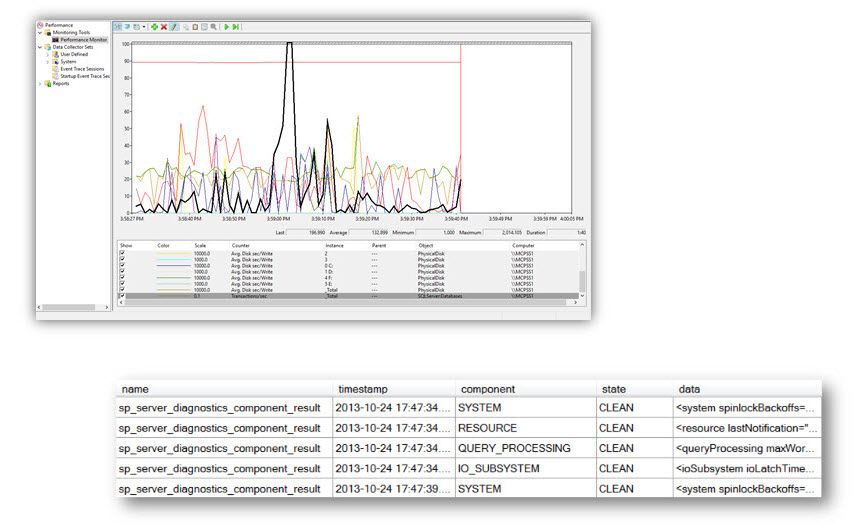
    • Windows Performance Monitor
    • Dynamic Management Views (DMVs)
    • Wait statistics
    • Extended Events for workload & query-analysis
    • Query Store
    • Azure SQL database watcher (intro)

The above techniques will be used to:

  • Identify the most impactful problematic queries
  • Detect I/O latency problems
  • Investigate Tempdb performance
  • Analyze indexes & statistics
  • Analyze locking & blocking and concurrency problems
  • Identify query plan regression

While no one has evolved into a performance-tuning-master in one single day, you can be sure to learn valuable techniques and concepts to build upon for day-to-day work. And of course, we will also discuss possible solutions or even implement them live. So, at your next phone call “Help, the server is slow!” you know will where to start.

Expect lots of demos and a deep dive into core concepts of SQL Server.

Hands-on! – Attendees who want to directly try out some of the techniques shown can connect to the demo-server which is under a constant workload simulation live with SQL Server management studio themselves! (All that is required is to bring a laptop with SSMS installed and ability to connect to a SQL Server on the internet on a given port.)

Prerequisites

Basic understanding of the SQL Server relational engine and Transact-SQL, basic familiarity with Dynamic Management Views (DMVs) and query plans

If you wish to connect to my server for running your own scripts, please bring your own device.

And here is the link for Signup again:

https://www.eventbrite.com/e/practical-performance-monitoring-troubleshooting-sql-server-tickets-1230431316189

Share article
  • Share on Facebook
  • Share on X
  • Share on LinkedIn
0 replies

Leave a Reply

Want to join the discussion?
Feel free to contribute!

Leave a Reply Cancel reply

Your email address will not be published. Required fields are marked *

Security Assessment Community Edition

Learn about my free Community Edition script.

Recent
  • Sample result in SSMS: local NTLM connections over shared memory from SQL01, and NTLM connections over TCP from a reporting server, an ETL server and a workstation
    NTLM Deprecation and SQL Server: How to Find NTLM Connections...18. November 2026 - 17:01in: Security
  • SQL Server Consolidation: $3M+ in Projected Savings and...30. September 2026 - 15:47in: Architecture & High Availability, Security
  • Using a Database Server as a Honeypot for Threat Detect...18. September 2026 - 16:00in: Security
  • Azure Arc for SQL Server: “Least Privilege” Mode Still...8. September 2026 - 15:56in: Security
  • When SIEM Enrichment Becomes False Attribution3. September 2026 - 14:26in: Security
Comments
  • Thanks Scott. Goof feedback. NETSTAT is a useful addition,...21. November 2026 - 15:44 by Andreas Wolter
  • I would go a little deeper with how to troubleshoot SQL...21. November 2026 - 15:15 by Scott O
  • Protecting database data at rest is essential for maintaining...21. October 2026 - 2:23 by Viska
  • Thanks Now Microsoft could document them as well, and put...19. August 2026 - 16:26 by Andreas Wolter
  • List of Action_IDs for Filter https://sqlquantumleap.com/reference/server-audit-filter-values-for-action_id/ Great...18. August 2026 - 0:59 by Peter Dünsch

Articles

Analysis Services Auditing Availability Groups Azure Best Practices Certification Columnstore Consolidation Deadlocks & Blocking Encryption Extended Events Get-SqlSafe In-Memory OLTP Indexing Least Privilege PASS Summit Patching Performance Analysis Permissions Privilege Escalation Reporting Services Security Principles Spatial Data SQLBits SQL Injection SQLSaturday SQL Server 2012 SQL Server 2014 SQL Server 2016 SQL Server 2022 SQL Server 2025 SQL Trace & Profiler sysadmin & Server Roles Threat Detection Vulnerabilities Workshop & PreCon
© 2026 Andreas WolterContactImprintPrivacy PolicyLinkedInRSS
Link to: SQL Server security admins, attention: Auditing is missing attempts to change permissions, leading to repudiation and miss elevation attempts Link to: SQL Server security admins, attention: Auditing is missing attempts to change permissions, leading to repudiation and miss elevation attempts SQL Server security admins, attention: Auditing is missing attempts to change...SQL Audit bug permissions Link to: Why you should use SQL Server contained availability groups to save time – and why consultants may not tell you about them Link to: Why you should use SQL Server contained availability groups to save time – and why consultants may not tell you about them ContainedAvailabilityGroup_DatabasesWhy you should use SQL Server contained availability groups to save time –...
Scroll to top Scroll to top Scroll to top
Manage Consent
To provide the best experiences, we use technologies like cookies to store and/or access device information. Consenting to these technologies will allow us to process data such as browsing behavior or unique IDs on this site. Not consenting or withdrawing consent, may adversely affect certain features and functions.
Functional Always active
The technical storage or access is strictly necessary for the legitimate purpose of enabling the use of a specific service explicitly requested by the subscriber or user, or for the sole purpose of carrying out the transmission of a communication over an electronic communications network.
Preferences
The technical storage or access is necessary for the legitimate purpose of storing preferences that are not requested by the subscriber or user.
Statistics
The technical storage or access that is used exclusively for statistical purposes. The technical storage or access that is used exclusively for anonymous statistical purposes. Without a subpoena, voluntary compliance on the part of your Internet Service Provider, or additional records from a third party, information stored or retrieved for this purpose alone cannot usually be used to identify you.
Marketing
The technical storage or access is required to create user profiles to send advertising, or to track the user on a website or across several websites for similar marketing purposes.
  • Manage options
  • Manage services
  • Manage {vendor_count} vendors
  • Read more about these purposes
View preferences
  • {title}
  • {title}
  • {title}