
This article was published in August 2013. Details may differ in current SQL Server versions. Newer article on this topic: The challenges for least privilege: When sysadmin is still required in Microsoft SQL Server (February 2025).
CONTROL SERVER vs. sysadmin/sa:
permissions, system procedures, DBCC, automatic schema creation and privilege escalation caveats
CONTROL SERVER vs. sysadmin in short: CONTROL SERVER grants every server-level permission, but it is not a full replacement for sysadmin membership. Many system procedures and almost all DBCC commands check for sysadmin role membership, not for permissions. And unless impersonation is denied, a CONTROL SERVER login can impersonate any login, including sa.
- Permissions: all grantable server-level permissions, and they work as documented.
- System procedures: 171 system procedures (SQL Server 2012) check for sysadmin, e.g. sp_readerrorlog, sp_addumpdevice and sp_adddistributor. Some GUI dialogs in SSMS fail for the same reason.
- DBCC: almost every DBCC command requires sysadmin. Exceptions: SHOW_STATISTICS, DETACHDB, FREEPROCCACHE and SQLPERF.
- Databases: CONTROL SERVER logins are not mapped to dbo. An object created without a schema name creates a new schema named after the login.
- Impersonation: CONTROL SERVER can impersonate every login, including sa, even with SQL authentication off.
- DENY: works against CONTROL SERVER logins, but never against sysadmin members.
Tested on SQL Server 2012 in 2013.
Since SQL Server 2005, the server wide permission CONTROL SERVER has been existing. In principle being an alternative to sysadmin-membership, it did not turn out to be much more than a shelf warmer. – Little known and even less used.
One of the main reasons for this was the absence of an option to grant this permission to a group of principals/Logins on server-level.
Since SQL Server 2012, it has been possible to define custom server-roles, so now this permission is used more and more.
However, it is no complete replacement for sysadmin. In the following, I want to demonstrate to my readers exactly why this is, where the differences are and where it can even be a risk.
I will take as a given basic knowledge about the behavior of sysadmin and dbo and therefore focus on the things that are different when using CONTROL SERVER.
First of all, a new Login, „DBA_TheDude“, is created – the password of course adhering strongly to my rules (for blogs). 😉
This is followed by a new server role “Role_DBA” to which the Login will be added as a member.
And since this role is meant for administrators, it receives the most extensive permission: CONTROL SERVER.

Server permissions with CONTROL SERVER
Next we log onto the system as DBA and have “our (effective) rights” displayed. 🙂 
| entity_name | permission_name |
| server | CONNECT SQL |
| server | SHUTDOWN |
| server | CREATE ENDPOINT |
| server | CREATE ANY DATABASE |
| server | CREATE AVAILABILITY GROUP |
| server | ALTER ANY LOGIN |
| server | ALTER ANY CREDENTIAL |
| server | ALTER ANY ENDPOINT |
| server | ALTER ANY LINKED SERVER |
| server | ALTER ANY CONNECTION |
| server | ALTER ANY DATABASE |
| server | ALTER RESOURCES |
| server | ALTER SETTINGS |
| server | ALTER TRACE |
| server | ALTER ANY AVAILABILITY GROUP |
| server | ADMINISTER BULK OPERATIONS |
| server | AUTHENTICATE SERVER |
| server | EXTERNAL ACCESS ASSEMBLY |
| server | VIEW ANY DATABASE |
| server | VIEW ANY DEFINITION |
| server | VIEW SERVER STATE |
| server | CREATE DDL EVENT NOTIFICATION |
| server | CREATE TRACE EVENT NOTIFICATION |
| server | ALTER ANY EVENT NOTIFICATION |
| server | ALTER SERVER STATE |
| server | UNSAFE ASSEMBLY |
| server | ALTER ANY SERVER AUDIT |
| server | CREATE SERVER ROLE |
| server | ALTER ANY SERVER ROLE |
| server | ALTER ANY EVENT SESSION |
| server | CONTROL SERVER |
Sounds good. Nothing seems to be missing at first glance. Or does it?
Let’s compare it to the list of all permissions which exist on server-scope:
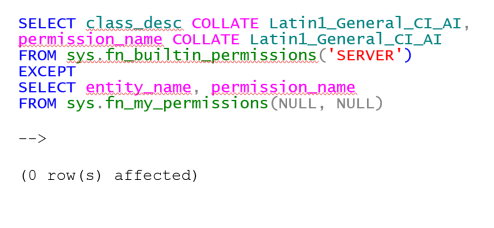
Ok, we really do have all permissions which can be granted (at server scope). This is also documented: Permissions (Database Engine) and here: GRANT Server Permissions (Transact-SQL)
Those permissions and commands really do work as documented.
System stored procedures that check for sysadmin
But how about system stored procedures?

Why is that now?
Quite simple. Most do probably remember from SQL 2000 times, that security wise critical system procedures include a check for membership in certain roles. And most of them still do the same today. One can call it an artefact of the then inflexible permission-management.
When we look into the code of sp_readerrorlog, this is what is being done there as well:

Okay. Of course we can work around this code by calling xp_readerrorlog directly.
This does not help in the GUI-presentation in Management Studio but we can use it as a manual workaround.
Among other system procedures that are called via SSMS and refuse execution are: sp_addumpdevice – for backup-devices sp_enum_oledb_providers – is used for viewing and configuring Linked Servers.
sp_addlinkedserver on the other hand can be executed without problems – just not via the GUI because of the just mentioned procedure.
Setting up Database-Mail via the GUI is also reserved for sysadmins. It should work via script though (untested).
Also the configuration of the distributor for replication by means of sp_adddistributor is not possible without the sysadmin bit. Other replication tasks are partially possible even via the GUI.
Under SQL Server 2005 – 2008R2, to add/remove (server) role members, solely the system procedure sp_addsrvrolemember / sp_dropsrvrolemember exists. This one also conducts a server-role-membership-check. – Under SQL Server 2012 this procedure still exists for backwards-compatibility reasons, but this specific check has been removed from the code. Thereby it now behaves like the direct call of ALTER SERVER ROLE {RoleName} ADD MEMBER {Loginname}.
Same applies to sp_addrolemember / sp_droprolemember for database roles.
So much for system stored procedures. Quite simple after all, if you know the background.
Therefore, wherever possible: use DDL-commands, as it is advised since SQL Server 2005.
Side-note: there are at least 7 variations for the check of sysadmin-membership. 🙂 🙁
A teaser:

The most frequent error messages which are triggered if applicable are:
| message_id | text |
| 14126 | You do not have the required permissions to complete the operation. |
| 14260 | You do not have sufficient permission to run this command. Contact your system administrator. |
| 15003 | Only members of the %s role can execute this stored procedure. |
| 15247 | User does not have permission to perform this action. |
| 21089 | Only members of the sysadmin fixed server role can perform this operation. |
| 22904 | Caller is not authorized to initiate the requested action. DBO privileges are required. |
A complete list of procedures that check for sysadmin-membership is included at the end of this post.
Let’s come to another important area:
DBCC commands

That’s a good start, isn’t it..
The „rule“ for DBCC is even simpler: Almost every DBCC-command checks for sysadmin.
From DBCC CHECKDB via DBCC LOGINFO to DBCC TRACEON. Thus some quite valuable commands also for external support. – In fact even DBCC HELP is only allowed for sysadmins…
The only exceptions known to me are: DBCC SHOW_STATISTICS
- one needs to be at least ddl_admin or owner of the table
DBCC DETACHDB
- this is a special case, since it’s executed via sp_detach_db
- db_owner or dbo of the database is sufficient
DBCC FREEPROCCACHE and DBCC SQLPERF
- Those require only the ALTER SERVER STATE permission.
DBCC DROPCLEANBUFFERS on the other hand requires sysadmin-role membership.
Those permissions are documented quite well, by the way.
Database permissions and automatic schema creation
With CONTROL SERVER, a principal has full access to all databases. Almost, but only almost like sysadmins, which are, as is well-known, mapped to “dbo”.
Logins with merely CONTROL SERVER permission are not(!) mapped to dbo.
The consequences of this can be seen in the following:


–>

SSMS:


What happened?
Do you remember the pre-SQL 2012 problem in which windows groups could not be assigned a default schema? And what happened if a developer forgot to specify a schema when creating an object?
Right. This is exactly the same issue: a schema with the Login-Name of the developer has been created. A true joy for later clean-up, to identify and drop the „right wrong” schemas. This Issue (one of the most voted Connect-Items) has been resolved with SQL Server 2012.
Unfortunately, the handling of the CONTROL SERVER permission has been overlooked to be fixed. I did create a connect item: „Login with CONTROL SERVER Permission Creating an Object without specifying Schema leads to creation of new Schema with Login-Name”. – Unfortunately too late. :-/
Probably an identical code-block is being used for that, since just like in the Windows-Group scenario, this implicit creation of the schema is uncatchable.
Conclusion: Always specify a schema when creating an object as a CONTROL SERVER granted principal – best: always specify a schema. (there are other reasons for that, too)
Privilege escalation through impersonation
Privilege-Escalation-risk:
I want to finish off with a security-wise extremely important hint:
Logins with CONTROL SERVER permission can impersonate EVERY Login. ALL OF THEM. Thus also all sysadmins and sa itself! – And even if SQL authentication is not active!
And this is how this can be marvellously exploited:

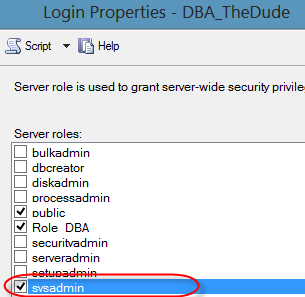
Those who wants to protect themselves from this form of privilege escalation must DENY impersonating. – And why would you not want to do that since this eventually would put the whole concept of CONTROL SERVER in question (?!) – Because this is the final and crucial difference:
Sysadmin-members cannot be restricted anything via DENY. Yet principals with mere CONTROL SERVER permissions can.
This is how all plain DDL/DML commands work.
So, to say it clearly again, because this is vital:
A Login with CONTROL SERVER Permission only makes sense when at the same time he is explicitly denied impersonation of any sysadmin (or better: any Logins). Otherwise you may as well just make him sysadmin right away!
Unfortunately this only works via “DENY IMPERSONATE ON LOGIN::[Loginname]”. This is because IMPERSONATE is hierarchically a direct subordinate of CONTROL SERVER!

For a changing list of system administrators, one has a real problem, in case of not remembering this crucial Deny! (Next risk!)
– At the latest at this point one should address the Auditing feature of SQL Server.
Conclusion
My conclusion and lessons learned therefore are:
CONTROL SERVER itself is a consistent continuation of the efforts of the security team to make SQL Server even simpler and thereby more robust.
Because of the impersonate-permissions, a privilege escalation is really simple. In order to prevent this, one should be familiar with the permission hierarchy of SQL Server. – As always: “Knowledge leads to security.”
What really does hurt, is one of the best application cases: Permissions for support-personnel, internal or external. The missing possibility to grant permissions to DBCC directly throws a monkey wrench in our plans. If one does not want to create a procedure as wrapper for every important DBCC command, there is no way around sysadmin in those scenarios. (!)
In the end, a strict “separation of duties” is the iron goal.
Here you can read more about it – you should also check out the “SQL Server Separation of Duties Framework” on codeplex with many good ideas:
https://techcommunity.microsoft.com/t5/SQL-Server/Separation-of-Duties-for-DBA-s/ba-p/383915
Update 04-2014:
With SQL Server 2014 CONTROL Server becomes a bit safer. You can read more on the new possibilities here:
A displacement of „sa“ is not planned by the way, but with every release the scenarios where sa/sysadmin is imperatively needed become less.
Happy securing,
Andreas
What changed since 2013
- SQL Server 2014 added IMPERSONATE ANY LOGIN, which can be denied to CONTROL SERVER logins: New Permissions in SQL Server 2014
- SQL Server 2025 added further permissions: New Permissions in SQL Server 2025
- Where sysadmin is still required today: The challenges for least privilege: When sysadmin is still required (2025)
Frequently asked questions
Is CONTROL SERVER the same as sysadmin?
No. It includes all server-level permissions, but many system procedures and most DBCC commands still require sysadmin membership, and CONTROL SERVER logins are not mapped to dbo.
Can a CONTROL SERVER login become sysadmin?
Yes, by impersonating a sysadmin login such as sa, unless impersonation is denied. Even with DENY IMPERSONATE ANY LOGIN (SQL Server 2014 and later), other escalation paths remain; see the 2014 article.
What should I use instead of sysadmin?
Grant only the permissions a task needs, through a custom server role. Newer versions added more granular permissions for this; the 2025 articles linked above show where sysadmin is still unavoidable.
Appendix: system procedures that check for sysadmin
Enclosed the list of all system procedures under SQL Server 2012 that check for sysadmin-role membership (171 – vs. 171 under SQL server 2008. SQL Server 2014 CTP 1 still the same):
(Hint: Altogether 197 system procedures check for server role membership like diskadmin or serveradmin and so on)
| Module_Name |
| fn_yukonsecuritymodelrequired |
| sp_add_agent_parameter |
| sp_add_agent_profile |
| sp_adddatatype |
| sp_adddistributiondb |
| sp_adddistributor |
| sp_addqreader_agent |
| sp_addsubscriber |
| sp_addsubscriber_schedule |
| sp_addtabletocontents |
| sp_attachsubscription |
| sp_cdc_cleanup_change_table |
| sp_cdc_disable_db |
| sp_cdc_disable_table |
| sp_cdc_drop_job |
| sp_cdc_enable_db |
| sp_cdc_enable_table |
| sp_cdc_restoredb |
| sp_cdc_vupgrade |
| sp_certify_removable |
| sp_change_agent_parameter |
| sp_change_agent_profile |
| sp_change_subscription_properties |
| sp_change_users_login |
| sp_changedistpublisher |
| sp_changedistributiondb |
| sp_changedistributor_password |
| sp_changedistributor_property |
| sp_changemergesubscription |
| sp_changeqreader_agent |
| sp_changereplicationserverpasswords |
| sp_changesubscriptiondtsinfo |
| sp_checkinvalidivarticle |
| sp_copysubscription |
| sp_create_removable |
| sp_cycle_errorlog |
| sp_dbcmptlevel |
| sp_dbmmonitoraddmonitoring |
| sp_dbmmonitorchangealert |
| sp_dbmmonitordropalert |
| sp_dbmmonitordropmonitoring |
| sp_dbmmonitorhelpalert |
| sp_dbmmonitorhelpmonitoring |
| sp_dbmmonitorresults |
| sp_dbmmonitorupdate |
| sp_dbremove |
| sp_drop_agent_parameter |
| sp_drop_agent_profile |
| sp_dropdatatypemapping |
| sp_dropdistpublisher |
| sp_dropdistributiondb |
| sp_dropdistributor |
| sp_dropmergepullsubscription |
| sp_droppullsubscription |
| sp_dropsubscriber |
| sp_dsninfo |
| sp_enumdsn |
| sp_flush_commit_table_on_demand |
| sp_generate_agent_parameter |
| sp_get_distributor |
| sp_get_Oracle_publisher_metadata |
| sp_getagentparameterlist |
| sp_getdefaultdatatypemapping |
| sp_grant_publication_access |
| sp_help_agent_default |
| sp_help_agent_parameter |
| sp_help_agent_profile |
| sp_helpdistpublisher |
| sp_helpdistributor |
| sp_helpmergesubscription |
| sp_helpqreader_agent |
| sp_helpreplicationdboption |
| sp_identitycolumnforreplication |
| sp_IHValidateRowFilter |
| sp_IHXactSetJob |
| sp_link_publication |
| sp_monitor |
| sp_MSadd_distribution_agent |
| sp_MSadd_logreader_agent |
| sp_MSadd_merge_agent |
| sp_MSadd_snapshot_agent |
| sp_MSadd_subscriber_schedule |
| sp_MSadd_tracer_history |
| sp_MSadd_tracer_token |
| sp_MScdc_cleanup_job |
| sp_MScdc_db_ddl_event |
| sp_MScdc_ddl_event |
| sp_MSchange_distribution_agent_properties |
| sp_MSchange_logreader_agent_properties |
| sp_MSchange_merge_agent_properties |
| sp_MSchange_snapshot_agent_properties |
| sp_MSchangedynamicsnapshotjobatdistributor |
| sp_MSchangedynsnaplocationatdistributor |
| sp_MScheck_pull_access |
| sp_MScleanupmergepublisher_internal |
| sp_MSclear_dynamic_snapshot_location |
| sp_MScreate_dist_tables |
| sp_MSdbuserpriv |
| sp_MSdeletefoldercontents |
| sp_MSdrop_6x_replication_agent |
| sp_MSdrop_merge_agent |
| sp_MSdrop_snapshot_dirs |
| sp_MSdropmergedynamicsnapshotjob |
| sp_MSdynamicsnapshotjobexistsatdistributor |
| sp_MSenumallpublications |
| sp_MSfetchAdjustidentityrange |
| sp_MSfix_6x_tasks |
| sp_MSforce_drop_distribution_jobs |
| sp_MSget_agent_names |
| sp_MSget_jobstate |
| sp_MSget_oledbinfo |
| sp_MSget_publication_from_taskname |
| sp_MSgetdbversion |
| sp_MSgetmaxsnapshottimestamp |
| sp_MShelp_repl_agent |
| sp_MShelp_replication_status |
| sp_MShelp_snapshot_agent |
| sp_MShelpconflictpublications |
| sp_MShelpdynamicsnapshotjobatdistributor |
| sp_MShelplogreader_agent |
| sp_MShelpsnapshot_agent |
| sp_MShelptranconflictcounts |
| sp_MSinit_publication_access |
| sp_MSreinit_failed_subscriptions |
| sp_MSremoveoffloadparameter |
| sp_MSrepl_backup_complete |
| sp_MSrepl_backup_start |
| sp_MSrepl_createdatatypemappings |
| sp_MSrepl_dropdatatypemappings |
| sp_MSrepl_enumarticlecolumninfo |
| sp_MSrepl_enumpublications |
| sp_MSrepl_enumpublishertables |
| sp_MSrepl_enumsubscriptions |
| sp_MSrepl_enumtablecolumninfo |
| sp_MSrepl_getdistributorinfo |
| sp_MSrepl_startup_internal |
| sp_MSreplagentjobexists |
| sp_MSreplcheck_permission |
| sp_MSreplcheck_pull |
| sp_MSreplcheck_subscribe |
| sp_MSreplcheck_subscribe_withddladmin |
| sp_MSreplcopyscriptfile |
| sp_MSreplremoveuncdir |
| sp_MSsetalertinfo |
| sp_MSSetServerProperties |
| sp_MSsetupnosyncsubwithlsnatdist |
| sp_MSsetupnosyncsubwithlsnatdist_cleanup |
| sp_MSsetupnosyncsubwithlsnatdist_helper |
| sp_MSstartdistribution_agent |
| sp_MSstartmerge_agent |
| sp_MSstartsnapshot_agent |
| sp_MSstopdistribution_agent |
| sp_MSstopmerge_agent |
| sp_MSstopsnapshot_agent |
| sp_MSupdate_agenttype_default |
| sp_oledbinfo |
| sp_procoption |
| sp_removedbreplication |
| sp_removesrvreplication |
| sp_replication_agent_checkup |
| sp_replicationdboption |
| sp_resetstatus |
| sp_restoredbreplication |
| sp_SetAutoSAPasswordAndDisable |
| sp_setdefaultdatatypemapping |
| sp_updatestats |
| sp_validatelogins |
| sp_vupgrade_mergeobjects |
| sp_vupgrade_replication |
| sp_vupgrade_replsecurity_metadata |
| xp_repl_convert_encrypt_sysadmin_wrapper |
Tags: Permissions - sysadmin & Server Roles
Categories: Security
Who has CONTROL SERVER or sysadmin on your SQL Servers? A security assessment answers that for your environment, including indirect paths such as impersonation and database ownership.


Hello Andreas,
thanks for this very good article. I have recently blogged about the same topic here with 3 different exploit techniques: https://databasesecurityninja.wordpress.com/2025/02/07/privilege-escalation-from-control-server-to-sysadmin-role/
one of the popular myths I would say is that “trustworthy” setting can only be changed/altered if account is granted “sysadmin” role….which is not the case, control server securable has this power also.
I think (unfortunately) Microsoft has done a very bad design with control server…in oracle database system for example you have a powerful role such as “DBA” yet you can’t escalate from it to SYSDBA. thanks again…
Regards,
Emad Al-Mousa
Hello Emad,
Thank you.
You are not wrong. From my perspective, having worked behind the scenes myself, I would say that the legacy code that SQL Server contains, specifically around msdb, make it almost impossible to totally lock down such a powerful permission/role.
With msdb out of the picture, there are just a handful of specific design flaws that can be abused for privilege elevation.
But fixing those would require a shift of focus, a lot of work, and unfortunately also require solutions for breaking backwards compatibility.
The fact that CONTROL SERVER is sufficient to set trustworthy to on can be considered a (serious) security bug. After all, the documentation clearly states it should not be allowed.
I would suggest taking this angle to escalate this. Feel free to contact me directly if you have questions.
‘utib altahayat
Andreas
Hi Andreas, in my search for a secure setup of SQL Agent jobs, I came across your valuable post.
Since some jobs need to run dbcc checkdb, I checked MS docs, which specify that dbo privileges for the given database would suffice, and I can confirm that that works (in SQL 2017). You mention that almost all dbcc commands require sysadmin (except a few). Could it be that that has changed since you wrote this post?
Kind regards, Willem
Hi Willem.
I am so sorry abou this super late reply. I did very bad with keeping an eye on comments among all the spam in general.
To answer your question. Yes, Microsoft and since 2018 I personally have been pushing for lowering some of the requirements and place them under VIEW SERVER STATE also.
I don’t have a complete list of changes at hand, but this article is probably about 20-25 % outdated. The online documentation should be accurate though – at least I have tried to maintain it a lot lately. If you encounter any mismatches in the docs please let me know.
Thank you and sorry agan for the late reply
Andreas
Good information but CONTROL SERVER is still very dangerous to be used. It can easily be escalated to an sa account or sysadmin, even if the IMPERSONATION on the account is disabled/denied.
just like that the securityadmin server role should not be used either because of the CONTROL SERVER as anybody with securityadmin server role can easily escalate itself or any other account to sa or sysadmin.
If needed I can provide a demonstration.
Thank you.
Hello Zeshan,
yes, you are right. There are several ways to escape the CONTROL SERVER “boundaries” and elevate to sysadmin still left. The phrase I used was “more secure than before”. Maybe that is not sufficient. On the other hand I did not intend to show all PE techniques in public.
If you think you know a way that is unknown to others/me, feel free to share with me privately and I will have a look.
Improving security in SQL Server is now my current Job at Microsoft.
best regards
Andreas
Thank you, S.E.
Btw:
this Blog is actually “closed”.
I have moved to http://andreas-wolter.com/en/blog/
Andreas
The SQL Agent problem has been resolved with SQL Server 2016. When creating/modifying a job with/to a different owner, you receive the following messages, respectively:
Only a member of the sysadmin server role can add a job for a different owner with @owner_login_name. (Microsoft SQL Server, Error: 14515)
Only a system administrator can reassign ownership of a job. (Microsoft SQL Server, Error: 14242)
I tested this with the GUI but as far as I checked the code, the check is present inside the called SPs.
Thanks for writing this, it’s the most comprehensive overview of sysadmin role vs CONTROL SERVER I’ve seen; if only it wasn’t all so much bad news!
This is the kind of thing Microsoft themselves should have documented more fully. It’s really astounding that the problems with system procedures haven’t been fixed even in SQL Server 2014.
And let’s exclude the possibility of injecting a SQL Agent Job-step that is running under sa or other code injecting methods for now 😉
That’s more like a general problem.
It is a point though of course: the job is not done by just denying.
Rather should the server be secured from ground-up. Mistakes can be exploited easily, if you know what you are looking for. 🙂
Hi David,
Thank you for your feedback.
I can completely understand the “bad feeling” that many have with working based on denies. But when the permission hierarchy is clear, it actually does make sense once in a while, to sort of trim down permissions.
Whether this is valid in this case.. let’s see.
How exactly do you want the undo the deny?
He can’t do it onto himself, and trying to do grant it to the role does not help.
Your point is very important though: I should maybe stress more, that I did DENY the Login and not just the Role on purpose. That’s actually the point. Denying the role can easily be undone. Totally true.
So thank you very much for making me think about this point again.
I am very open to hear any of the other 99 ideas 🙂
Andreas
There are probably 100 ways for a login with CONTROL SERVER to become a sysadmin. You shouldn’t try to block them, because you’ll never get an exhaustive list and the security is illusory.
For instance a login with CONTROL SERVER can undo the DENY that block impersonation.
grant impersonate on login::sa to role_dba
Hi Alvaro
Thanks for adding this important point.
I would not consider this a “hole” (It is quite logically and just follows the permission hierarchy) but it is important to keep in mind:
A Login != a User
And Control Server => Control “Any” Database
Using “hand-crafted” permissions is in fact the most secure option.
But be aware: Even if you specifically “DENY IMPERSONATE On USER::xyz”, depending on the schema the data is in, the CONTROL-SERVER-Login can still get the data easily if he is able to exploit an owner-ship chain (!). And this is as easy as it could be…
So to really make sure he cannot get certain data, I highly recommend to “DENY CONNECT ON DATABASE::[DB_ContainingTheData] To ControlServerLogin”
Thanks for your elaborate comment and scenario,
Andreas
Hi Andreas,
Adding to the scenarios in your article. Let’s say the DBA team add a CONTROL SERVER’s account as a user in a user database – for the sake of later forbid him access to user data in that database (ie, DENY CONTROL ON SCHEMA, or DENY CONTROL on a certain table, etc.). The team also DENY ALTER ANY LOGIN and ALTER USER for that CONTROL_SERVER login/user as well.
In that database, let’s say there is a “schemauser” user (and server login). So we DENY IMPERSONATE ON LOGIN::schemauser to the CONTROL_SERVER login and, in effect, given the set of privileges denied above, and existing a mapping between the CONTROL SERVER login and a user for that login in that database, the CONTROL_SERVER account won’t be able to access user data/schemas.
But unless the DBA team also explicitly DENY IMPERSONATE ON USER::schemauser TO CONTROL_SERVER_user , he will be able to do a EXECUTE AS USER=schemauser to access the data as the schemauser.
So in my case, creating a CONTROL SERVER login and at the same time, trying to prevent him access to user data, will force the DBA team to:
1- Deny any kind of ALTER LOGIN or ALTER USER (or APPLICATION ROLE) privileges at a minumum.
2-Always pay attention to newly created logins/users in that database, because the CONTROL SERVER account will just keep track of a new user and impersonate him as described — unless the DBA team, on each login/user creation, automatically repeats the DENY IMPERSONATE ON LOGIN/USER::the_newly_created_login_or_user …
For a project involving separation of duties (but that required to forbid access to user data) I frankly ended not creating a such “marvellous” CONTROL SERVER account, but instead granting individual privileges out of the hundreds of them (project was over a SQL2008 R2 unfortunately,couldn’t use SQL2012 server roles)
Regards,
Alvaro Fdez
Naja, es ist ja kein Geheimnis. Ich urteile ja nicht, ich spreche es nur an.
Und was damals alles zu der Entscheidung führte, entzieht sich meinen Kenntnissen. Ich vermute aber [Vermutung] Zeitdruck [/Vermutung]> – wie auch bei der Implementierung der Database Authentication in SQL 2012. Und das weiß ich sicher, da ich seit längerem mit dem Security-Team in Kontakt stehe..
@Andreas:
🙂 das wird Paul Randall nicht unbedingt gefallen.
Sie haben den Finger in die Wunde gelegt 😉
Hrmpf. Das ist natürlich wahr!
Das heißt, DBCC macht also intern nur die Prüfung auf is_srvrolemember(‘sysadmin’)? Schaue ich mir noch mal an, mal sehen, was ich finde.
Danke für Ihre Antwort!
Hallo Herr Girsch,
vielen Dank auch und schön, das der Artikel interessant für Sie ist.
Zu DBCC: Ja, CHECKDB kann Daten ändern, und ist natürlich nicht für alle Rollen sinnvoll.
Aber Achtung: CONTROL SERVER enthält ALTER ANY DATABASE, und damit kann derjenige ALLES mit Datenbanken machen. Anlegen, Erweitern, Daten manipulieren, Daten und gesamte DB Löschen…
Das Problem der DBCC Kommandos ist tatsächlich wie bei den Systemprozeduren: sie wurden nicht mit Gedanken an das flexible Berechtigungskonzept über DDL/DML-Berechtigungen entwickelt.
beste Grüße
Hallo, Herr Wolter,
den Kniff mit der Impersonifizierung von sa: auf den war ich nicht gekommen. Ich hatte nämlich auch darüber gebrütet, ob es nicht möglich ist, sich unzulässiger Weise sysadmin-Berechtigungen über die CONTROL SERVER-Berechtigung zu verschaffen.
Davon abgesehen: Toller Blog, danke!
Ich denke, Sie haben schon sehr gut herausgearbeitet, dass eine CONTROL SERVER-Berechtigung eben NICHT den sysadmin ersetzen soll.
Dass allerdings der DBCC CHECKDB nicht funktioniert, ist meines Meinung nach by design: Dieses Kommando führt schließlich Änderungen an der Datenbank durch; das Recht VIEW ANY DATABASES sagt aber eben nur “Anschauen”, nicht “Verwalten”. Das ist, wie ich finde, sehr sinnvoll!
Gelungener Beitrag!
Hallo Torsten,
vielen Dank.
Ja, so ist es.
Ich würde es nur andersrum ausdrücken: Das Problem sind die DBCC Kommandos selber, die sich nicht in die Sicherheitsarchitektur einorden. Genau so wie die Systemprozeduren, die man mehr und mehr versucht loszuwerden.
Jetzt darfst Du das zuende denken.. 😉
Hallo Andreas,
das ist natürlich ganz nach meinem Geschmack :-)! Aber wie Du richtig herausgestellt hast, fehlt es an der konsequenten Umsetzung, so dass auch DBCC Befehle adäquat abgefeuert werden können!
p.s: 5 Sterne!